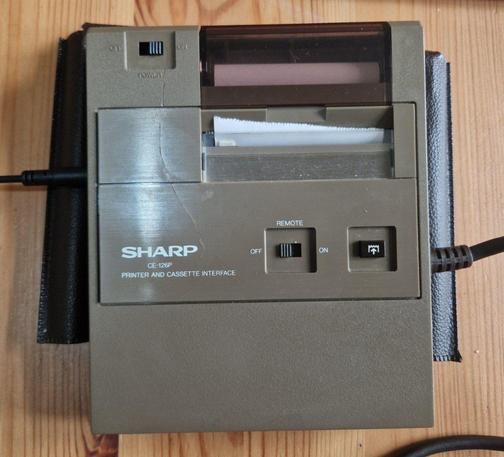
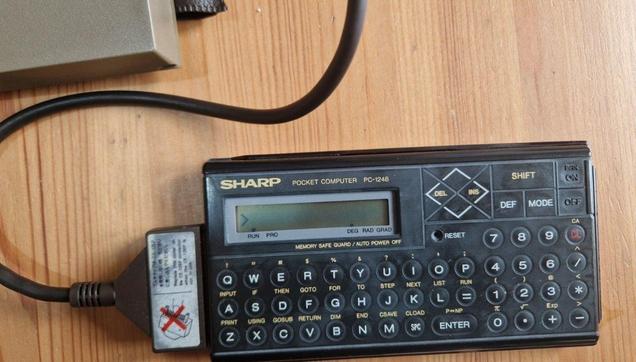
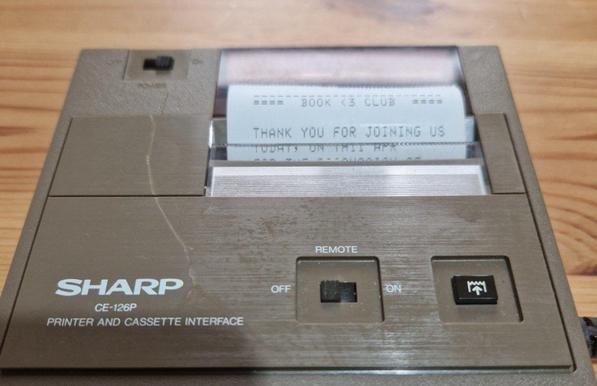
I got a printer and a tape interface for my 4-bit BASIC computer/pocket calculator Sharp PC-1248. I love this little toy because it has far more RAM than most users would ever need - almost 8K is available to the user. The printer is quick and tiny, too. The computer runs 150 hours from two CR2032, and the printer is powered by four AA batteries with unknown yet runtime.

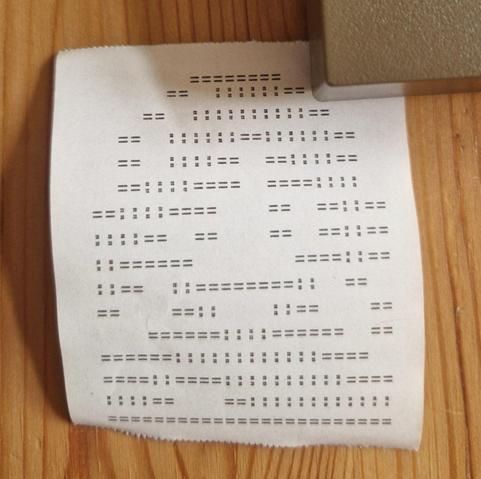
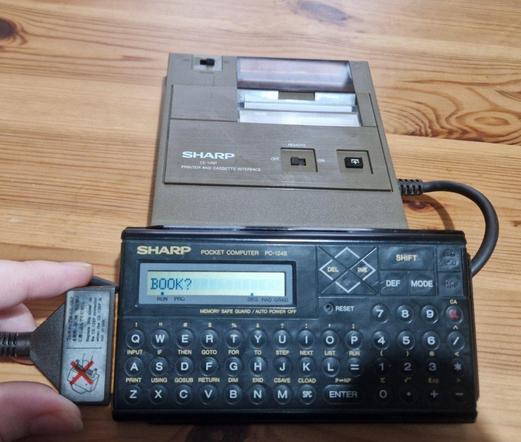
Here's the device loading the program and printing the image. Sorry it's very blurry, I'm too excited to share it ASAP :D

If you're wondering why I needed a printer for this computer: well, first, it's cool, and second, the computer can record the programs to a tape without this device, but can't load them. I tried to build my own version of the cassette tape interface for it from scraps a couple of weeks ago, but it didn't work for some reason. Probably the signal was too quiet.

If you ever find yourself owning this little computer, here are some very useful resources:

Basic->WAV converter (comes with source codes):
https://www.peil-partner.de/ifhe.de/sharp/

DIY tape interface (you can't just load tapes from the device without it, only save): https://ht-deko.com/pokecom/bbce124.html

Printer emulator using Arduino: http://www.cavefischer.at/spc/html/CE-126P_Emulator.html#PC-1250A

Now that I have this wonder of portable personal computing in its final form, I need to think: what kind of computing I can do on a 4-bit BASIC computer (read: slow) with a super bad keyboard (read: worse than ZX81) and a screen of 16 characters (e.g. most output goes to a printer right away)? And the IO is limited to a tape and a printer.

There's enough RAM to run a simple text editor, but the keyboard is a pain, so I'd rather not. Simple spreadsheet app is feasible, but I might as well just use BASIC. A database app would require some clever sharding. It could work as an organiser for 100 notes/contacts, but this is better done by a sheet of paper hidden in the back cover of the computer.

What do I even do with you, o little computer?

It's obviously very useful for little programs like "enter your mortgage details and we'll print the payment schedule, taking compound interest into account" or "type in the colours of the stripes on your resistor and it'll print out the resistance". But what else?

I guess very few people bought such pocket computers / BASIC calculators to play video games, but I think it's going to be pretty good for all sorts of little games. I'm sure even a decent game of chess is very well achievable with 8K of RAM for BASIC.

Sadly, the device can't play music, and its serial port is a bit wonky, so even controlling MIDI through it might be a bit too much 🤔

Accessing BBSes is also out of the question; the screen is too tiny, and the serial port can't be used with the printer connected. Maybe it is possible to use a phone line to transmit programs/data over it as if its a tape recorder, but I doubt it'll work.

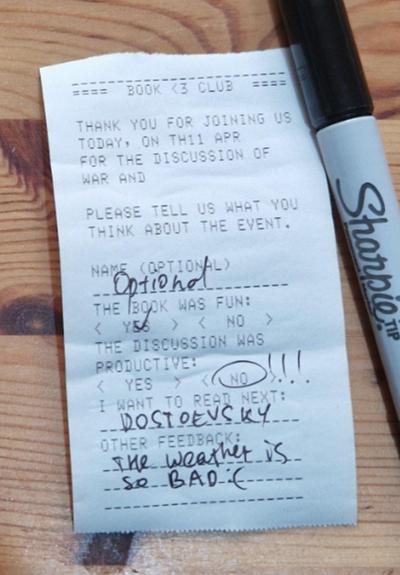
I found a reasonable application for this pocket computer. Imagine you're doing a book club with a small number of visitors every time (5-10 people). You want to collect everyone's feedback about the club. Printing 500 copies of the form for the next year is annoying, and you'd have to write down the name of the book you're reading, the current date and the next date for every event. You also might realise, after using 50 forms, that the form is missing an important question or something.

This little computer is almost perfect for those small-scale print jobs. You type the form one, and you can get as many copies as you need (well, up to 100 copies from four batteries, unless you have a wall plug).

Sorry for messing up the string variables :D

@nina_kali_nina

I used something similar at a structural engineering firm back in the 90s, albeit a Casio. One of the partners wrote a beam design program on it. They had a bunch of them for the engineers but they were starting to fail. One of my jobs when I joined was rewriting it for a PC with Visual Basic to preserve the program. It would have been easy except there was a mistake in the maths but the partner wouldn't accept it and kept demanding why the new program gave different numbers 🙄

@nina_kali_nina My father owned a Sharp PC-1211, and I remember some moon lander game.
@nina_kali_nina So the cassette input is one channel audio, I presume? Or what kind of frequencies does it work at? I would imagine an analogue phone line would probably have no problems with the same frequency range. Why do you doubt it would work? Audio compression over a digital connection might corrupt the signal. But in principle I imagine it could work.
@steeph I have a cassette tape player that doesn't work with this computer because its earphone output is too quiet. Even when I use my laptop as the sound signal, I have to crank up the volume to the max or it doesn't work

@nina_kali_nina Hmm, would need an amplifier then.

One question is whether it's OK to use additional hardware to get another interface established. Because if that would be an option, a microcontroller that translates anything into whatever is required would be an option, too.

An amp would probably be below that threshold because it's not designed or programmed for the purpose of getting this device an additional way of communicating.

@steeph well, there's all sorts of interfaces made on Arduino, but at this point you might as well just use the Arduino but with a bigger keyboard and screen
@nina_kali_nina Pretty much what I thought. It's an interesting puzzle. Pretty tight constraints compared to 8 bit computers with parallel and serial ports.
@steeph it is designed to be a secondary computer for sure; it can sync with a PC and, from what I've heard, was used by all sorts of salespeople travelling around

@nina_kali_nina That makes sense.

Well. if it's meant to be used in combination with another computer, the other one might as well be an Arduino. LöL

It should be possible to recompile/reuse many of the programs for TRS-80 PC-1, which is a grandfather of this computer: https://github.com/Robert-van-Engelen/119-Practical-Programs-for-the-TRS-80-Pocket-Computer?tab=readme-ov-file
GitHub - Robert-van-Engelen/119-Practical-Programs-for-the-TRS-80-Pocket-Computer: All 119 programs with wav files to load in your TRS-80 PC-1 and Sharp PC-1211. Making it easy to load and merge multiple programs and to create program collections.

All 119 programs with wav files to load in your TRS-80 PC-1 and Sharp PC-1211. Making it easy to load and merge multiple programs and to create program collections. - Robert-van-Engelen/119-Practic...

GitHub
@nina_kali_nina games? I had a Casio PB100 and the manual had a "snakes in the grass" BASIC game - there was a row of colons and every so often one would turn into a semicolon :::;:: and you had to press the corresponding digit before it disappeared.
@kw217 the manual for this one has a couple of games, too: Lunar Lander and Hunt (run around a 2D map chasing a "fox"). I think there is enough RAM for complex economic and role playing games - it should handle 1000 lines of BASIC with 2-4 commands per line
@nina_kali_nina ah yes - is the Lunar Lander one with velocity and altitude as numeric displays and you have to boost just right to land without crashing?
@kw217 yep! That's the one
@nina_kali_nina I guess Colossal Cave would have too much text but maybe you could tokenize it?
@kw217 maybe it could fit, and there's tape for loading extra data
@nina_kali_nina a better version of that one line game that was on some casio calculators with only a 8-segment display (casio mg-880)

if you can store and execute arbitrary data something more complex
@evv42 it is possible to program this calculator in machine codes somehow, but this particular model is fairly neglected/obscure. Tbh even the BASIC isn't particularly bad
@nina_kali_nina

- print a randomly generated poem
- tarot reading
- basic inventory management (tracking stock, recording item transactions, tracking storage locations)
- regular reminders (if it has an internal clock); could be useful if you're the kind of person who finds physical reminder notes better & need to remember a bunch of regular things ie medication intake. have the printer roll out the thermal paper straight onto your desk and don't tear it off until you do it
@cyanidesunrise the reminder thing is pretty cool! It is possible to connect a 9V power brick to run it off the mains, and there's WAIT command that should sleep for ~1 second, so it should be doable. Probably not the best way to use all the powers
@nina_kali_nina if it's no clock and wait commands it'd need regular sync (i bet some commands are VERY blocking), which feels self-defeating. your reminder device needs reminders to function
@cyanidesunrise well, one of the examples implements a tiny pocket clock using WAIT, which is pretty impressive. This is a direct spin off of a first pocket commuter programmable in BASIC, so even if it drifts by few minutes day it's still very impressive
@nina_kali_nina i suppose it could display its own clock on the screen and add "i do not comprehend the concept of time :( please check the screen and correct for drift" as a reminder every week or so
@cyanidesunrise the batteries last a bit over 6 days, so...
@nina_kali_nina i think the reminder thing could also be adapted to a multi user context, like household chores reminder with the option for anyone to type in additional schedules; the horrible keyboard does not matter if it's just "mo/1230/milk for andy"
@nina_kali_nina very fancy retrotech fridgenote
@nina_kali_nina bonus points if you manage to affix that thing to an actual fridge door
@cyanidesunrise it is very light, so it should be possible to glue it easily
@cyanidesunrise it does work as a tiny printer with a timer, but it's not clear to me how it is superior to just a note on the fridge and an alarm xD
@nina_kali_nina it's not, the idea is bullshit, i'm just trying to scrounge up SOMETHING
@nina_kali_nina i suppose it is vastly aesthetically superior. you invite someone over and they see disheveled antique hardware with incomprehensible key layouts glued to furniture ask wtf that is and you say "oh that's my post-it" but that's probably nothing new in your home
@cyanidesunrise Oh, I know what kind of stuff it can be used for! Let me try a thing...
@nina_kali_nina Golf. There is a credible version played along one line in 49 Explosive Games for the ZX81.
@drj I see there's Pool already, so making Golf shouldn't be too hard. But that's, again, games - I want something practical I guess xD
@nina_kali_nina Some sort of interactive fiction? Think “citizen sleeper”, but text-only…
@nina_kali_nina another thought — a small-scale turn-based strategy, like “into the breach”, but (you guessed it) text-only.
@wbftw yeah, I'm thinking of Sharp City or Sharp Settlers
@nina_kali_nina can’t find anything online re: those, but a city builder sounds fun. Wonder how it’d work in text-only mode (unless there’s support for graphics?).
@wbftw I meant knock-offs of SimCity and The Settlers :)
I suspect the text-only mode would work just fine