 normanvalentine
Filing the corners off my MacBooks
I just did this to my MacBook not because of the sharp edge but because the pitting turns a sharp edge into a sawblade. Something about the grounding on on the frame when plugged in mixed with my sweaty hands leads to damage along this sharp edge on every MacBook I've ever owned.
See https://www.reddit.com/r/macbook/s/hbyVh5SJhw for another poor soul with the same caustic skin
This comment is concerning.
> acidic sweat. once you got through the anodization the raw aluminum wears faster....
If one files off the sharp edges, won’t the sweat eat through everything faster, as that protective layer was filed off.
Aluminum should oxidize essentially instantly.
Oh wow I think I have a mild version of this.
Can it cause the plastic on the mouse to break down?
You need to moisturize more.
Oh is that why it happens? Was wondering why the spot directly under my wrist was pitted into a sawblade. I also filed it, though just enough to remove the pitting, nothing like the OP did.
It's easy for me to feel the mains frequency while gently rubbing the top surface of the MacBook while it's plugged in. Really feels unsafe, but neither me nor the computer have suffered any serious injuries yet.
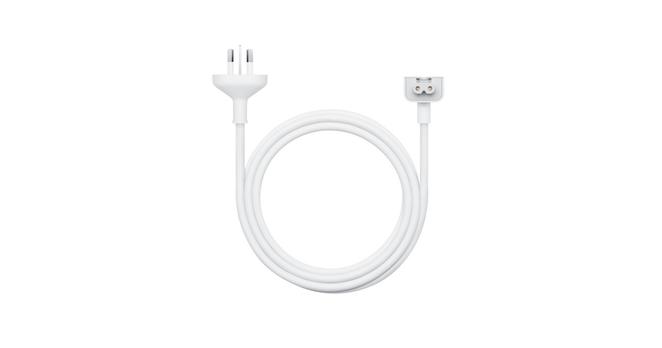
The extension cable they used to include in box with the computers, it has the third pin for the charger brick connector which is wired to ground
I don't know if this link will work - https://www.chargerlab.com/wp-content/uploads/2022/06/202206... but that metal round pin thing is a ground; and the three-prong cable connects to it.
There are grounded duckheads for this purpose, e.g. https://amzn.to/4cnzuef (note out of stock. I guess your best bet is to use a UK duckhead, but half of those have a dummy ground...)
if you take the plug part from the brick you'll note that there's only two pins but the button-like thing is a ground
as noted in a sibling, the power adapter extension cable does plumb the ground through (https://www.apple.com/shop/product/mw2n3ll/a/power-adapter-e...)
Amazon.com: Grounded Duckhead for Apple Mac - No Tingling or Buzzing! - AC Wall Adapter Plug Duck Head 3-pin US Charger for MacBook/iPhone/iPod AC Power Adapter with Ground Prong - Won't Slip from Outlet : Electronics
Buy Grounded Duckhead for Apple Mac - No Tingling or Buzzing! - AC Wall Adapter Plug Duck Head 3-pin US Charger for MacBook/iPhone/iPod AC Power Adapter with Ground Prong - Won't Slip from Outlet: AC Adapters - Amazon.com ✓ FREE DELIVERY possible on eligible purchases
> It's easy for me to feel the mains frequency while gently rubbing the top surface of the MacBook
I haven't been a regular Mac user, but I've had maybe 3 work MacBooks since 2010 and I recall having this issue with all of them.
Why haven't they fixed it?
I’ve been traveling around the world. It is 50 / 50 of the socket is properly grounded —-anywhere in the world. I get a tingling zap on the wrist when not properly grounded. The charger also gets hot and sparks.
If you swap in the extension cable head, that does indeed have a ground pin, at least in Australia anyway. The grounding comes from that metal ring that the connector uses as a guide. https://www.apple.com/au/shop/product/mw2n3x/a/power-adapter...
only two prongs of which make it through. Usually the regulation as I understand is that it's fine if you can prove the case can never get in contact with anything electric, for most laptops that's just being made of plastic.