
I really dislike how #Maven outputs text during a build. Gonna be extremely difficult to automate my next task because Maven's output is definitely not even meant for human eyes, let alone machine.

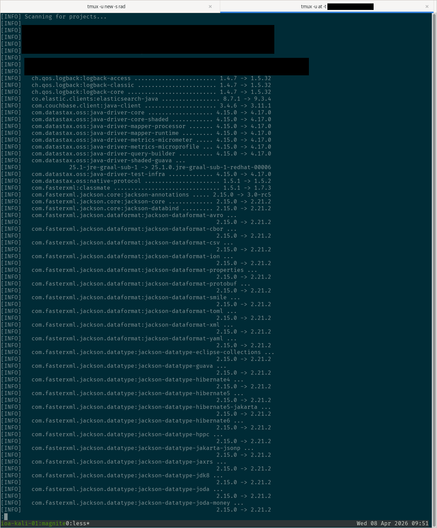
This is not easily parsed by machines (or even humans). Some version numbers are on the same line, others are on a separate line.

There's extraneous and unneeded info.

And there's no way to influence the appearance of the output. For example, the ps command as the -w flag to explicitly set wide text output mode.

#Maven #Java #Programming

@lattera what are you trying to extract from it? Looks like a little awk might go a long way toward beating it into submission
@gumnos I'd like the version info to be machine parsed so I can automate checking these dependencies for outdated versions, matching up CVEs to them.

@lattera

Also, have you tried faking the terminal width with

$ COLUMNS=99999 mavin …

(some tools, including ps(1) will consult this in a pipeline, and it's allowed me to fudge some otherwise yucky output)

@gumnos Just tried that, but no go.

@lattera

One other hack up my sleeve that might (but won't likely) work is to use

$ stty cols 99999 ; mavin …

which *might* also lie sufficiently to mavin.

That said, mavin just might be a dork and refuse to respect tty dimensions and force a presumed 80-column hard-coded limit.

@lattera apparently you can increase line width with versions.outputLineWidth (default is 80)
Workaround could be to output to a file maybe
Haven’t tested that line width option but I hope that helps

@xilerk Good catch! This command did the trick:

$ mvn -D versions.outputLineWidth=${COLUMNS} versions:display-dependency-updates

Of course, ${COLUMS} could be set to some arbitrary huge value to help better ensure single line per dependency.

Thanks a bunch for the suggestion! :-)

#Maven #Java #Programming

@lattera it can be very chatty, yes. istr you can trim that down to bare minimums, though.

@doofus_canadensis it's less about how verbose it can be, and more about how the crucial bits of data are split across multiple lines of output.

I'm mainly checking a large project for outdated dependencies via mvn versions:display-dependency-updates.

There's hundreds of dependencies in this project, so sifting through the results one-by-one by hand would be prohibitively painful.

And it's looking like trying to automate this will be even more painful due to how crappy quality the output is.

@lattera ah yes... I know somebody who did that not too long ago. I no longer have access to what he wrote, though.

@lattera You can generate a XML report if you need to process the result in an automated fashion if you use dependency-updates-report instead:

mvn -DdependencyUpdatesReportFormats=xml versions:dependency-updates-report

That will create target/dependency-updates-report.xml

For more details see: https://www.mojohaus.org/versions/versions-maven-plugin/dependency-updates-report-mojo.html

versions:dependency-updates-report – Versions Maven Plugin

@truls46 That's a great reference! Thank you! :-)