 DeckPacker
Piefed just got a new "community theme" option, feel free to get creative with it!
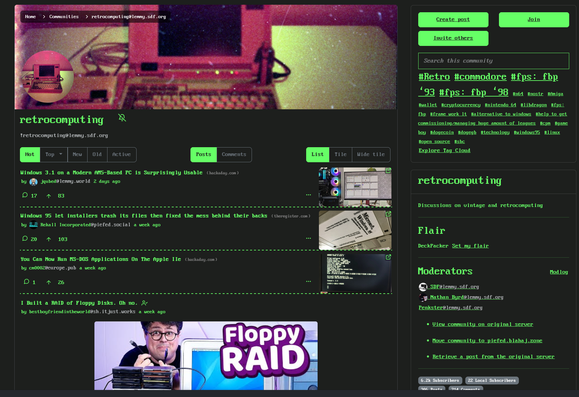
Piefed just got a new "community theme" option, feel free to get creative with it!
This is awesome.
Is there a user option to override it and continue to use the users theme?
Also do themes have to be added to the codeberg? If an admin uploads it directly for their instances directory would that work, and would browsing that from a different instance load it or would they also need the theme in their files?
To do this on a per-community basis, it might make sense to store it in the session cookie rather than in the db. Look for instances of response.set_cookie and request.cookies.get to see other examples of where we do that.
Some user settings are stored in the cookie to look at as an example; stuff like the compactness level, low bandwidth mode, etc. Basically anything that is set on a per-device basis rather than stored in the db.
Disabling a particularly annoying theme seems to me like something you would wanna do on every device, no?
Maybey it would make sense to store the user theme in a cookie though, because that is a thing, you may want to be different on different types of devices.
Do you know, how long such a cookie lasts?
My thinking on a per-device basis was that themes might work better/worse in a mobile vs. desktop browser, so people might prefer different experiences, but I could see the other side of things as well. That was also the rationale for making compact mode be in the cookie rather than saved in the db.
I honestly don’t know what the expiration of the session cookie is. It might depend on the browser. I think it is pretty long-lasting unless people clear their cache because I have definitely loaded up piefed instances after a long time and have still been logged in.
As for technical details, to save space, it might make sense to make a key (maybe like ignore_comm_theme) be a comma-separated list of community id’s that people have unchecked the box. That means you can easily convert this to a list with split and then see if the currently requested community id is in that list. Being the id means that it is unique for the instance and avoids name collisions like the actual community name might have (how many linux communities do we have now). It also keeps things relatively small since the cookie has a pretty small size limit iirc.
 lumpenproletariat
 wjs018