Restoration thread:

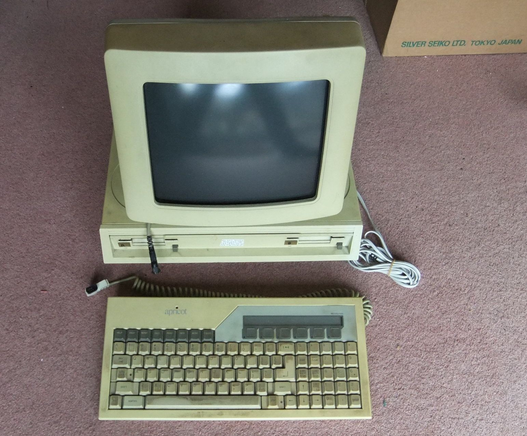
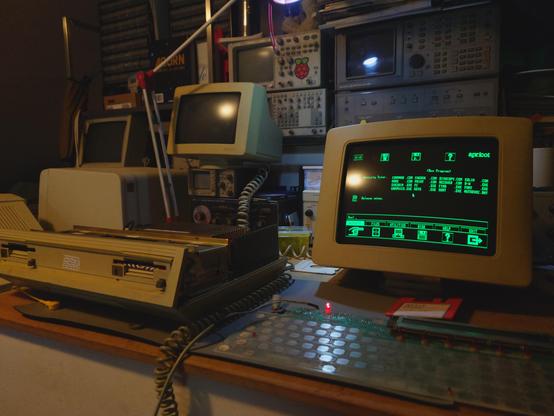
Saturday I hauled a full Apricot PC setup from South Wales back to Nottingham via the train

I had been after one of these machines for a while, I was fascinated with how cool the Apricot F1 and Portable are, this is the machine that they were based on, and with dual drives and multiple expansion slots it will definitely be useful in supporting my other Apricot machines

#apricot #apricotcomputers #actapricot #vintagecomputing #retrocomputing #dos

Getting this thing on my bench, I started pulling this apart, I immediately noticed the telephone cable and the sign talking about being approved to use in telecommunication systems

We have a modem card! This is super cool, Apricot expansion cards used their own interface, and so not many cards exist any more, finding this is super cool and I can't wait to play around with it

Disconnecting the power supply and powering on to test the voltages... caused all my lights to turn off, OK, the PSU needs work

Looking deeper and yeah, blown Rifa capacitors, suuuuuper common, I de-solderded these and carefully restested, now more tripping breakers, but it did make a high pitched noise rhythmic chirping noise and all the voltages looked weird and were jumping on and off; if there are other bad caps it may very well be making the switch mode PSU act up, so I took and inventory of all the capacitors and placed an order, which was gonna take a few days

Moving on to other areas of the computer I can test, the drives.

These are early Sony 3.5 inch floppies and I am *scared* of them, they are very early, so are electrically and dimensionally non-standard, are usually in a system where the case is moulded to the shape of the drive, and they are *VERY* prone to breaking

Specifically they are prone to the grease turning to paste, making the eject mechanism not work quite right, and pushing the drive partially out but not fully retracting the heads, allowing unwitting user to pull the driver out and do anything from significantly damage or rip off the heads

This was the case for both of my Apricot Portables, so far the only Apricot I have had with a working drive is my F1, and this machine has 2 of them  thankfully since ACT/Apricot used the same drives in all of their machines, I can use my F1 to test

I first made sure to very gently clean the heads which thankfully were still in place and were visually OK, and placing a cardboard floppy drive protector in there, the mechanism worked perfectly, whew

Placing each drive in my F1 with a bootable disk... the F1 booted riiiight up first try, for both drive, HOLY CRAP, we have 2 working drives in a dual drive machine

That was *really" cool, but I still had time to kill whilst I waited for all the capacitors to be ready, so I continued testing the PSU components, I ended up testing *all* of the PSUs semiconductors out of circuit, they were all fine, so hopefully this is a capacitor issue

I better continue this threat for #aprilcot

Full capacitor replacement later, I did a power on of the PSU and and the high pitched rhythmic clicking noise returned - ANNOYING

After checking and ruling out basically all of the active components, I was stumped, until prompted to try it under load, not wanting to hook the main board up just yet, I sourced some high power resistors, and bingo, clicking gone and voltage all normal

I had heard legends of PSUs that need to be under load, just managed to avoid them until now

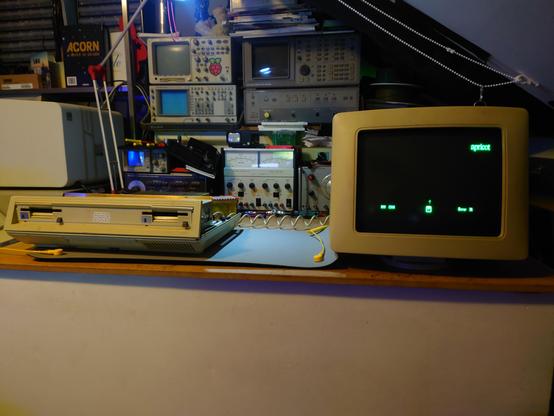
Reassembling the machine and powering everything on, it works! And now on to boot disks...

There is a huge repository of apricot disk images, including boot disks https://actapricot.org/disks/aprididx.htm

The problem is, reading any information on the internet (at the time) on how to get a boot disk, was that due to non-standard disk geometry, you need to copy your chosen disk to a IBM compatible DOS PC, and then use an executable called apridisk https://actapricot.org/support/apridisk/apridisk.htm to write out the image

After several days of trying and failing at getting data on to my one working compatible DOS pc, I looked deeper at the double sided Apricot disks, and discovered... they were standard 720k geometry?

It turns out, the disk image IS STANDARD, the high level filesystem was not, and so was the Apridisk.exe utility, which read and writes it's own file format, which just so happens to be that's the format all the files on actapricot.org are in

If I could convert the file format to be the standard RAW file format used by Greaseweazle, I could use that to write a boot disk directly from my PC and not bother with a whole other DOS PC

On a hunch, I spun up DOSBox, mounting a directory containing my boot disk image and Apridisk.exe, and a blank 720k disk image, running Apridisk to write out to that disk image, and then writing that file to disk with a Greaseweazle...

It worked! I blogged about this in more depth here https://forum.vcfed.org/index.php?threads/creating-bootable-apricot-disks-with-a-modern-pc-and-greaseweazle.1256679/#post-1495033

And then non other than John Elliot, author of the QDAE Apricot emulator commented that his dskconv tool will do all the conversion without needing DOSBox

ACT/Apricot - disks

That was a lot of work nothing; but in my defence, I, nor clearly anyone else in the Apricot community could not find ANY prior reference to LibDsk or dskconv in reference to Apricot/Apridisk on the internet apart from on the LibDsk website

https://www.seasip.info/Unix/LibDsk/

The source tree for LibDsk also contained a HTML file describing the Apridisk format, it turns it's just RAW, but every sector has a header, and there can be comment records, and some sectors can be RLE encoded, that makes converting them actually pretty easy

Using that as a reference, I was able to add support for Apridisk file formats directly into the Greaseweazle CLI client, meaning, you can now directly write out Apridisk formatted files (and thus, all on actapricot.org archive) using Greaseweazle using the flag `--format=apricot.single` or `apricot.double`

https://github.com/keirf/greaseweazle/pull/626

A far cry from spinning up a whole other DOS PC that was the Internet's generally accepted method previously  

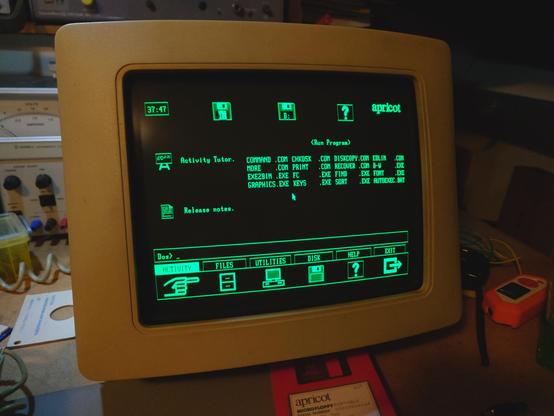
And ofc, my Apricot PC is booting off of both drives without issue, and I got DR's GSX working which meant I was able to load Apricot's very own Activity GUI shell!

Now, I just need a mouse...

#aprilcot #apricot #apricotpc #actapricot #vintagecomputing #retrocomputing

Apricot mice are rare, I don't own one

A few months back, I was able to reverse engineer the protocol used by the Apricot wireless IR mouse and was able to make a USB mouse to Apricot IR adaptor which I used with my Apricot F1 and Portable

https://woof.tech/@crashtestdev/115715072242669893

So I thought I'd have a crack at the wired mouse, visually, the wired and IR mouse are identical, so it stands to reason they used the same OEM

Referring to the technical manual, I learned that the keyboard and mouse sent data over RS-232 serial 8n1 @ 7800 baud (on page 218), and then on page 223, we learn that the mouse shared the bus with the keyboard, same as the wireless, but since it is wired, the mouse also asserts a REQ line to the keyboard controller (a whole damn 6301 ) and awaits an ACK to be asserted before sending any data, scrolling further down to page 226, hex codes 0x70-0x7f are the mouse codes, meaning that it sends 4 bits per byte which is ALSO the same as the wireless mouse, and 0xEF is the mouse packet header, which the mouse also has

It stands logically to reason then that the wires mouse protocol is going to be similar to the wireless one

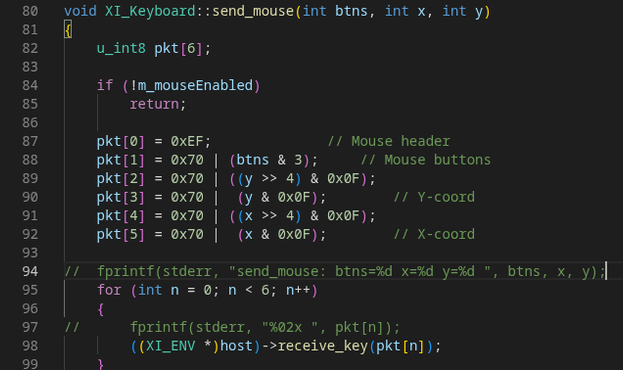
Wanting to verify further, I took a look at the QDAE emulator source, and BAM! Right there, bin/xi_keyboard.cxx on line 87, 6 byte packet, begins with 0xEF, first data byte is the button statuses, followed by y and x coordinates, in big endian format

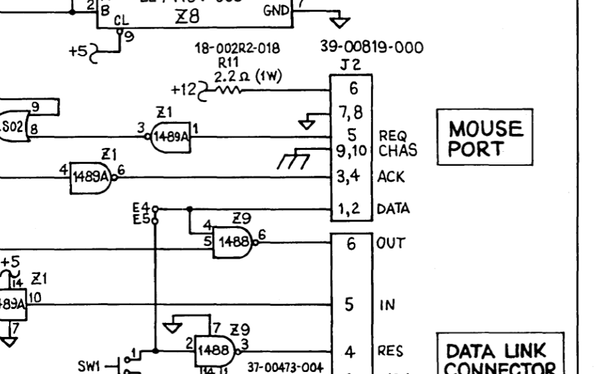
Taking a look at the schematic for the mouse connector pinout, I quickly hooked up an RP Pico via a MAX232 converter, I initially just tried asserting REQ and reading ACK, sure enough, with the mouse drivers loaded and the Activity GUI shell loaded, when REQ is asserted, ACK follows, and is unassertive when REQ is removed

Then I tried hooking up the serial, it caused the whole system to reset

THAT'S INTERESTING

Looking deeper at the schematic reveals something rather odd, whilst REQ and ACK go through an MC1489 RS-232 level shifter, DATA does not, and is at normal TTL levels, and what's more weird, when DATA is pulled to ground, which it would be when hooked up to a MAX232, it triggers an MC1488 which sets off the reset line

HUH

Trying the data line going straight to the serial RX pin on the Pico, and running a loop which sends a mouse packet every 2 seconds just moving the mouse down, it worked!

@crashtestdev What’s weird is it shows separate OUT and RES lines on this side, but when you look at the main board schematic, there’s only the input line connected to both the SIO’s RX *and* RESET via a 1489. They clearly hacked in the reset button over the data signal. I don’t know why they didn’t just use one of the 0V pins.