Getting rather frustrated that the latest Android strips location EXIF from the web file picker.

Doesn't seem to be any workaround that'll let you pick a photo and have a web browser see the geolocation.

Like, I get the privacy issues, but it is rather frustrating for location-based web apps.

(Before reply-guying, please test if the code you found on a 4 year old StackOverflow post actually works on modern Android, thanks.)


#Android #EXIF

*sigh*

Looks like Android is stripping GPS EXIF from photos whenever they're shared.

Affects QuickShare / Bluetooth - https://issuetracker.google.com/issues/485307531
And the web photo picker - https://issuetracker.google.com/issues/40287342

Basically the only way to get geolocation is using USB transfer.

Like, I get the privacy aspect, but it is so annoying to explain to users of @openbenches that they can't upload via the mobile website any more.

#Android #EXIF #Privacy #Geolocation

Google Issue Tracker

Anyway, if you think the web should have a way to get the *full* photo a user uploaded - including geolocation metadata - please leave a 👍 reaction on this request → https://github.com/whatwg/html/issues/11724#issuecomment-4192228562
A way to remove EXIF data on `<input type="file">` before sending to server · Issue #11724 · whatwg/html

What problem are you trying to solve? I would like to strip EXIF data from file attachments before they ever reach a server. It would be nice the either the <input type="file"> or something in the ...

GitHub
@Edent 👍🏼
@LaChasseuse you have to click on the link to GitHub and leave the reaction there.

@Edent @openbenches Much rage!

I suppose there's some value in adding an optional <geolocation> element or similar to the app anyway (I don't know about others, but I do most of my submissions while sat on the bench in question!). But I appreciate this is still a loss in quality.

Feels like this could be easily fixed by Google adding a toast popup that says "Location and other metadata was removed before uploading" with an "undo" button to re-try without that, maybe.

Anyway - for now: much rage.

@dan Yeah, we can ask for GPS but, as you say, people are rarely in the same place where they took the photo.

@Edent @openbenches is this affecting non-Google camera roll backup too?

Mine still seems to get location but I don't know if it's because I'm on an old version.

@InsertUser I don't know. It seems to be a problem on the defaults.
I used to backup my photos from Android with a script in Termux. I first stripped some of the exif data with exiftool (I think, it's been a few years) then used rsync to send them to back them up on my server. I'm not sure if something similar would work for you and just skip the exiftool part.

Also, I have another Termux script, where I can share any file and it uploads to an uploads folder on my server (as an alternative quick way to share something.) Give me a few minutes and I'll test if exif is preserved.
so this termux script works (using ssh) https://chven.us/uploads/termux-file-editor.txt and preserves exif data. Not sure if this will work for your use case or wherever you need to upload to.

edit: renamed file to have .txt extension because firefox was trying to download it as .bin

2nd edit: just re-read your post and realize you're talking about uploading in webapps and my comments are useless. Good luck
@sam it's for the public to upload to a public website but needs the location the photo was taken for it to function and work as the photos need to be located on a map.

@Edent How recent do you mean by latest? By switching from image picker to file picker in https://github.com/mysociety/fixmystreet/commit/571c15baa2211f2c25d9e0d0ab2e3e3f5635f9e0 in January, this seemed to let us start getting locations from Android uploaded photos, in at least some cases.

(iPhone is weird, you get location if you use existing photo but not if you take it there and then, hope that’s just a thing they’ll fix.)

Allow any file type from front page upload. · mysociety/fixmystreet@571c15b

On iOS, this doesn't appear to change anything, still offering a choice of Photo Library, Take Photo, or Choose File. On Android, however, this means it switches from an image picker (that lets...

GitHub
@dracos Hmm. That's what I'm doing. But the file picker on Android 16 won't let EXIF through.
Wondering if it is a GrapheneOS issue now?
@Edent The Chrome user agent string on Android is fixed to "Android 10" so I don't actually know if any Android 16 in the ones with successful geolocation, I can try and find out next week probably
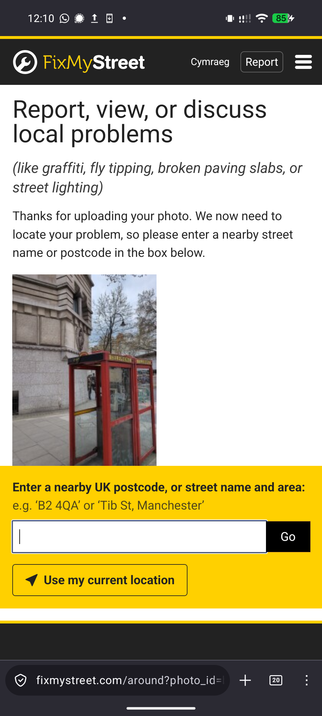
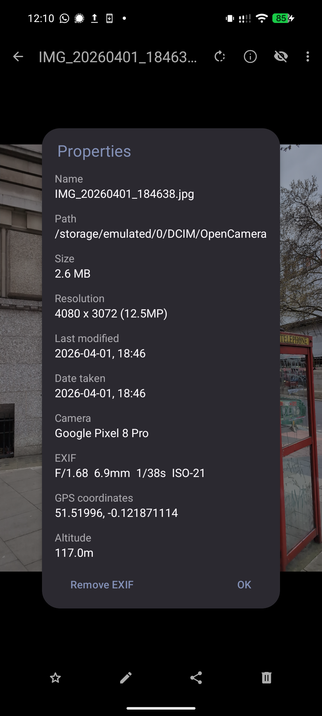
@dracos just tried this photo which has geolocation - looks like FMS can't see the EXIF.
it seems that in my tests with uploading anything through the browser or an app where it uses the file picker, then the exif location data is removed. When I open the photo with exif location data in my gallery app (Fossify Gallery on Pixel 8 with grapheneos) and then share that to Termux (like I mentioned in my useless comment), then it's preserved. I wonder if there's a way to share to the openbenches webapp similarly and just skip the file picker?