
I just decided to give GNOMEOS another goal as daily driver on my main machine.

So far after a relatively fresh install, `updatectl` seems to be broken. Might be related to the fact that I added a second device to my btrfs lvm? (Not sure why, but that's the only major thing I changed after a fresh install)

Anybody familiar with this issue? Otherwise I'll just file a bug.
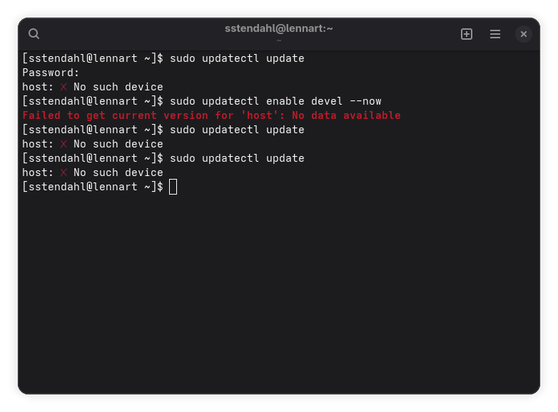
#GNOMEOS #GNOME #updatectl

I knew this issue seemed familiar, I filed an issue about this myself last year. So no workaround so far it seems :(

https://gitlab.gnome.org/GNOME/gnome-build-meta/-/issues/985

Adding additional btrfs to volume drive breaks `updatectl` (#985) · Issues · GNOME / gnome-build-meta · GitLab

I've recently started to daily drive GNOME OS. My machine uses two NVMe drives, which I typically combine to one single logical volume. Typically I've always let the...

GitLab
@sstendahl Yes, that is difficult to make it work automatically. But I think there is a way to set the device manually. I will update the issue

@Valentin I’ll get back later on the actual issue with more detailed answer, but so far the conf files don’t seem to trigger any changes. Tried with every path in my `/dev/disk/by-path` directory, and tried rebooting.

But again, will try to see if I can provide more information when I get back to my laptop.

@sstendahl Make sure not to use the partition ones. It is the whole disk you should point to.

@sstendahl And it must be the one where you have /usr partitions.
That should be the result of:

```
for p in $(udevadm info --query=property --property=DEVLINKS --value /sys/$(udevadm info --query=property --property=DEVPATH --value $(readlink -f /dev/disk/by-partlabel/gnomeos_usr_* | head -n 1))/..); do case "$p" in /dev/disk/by-path/*) echo "$p";; esac; done
```

@Valentin I figured it would be the whole disk. But since I didn't notice any effect, I simply tried all paths one by one. Unfortunately, that didn't really change anything either.
@sstendahl You might be getting another issue. It would be interesting to see the output of `sudo env SYSTEMD_LOG_LEVEL=debug /usr/lib/systemd/systemd-sysupdate update`