 Becky
BeckySo if you run #Linux and wanna stream on #Discord , but keep running into sound just not being reliably captured, I have found a stupid solution for a stupid problem.
So when discord captures audio from your desktop, it doesn't actually capture your desktop audio. It cherry picks some programs that are "probably games" and captures those individually, as to not also capture audio from an ongoing voice call.
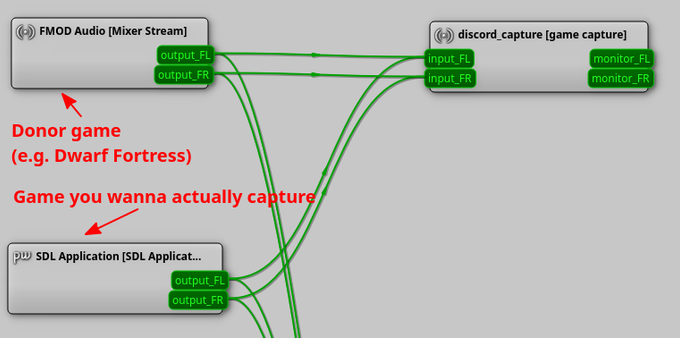
The problem is if discord comes upon a game it doesn't know, you are shit out of luck, it won't record it. However you can coerce it using a tool called qpwgraph, which lets you rewire audio from applications to whereever you want.
First you need to run a game that discord knows, so that it will create a special recording audio device. I usually use the free version of Dwarf Fortress, it boots up fast and won't eat up any resources while idling in the menu. Make sure to mute it. Next, you open the game you actually want to capture and start your discord stream. In qpwgraph there should now appear a "discord_capture [game capture]" device, connected to the donor game. Now just wire the output of your game into that and now you should have working audio on stream!