 Kyle Bashour
I have no technical ability. I know nothing about Swift macros. But I have confidence in my taste, and the ability to express what I feel.
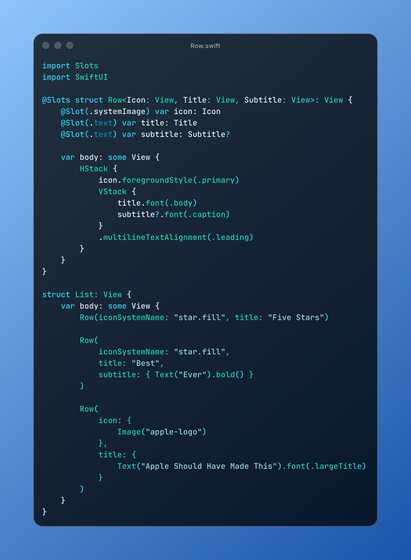
Introducing Slots - convenient view slots without the init explosion https://github.com/kylebshr/slots
I have no technical ability. I know nothing about Swift macros. But I have confidence in my taste, and the ability to express what I feel.
Introducing Slots - convenient view slots without the init explosion https://github.com/kylebshr/slots
@kylebshr I did read through the readme before responding. (Twice actually. 🙂)
I’m a little unsure as to how it would handle the EmptyView scenario I mentioned, given you wouldn’t actually store it as nil but as a “slotted type”. In the icon example why is the annotation `.text`? I would expect something like `.empty`, but perhaps I’m completely misunderstanding how this is supposed to work.
@mergesort I think I understand what you’re trying to do, and instead of something like `.empty` I’ve used the type system for this; optional view properties get init variations where they’re omitted from the init, and they get set to nil (and constrained to Never, though you could constraint to EmptyView for the same effect).
I prefer optional views instead of views that may be EmptyView, because you can customize the layout based on their presence instead of checking the type.
@mergesort how would you feel if headerView was optional, and instead of where == EmptyView you used where == Never and assigned nil? Ignoring slots for a moment, I think this is a slightly better design that accomplishes the same thing, because internally you might want to adjust layout based on headerViews presence, e.g., in the body:
if let headerView {
Spacer()
headerView
}

@kylebshr @mergesort A more resilient approach I like to use for components like this is to use Group(subviews:transform:) to resolve subview proxies, so you can check if the view is _actually_ empty (beyond just inspecting types).
Unsure if that’s something a macro could help with — seems less likely.
 Joe Fabisevich


 Jonathan Willing