 Glyph
GlyphI am writing a blog post about why it is bad to use AI. It is extremely heavily sourced. I have a tedious automation problem formatting my citations. No problem, I think. I will write a computer program. The computer program does not work, because websites are blocking simple computer programs in an effort to block AI. Solution? Simple. Browser comes with AI embedded, browses like a human, has all my cookies. Just ask the AI. It sails through the primitive anti-AI measures easily.
serious question though, is there a requests (or httpx or treq or whatever) compatible selenium driver so that I can write a simple Python CLI that just says "give me URL please" and Safari does all the HTTP traffic so it can get the request body with all my ridiculous CAPTCHAs and news website logins in it
 Hey Gus
 Mark Eichin
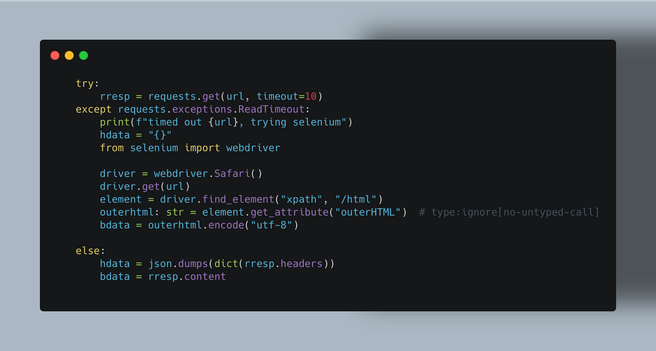
@glyph heh, my side project this week was the reverse of that - selenium to "run" a page (lots of javascript based partial execution) and click a button (which rewrote part of the page without reloading)... and then extract a URL from that and use requests to cleanly get a Location: header out (basically forcing the service to canonicalize itself for me.)
 Noah K
@glyph ytdlp has some underlying features like this, might be a thing you could import but probably not a public api :)
 Nic Roland
@coderanger @glyph yeah! There's a feature where you point it at your browser's state directory (which for Firefox you can find in about:profiles) and it can borrow all of your cookies. I've definitely wanted to figure out how to quickly implement this in scripts in the past... But then my attention span jumps out a window...
@nicr9 +1 to Nic’s line of thinking.
Also to Nic’s attention span, this is an uninteresting (to me), very fiddly, very fragile way of accomplishing things.
It’s probably one of your best bets though.
 JayF
JayF@glyph we needed to do this for ironic, originally implemented it as selenium but switched to a Firefox extension

 cthos 🐱
 mborus
@glyph instead of Selenium, you may want to check out Playwright. https://pypi.org/project/playwright/
It allows browser automation in a very pythonic way - also headless. It installs its own Chrome/Firefox/Safari and avoids any configuration you done to your browser installs.
 Jeff Forcier
 LisPi
LisPi
GitHub - ultrafunkamsterdam/undetected-chromedriver: Custom Selenium Chromedriver | Zero-Config | Passes ALL bot mitigation systems (like Distil / Imperva/ Datadadome / CloudFlare IUAM)
Custom Selenium Chromedriver | Zero-Config | Passes ALL bot mitigation systems (like Distil / Imperva/ Datadadome / CloudFlare IUAM) - ultrafunkamsterdam/undetected-chromedriver
 📄 Mehdi.doc
@glyph maybe not a complete solution, but some have already tried tools to bypass protections, for instance for automating torrent downloads etc. : https://github.com/FlareSolverr/FlareSolverr
