FreeCAD Version 1.1 Released

After an enormous amount of work and dedication from FreeCAD contributors we are delighted to announce that FreeCAD Version 1.1 is now released and available for download. There are significant amo…

FreeCAD News

I post this in every FreeCAD thread: If you're going to start designing something with it, use the spreadsheet tool to make everything parametric. You'll save yourself a ton of time as your designs get more complicated.

Maybe this isn't anything new to experience CAD users. I don't know if other CAD tools do this as I started using FreeCAD after playing with 3D printing.

It's very common (Fusion calls it User Parameters, etc.) and indeed nice practice. FreeCAD has a few ways to do it, Spreadsheets but also free-form properties on objects. It's very flexible in this regard.

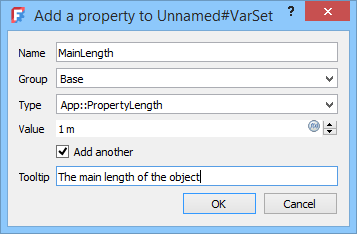
You can also use VarSet[0], which I think is easier than spreadsheet since you don't have to switch the workbench.

[0]: https://wiki.freecad.org/Std_VarSet

Std VarSet

.

FreeCAD Documentation
Did not know about this. How do you see all the properties?
Other cad tools do support this but in my experience it's always pretty awkward to use. I haven't tried the FreeCAD implementation.
Some CAD systems, i think NX for example, let you give it a reference to an actual Excel (or csv?) file, that you edit in Excel.

Or don't and adjust it in the sketcher? If you name your constrains you can just reference them directly elsewhere.

I think that's much easier as you don't have to go back and forth with a spreadsheet.

Recently one of the magnet holders for my window shutters broke, and I thought I'd take a crack at designing a replacement to 3D Print. I'd never designed anything in CAD software before, so I had no real reference.

I found FreeCAD extremely easy to use and intuitive. I watched a couple videos and followed-along with the tutorials, then started on my own item. It's a relatively simple 3-part component. I took measurements with digital calipers, and in a few hours was printing the first prototype.

A couple prototypes later (small measurement adjustments to account for plastic shrinkage, etc), I had the final model. Replaced all of the magnet holders since they were sure to go soon, too.

I had fun, and finally used my 3D printer for something "real". Pretty cool.

Learning to design parts was a huge "unlock" for me.

Wasn't just printing other people's designs.

Great feeling to measure and design something then have it fit perfectly.

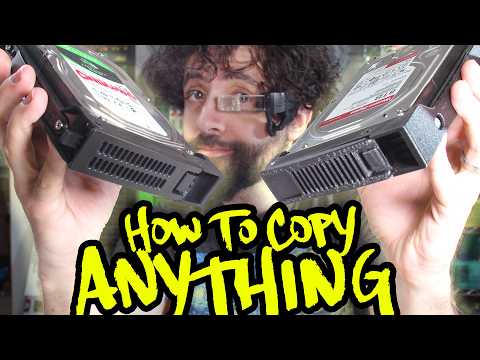
I just saw a great video on how to replicate parts for printing https://www.youtube.com/watch?v=OcMvTfUfNXo

Previously I'd get my calipers first and try to model using the direct measurements. The key point imo of the video was to take photos and model based on the photos, and then correct the measurements with your recorded measurements second.

You can copy and print perfect spare parts! (Legally) (Probably)

YouTube

That is the spirit! A friend recommended me to buy a Bambu P2S: there are parts I want to print and I don't want to model then send them to have them printed, nor to bother my friend all the time. Funnily enough I've got magnets falling too: for an alarm system on the doors/windows and they don't hold well anymore after the years. Then my car's radar detection device (fully legal) doesn't fit nicely in the phone holder I use to that effect: I want it a specific angle (I want it both inclined and facing towards me a bit). So I'll model those and just print them. There are a few things like that where I keep thinking: "If I had a 3D printer, I'd just print a part".

Most importantly: I've got a 11 y/o and I think it's cool for the kid to see how it works.

Already watch a few vids. Doesn't look too hard for simple things.

I had a hard time but I didn’t start with the tutorial first.

But once I saw their “philosophy” as it were, everything became so much easier.

for incredibly simple parts that i can describe using measurements, i've had a lot of fun pointing a high-power ai at openscad and letting it iterate through making the design for me

it's still tough to turn it into something i can then keep fiddling with in freecad though

put on "tron: legacy" in the background to fully appreciate the model designing something that will be 3d-printed :)

Slightly unrelated to this story, but I’m curious if anyone has good resources for learning FreeCAD. I have quite a lot of experience with SolidWorks, AutoCAD, OnShape, and similar software, but FreeCAD has always been hard for me to pick up.
YouTube was very effective for me to learn FreeCAD. I just searched for some FreeCAD tutorials and followed-along. I had zero prior CAD experience though, so I was a "blank slate" in a way.
MangoJelly on YouTube was my primary learning source, and a few other channels - but his "gelled" with me the best.
Oh wow - over on Reddit, someone mentioned that the Deltahedra YouTuber has started using his own voice, rather than a generated one - and - well, his content is now far more watchable than it was previously!
Yup, mine too. He has a course on Udemy as well.
My goal this year is to finish his 40ish hour course. Excellent quality course at a good pace.
I often recommend https://youtube.com/@deltahedra3d - some good tutorial videos and other excellent FreeCAD content.
Deltahedra

French Engineer doing CAD stuffs.

YouTube

In coming time you can see freecad massively improving.

This space lacks good opensource solution.

I have tried creating my parts, tried tinkercad (which is simple but limited)

Tried fusion. And pretty much other things don't support mac.

I've a hunch lots of vibe coders are going to come and launch stuff like freecad and Gimp (which I never liked, can't even get simple tasks done in gimp)

Future is bright for opensource powered by LLM coding on steroids.

Looking forward to this update. There are so many hidden gotchas in FreeCAD once you get past the basics. Load of bugs and head scratching issues. However its free and local so can’t complain to much.