
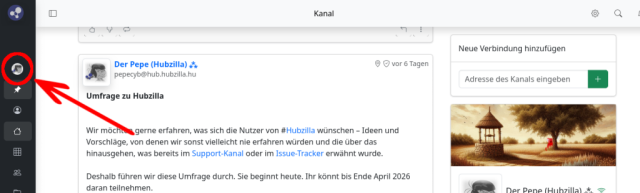
Eher still und unbemerkt hat sich etwas beim Utsukta-Theme "Adminlte" geändert. Das Hauptmenü, also das Menü, das man über das eigene Avatarbild erreichen kann und welches Zugriff auf das Profil (und den Profil-Editor), die Kanalwahl, die Einstellungen, ggf. das Admin-Panel (für Nutzer, die Admin-Rechte haben) und das Abmelden erlaubt, ist heimlich, still und leise von der rechten oberen Ecke (in der Navigationsleiste) nach links in die Seitebnleiste gewandert. Es befindet sich nun also dort, wo das App-Menü auch ist und wurde Teil eines eher zentralen Menüs, in dem nun App-Menü und Hauptmenü zusammengefasst sind.


Also nicht wundern... alles ist in Ordnung, auch wenn der Avatar nun nicht mehr rechts oben prangt.

In de Hubzilla KnowledgeDB habe ich das entsprechend auch aktualisiert: Wo ist was bei den Utsukta-Themes?

#hubzilla #themes


---
Member of the Hubzilla Association
this was done because someone reported that on small screens (mobile) the items on the top navbar were not fitting and breaking display since the viewport width was exceeding the device screen width. Should have announced, missed it. apologies.
@Saiwal

No problem at all. It wasn’t really a big deal to find the main menu again.

I hardly ever use Hubzilla on mobile devices with small screens myself. Even so, I think the solution is brilliant! It brings together everything that belongs together. The sidebar has thus become THE central menu. Because the main sections (main menu, pinned apps, featured apps) can be expanded and collapsed, it doesn’t feel cluttered, even though everything is now contained there.

On that note (in this unusual spot), here’s a “feature suggestion”:

When you open a view (app) that has its own settings, the cog icon appears in the navigation bar (which takes you to the app’s settings). Would it perhaps be possible – if such settings exist for a view – for this cogwheel to appear in the sidebar instead? I think that would be a further improvement to the UX.
@Saiwal

No problem at all. It wasn’t really a big deal to find the main menu again.

I hardly ever use Hubzilla on mobile devices with small screens myself. Even so, I think the solution is brilliant! It brings together everything that belongs together. The sidebar has thus become THE central menu. Because the main sections (main menu, pinned apps, featured apps) can be expanded and collapsed, it doesn’t feel cluttered, even though everything is now contained there.

On that note (in this unusual spot), here’s a “feature suggestion”:

When you open a view (app) that has its own settings, the cog icon appears in the navigation bar (which takes you to the app’s settings). Would it perhaps be possible – if such settings exist for a view – for this cogwheel to appear in the sidebar instead? I think that would be a further improvement to the UX.