I’ve had this with my Dell laptop running on Ubuntu 24.04 a couple of times where I open my laptop (after suspending it) and I get a square mouse pointer and “authentication error” and I can’t type or do anything.
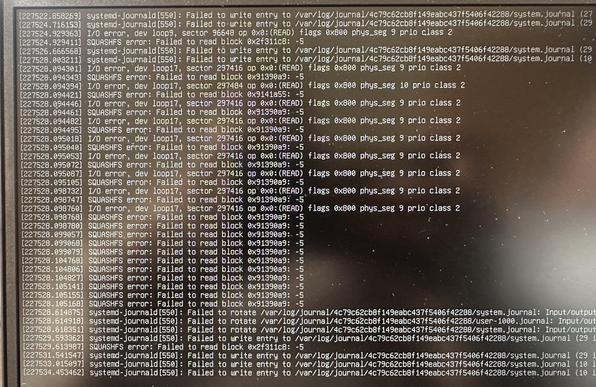
Switching to a console I get a whole bunch of errors and stuff.
Anyone have a clue what is going on (and there is no nvidia graphics card)
#ubuntu #help
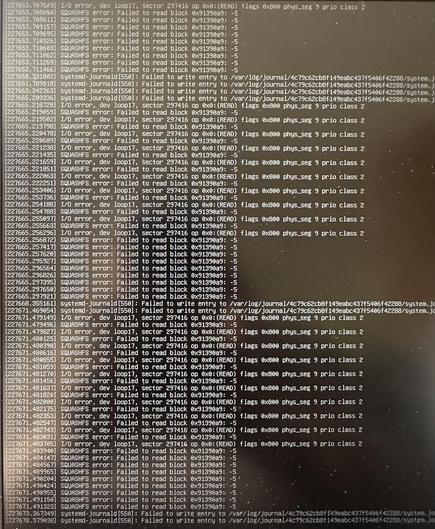
Here is what happens.
The white square is supposed to be a mouse pointer.
@PaulaMaddox can anyone in #linux help with the above ^^ post?

@PetterOfCats @PaulaMaddox are you using an encrypted FS? It looks like it is trying to read your encrypted fs and getting an error. might be worth doing a fsck once you have a prompt again. if that comes back clean, then you will need to reboot and do a `journalctl -o short-precise -k -b -1` and start parsing just what had happened, which... is gonna be a fun puzzle.

or a nightmare, depending on your proclivities.

@ghostrunner @PetterOfCats nope, no encrypted file systems, FAT32 (/boot/efi) EXT4 for file system and a second hard disk with EXT4.

I can't run an FSCK as the file system is mounted :)

@ghostrunner @PetterOfCats

nvme0n1
├─nvme0n1p1 vfat FAT32 ESP A84A-3495 829.8M 7% /boot/efi
├─nvme0n1p2 vfat FAT32 OS 2C59-60CF
└─nvme0n1p3 ext4 1.0 a8383543-4c0c-4744-b825-24cb77c5670a 1.5T 14% /
nvme1n1 ext4 1.0 Data e00ded2d-b551-4104-8990-44de748cead2 839G 3% /mnt/e00ded2d-b551-<shortened>

@PaulaMaddox @PetterOfCats hrm, looks like i was wrong; its more probable that the kernel is continuing to do work after falling asleep.

for the fsck thing - yes, you would need to boot up linux from usb with the hd unmounted, then fsck check from there, but given what you showed, i doubt that is the issue.

a little googling and it looks like your square mouse issue is a known defect in ubuntu around the driver loading in X, which conforms with the theory that the kernel is continuing to do work despite being in a partially off state (disk asleep, brain awake).

very strange situation, especially given the intermittent nature.

the 'suspend' function may be your saving grace here. instead of trusting the logind <-> PMIC driver interation. Its a long shot, but maybe logind (the thing that controls with the screen) isnt suspending via the same mechanism as the X control menu and it will fix your issue.

@ghostrunner @PetterOfCats it seems I'm not the only one, a few others have had the same issue.
I also had issues with the time keep randomly changing. so I rebuilt the OS..

@PaulaMaddox @PetterOfCats nice! Like reinstall from image or old-school recompile on hardware? I haven't done the latter since '03.

More importantly, have you had an incident since the rebuild?

@ghostrunner @PetterOfCats from an image. I’m not really into the building of kernels etc.
I’m a hardware engineer who tinkers with software and I moved away from windows about a year ago.
@PaulaMaddox @PetterOfCats godspeed on your endeavor. I hope the new image corrects your issue. Rest assured it doesnt look like a _real_ (bad hardware) issue and more a compatability issue.
@ghostrunner @PetterOfCats Thanks, yeah it's nice to know in a way.. seems this has been around for a few years now which is interesting.
However, no way I'm going back to windoze.

@PaulaMaddox

Are you using a LiveCd or LiveUSB? If not,
Reboot
sudo apt update && sudo apt install smartmontools -y
sudo smartctl -a /dev/sda

Check for Reallocated_Sector_Ct or Current_Pending_Sector to be non-zero

Drive may be failing.

Boot into recovery mode from Grub and run this sudo fsck -f /dev/sda1 to see if the file system is jacked

And finally give us errors from last boot using journalctl -p 3 -xb -1

@iaintshootinmis @PaulaMaddox But why are there squashfs errors? That shouldn't be present on a typical ubuntu installation?
@cm @iaintshootinmis @PaulaMaddox
That's snaps running from loopback mounts of their read-only squashfs images.
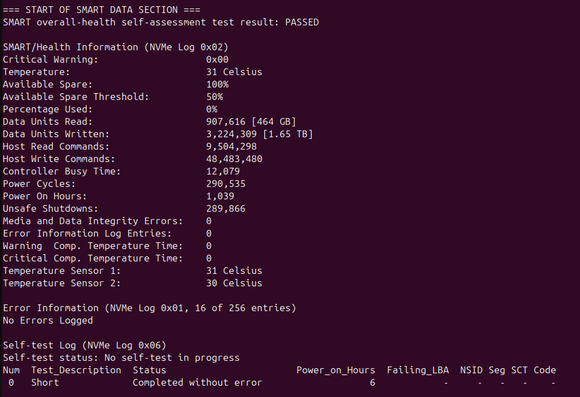
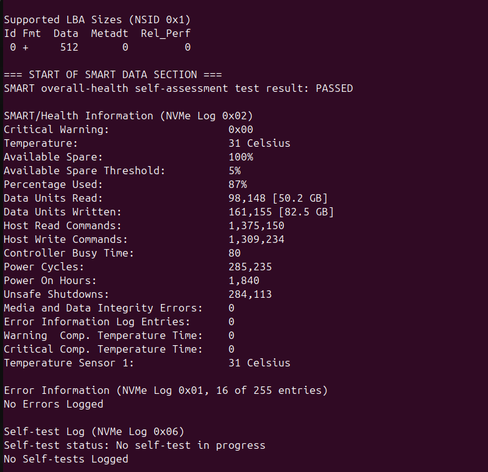
@iaintshootinmis no errors with either nvme drive
@PaulaMaddox this is a long shot but try sudo dpkg --verify

@PaulaMaddox I/O errors, is your disk dying?
What does SMART info tell you?

Anyway, is your backup uptodate? You may need it.

@hansotten My first disk (nvme0) and second disk (nvme1) show this, I don't see anything untoward.
@PaulaMaddox looks like a healthy disk.
The unsafe shutdown value is high ..
That does not hurt the physical disk, but may lead to logical disk errors.
@hansotten probably because I have to power it off each time :(
Though I haven’t done it that much.
@hansotten Thankfully I keep all the data I want on the 2nd drive.
I've had to reinstall Ubuntu as it was totally borked :(