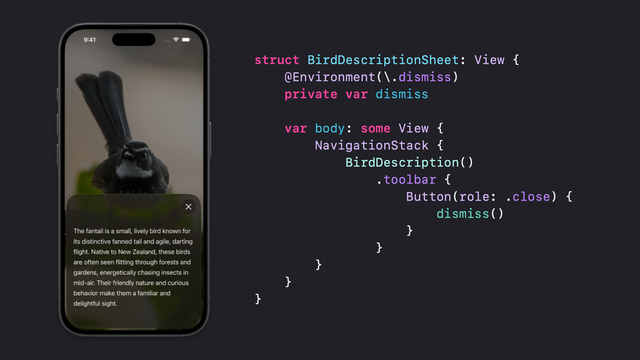
Am I missing something, or does SwiftUI have no way to detect whether a view needs a dismiss button?

i.e. just tell me if there is a system back button shown

@harshil AFAIK, it’s only automatic when presenting a UINavigationController. Otherwise, gesture dismissal is “enough” for sheets. Full screen cover? Provide the button yourself via toolbar.

Take this with a bag of salt. It’s my current understanding with no research.

@josh Lots of dismiss and done buttons everywhere in iOS 26
@harshil Sure. But I think you don’t get them for free except in very specific contexts. Try presenting a modal alert or other “stubborn” modals. They might appear there.
@harshil But the main thing I’m trying to say is “add a button to the toolbar with an appropriate role; automatic seems not to be a thing.”
@harshil Or am I answering a question you didn’t ask? Entirely possible.
@josh Basically I have views that are sometimes shown in a sheet, sometimes in a nav stack, sometimes in a nav stack in a sheet, and sometimes drilled down within a sheet etc. I would like some way to know “hey this thing can be dismissed but you might want to show an affordance because we don’t”
@harshil @josh you can add a button with the close role, and I think it won't appear at all unless the view is inside a modal: https://nilcoalescing.com/blog/AddACloseButtonToSwiftUIModalsOnIOS26/
Add a Close button to SwiftUI modals on iOS 26

In iOS 26, SwiftUI introduces a new close button role for dismissing informational views, automatically showing a standard close icon without needing a custom label.

Nil Coalescing
@nicklockwood @josh Ooh I’m gonna have to try this