GDC 2016: "Rendering 'Rainbow Six | Siege'" by Jalal Eddine El Mansouri of Ubisoft Montreal https://gdcvault.com/play/1023287/Rendering-Rainbow-Six-Siege

This presentation was a bit challenging to follow. There were 2 main topics of the presentation:

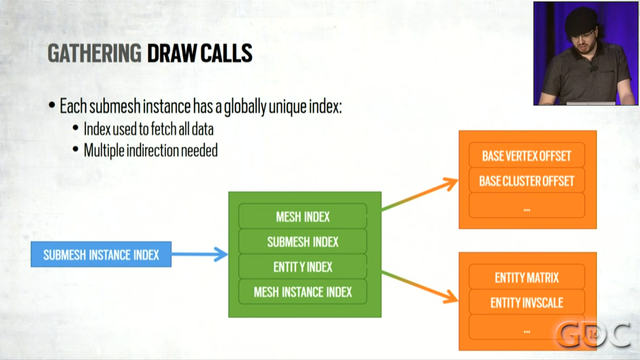
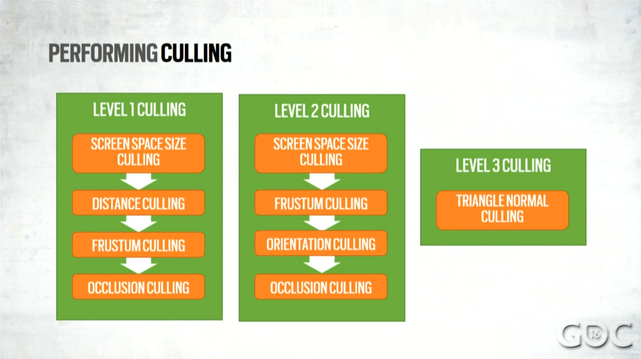
1. They try really really hard to reduce the number of draw calls they use. They do this in two ways: GPU-based culling (which seemed fairly standard to me), and by merging resources. For example, they have a single vertex buffer for the entire map.

1/6

Rendering 'Rainbow Six | Siege'

Rainbow Six | Siege is based on the first iteration of a new current gen only rendering engine. With massively and procedurally destructible levels, it was important to invest in techniques that allow for better scaling on both CPU and GPU. This...

By merging resources, they reduce the number of bind calls they need to make, which means adjacent draw calls can be coalesced into a single one. This requires their shaders to have more memory indirections in them.

Their culling seemed fairly straighforward to me: they cluster their triangles at authoring time, and then use hierarchical depth to do depth culling, and also do per-triangle orientation culling, etc.

2/6

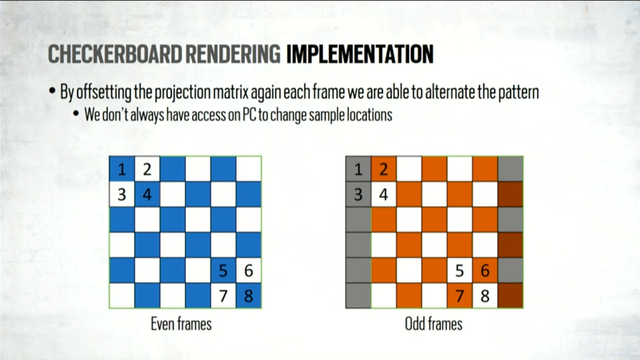
2. Checkerboard rendering. I'm familiar with the general technique, but not the details, so I appreciated the description here. You render at half axis res, but with 2x MSAA, and enable sample shading, which means the fragment shader runs once for each square in a checkerboard pattern. You flip the black/white squares each frame.

So now we need a way to fill in the holes. You could naively use whatever the last frame produced, but that will often lead to artifacts.

3/6

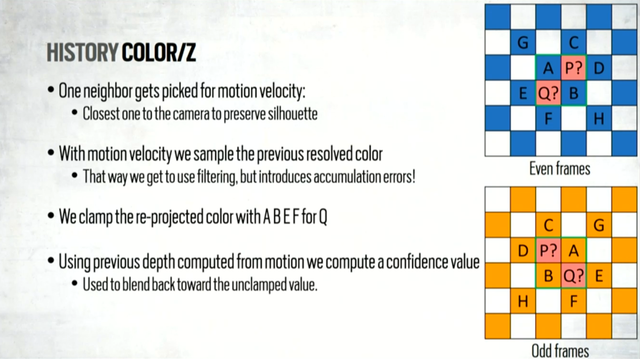
Instead, you want to do it like TAA does: blend between spatial data and temporal data. For the spatial data, just blend the 4 direct neighbors of each hole. For the temporal data, just use whatever is in the full-res buffer you presented last frame.

The trick is computing the blend weight between them. Temporal data is more stable, but can lead to ghosting with disocclusion. So, they detect disocclusion by using 3D motion vectors.

4/6

For each hole, pick the neighbor with the closest depth value, then reproject that pixel to the previous frame, and compare that depth value with the real depth value from the previous frame. If they're different, that indicates disocclusion happened. This gives you a confidence you can use to weight the temporal data and the spatial data.

It sounded like they also had a bunch of heuristics they added in too - they said they fussed with it for months to get it to look good.

5/6

Review: 6/10 The content was good, but it lost a point because the presentation itself was difficult to follow and not very polished. The presenter said "um" like a million times. I would have preferred a more focused, polished presentation.