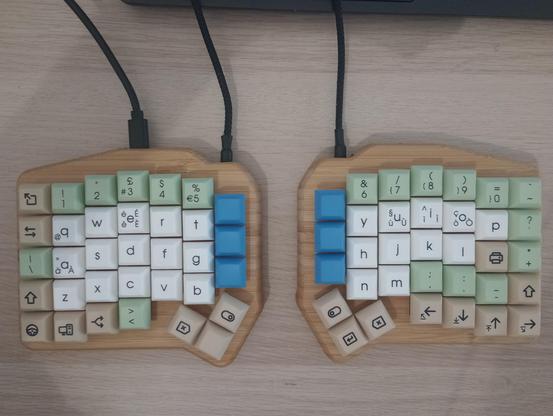
I've just updated my #MechanicalKeyboard's Japanese #KanaInput layer to #NaginataStyle v17 (#薙刀式) https://oookaworks.seesaa.net/article/519707171.html

Recently in https://oookaworks.seesaa.net/article/519836919.html the author Toshihiko Ōoka (#大岡俊彦) estimated there are a few thousand users. I'm an outlier... 🤣🏴󠁧󠁢󠁳󠁣󠁴󠁿⌨️🇯🇵

See https://astrobeano.blogspot.com/2025/08/naginata-style-for-typing-in-japanese.html for my explanation in English (of v16). Four rarer kana swap places in v17, released in January.

This is timely as I've found an online typing site where I can actually start to practice touch typing in kana mode (albeit with some major caveats).
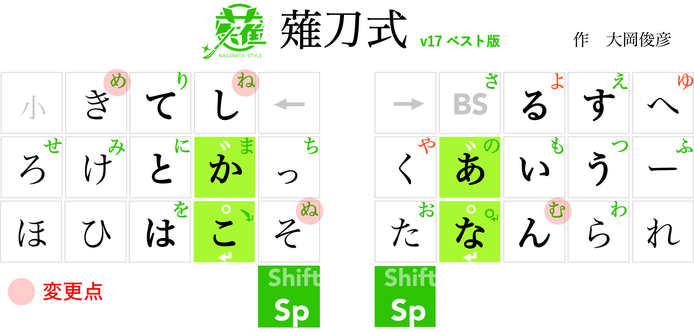
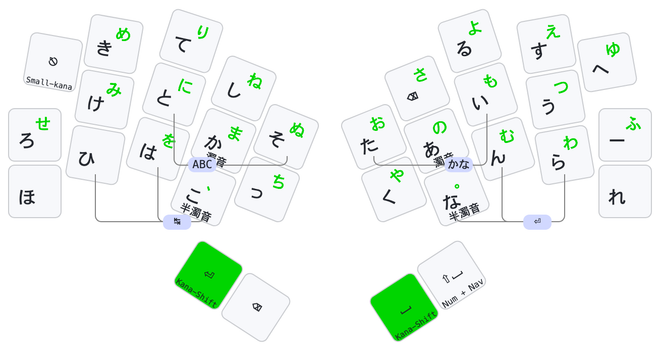
See https://astrobeano.blogspot.com/2026/03/naginata-style-update.html for my blog post about updating my #MechanicalKeyboard for #KanaInput using #NaginataStyle #薙刀式 v17, minor adjustments for less keys.
@pjacock
I have to read the details.
Seems interesting.
Does it imply Japanese layout or IME on PCs?
@AAMfP yes, still would use IME as usual. The QMK and ZMK programmable keyboard versions of Naginata Style send the romaji letters. The Karabiner Elements implementation runs on a Mac and translates the Qwerty keys into romaji. You could also imitate the JIS keyboard layout (Q does た etc).
@pjacock
Got it.
Unfortunately it uses the Unicode and, being on Windows I prefer to not need installing external things.
Maybe I can adapt it by using Windows Alt+code macros...
It seems a very nice layout!
Thanks.
@AAMfP the Unicode stuff is only for a handful of symbols on the extra layers (and is a faff on macOS) - I don’t use that. All the core kana just work. And on Linux/Windows using alt-codes should just work for the Unicode?

@pjacock
Cool, interesting!
Might work, then. I have to check.
Consider that, at the moment, I'm using the simplest json format (see https://marcoxbresciani.codeberg.page/other/keymap.json for QMK and https://marcoxbresciani.codeberg.page/keyboards/ergodash/current.html even simpler than described, now) to describe my layout and I'm no more used to C and haven't yet properly studied QMK or ZMK details enough...

Have to study and work on it: I like this layout!

@AAMfP I found https://github.com/eswai/zmk-naginata very easy (but I already had plain ZMK working; current advice is target #ZMK v0.3, main branch still in flux).

On the other hand, there is https://github.com/eswai/qmk_userspace which I think I got to work months ago - but the details are not fresh in my mind. The whole #QMK user space upheaval was still settling.

I focused on ZMK as I was doing my first Bluetooth keyboard.

GitHub - eswai/zmk-naginata: ZMK 薙刀式

ZMK 薙刀式. Contribute to eswai/zmk-naginata development by creating an account on GitHub.

GitHub
@pjacock
Nice. Thanks again.
I'm now with an ErgoDash with QMK (68 keys) but my 10yo kid wants it, therefore I'll probably move to the Piantor Pro BT (42 keys), so ZMK.
I have to study a lot!
@AAMfP Rather than giving up mine, I made our eldest their own #MechanicalKeyboard - the spacing dictated by the keycaps is still a bit too big though... https://codeberg.org/peterjc/pico-keyboards/src/branch/main/slump52 https://astrobeano.blogspot.com/2025/12/fourth-keyboard-slump52-with-numpad.html
pico-keyboards

My mechanical keyboard designs

Codeberg.org
@pjacock
Nice one!
I actually prefer full split things.
And giving mine to the kid, allows me to buy a lower profile one. 😇 I need something smaller.