 RmDebArc_5
Seriously, just stop (or use Linux)
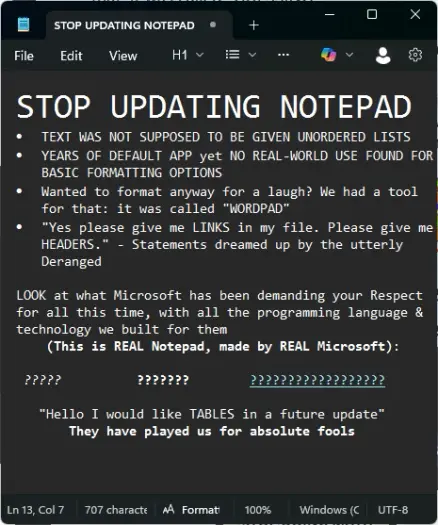
That makes no sense even if you ignore the fact that Copilot can be easily disabled in Notepad, and it doesn’t directly load with the app (as in: doesn’t slow down startup or anything like that).
Notepad works just as it always had, it just has dark theme, tabs, sessions, and a Markdown viewer now.
Don’t take this as an attack against yourself, but holy shit, where are you getting your news from? Do people seriously believe that everything is AI in Windows now?
Recall is not yet live (it’s available as a preview feature), you have to enable it manually, and even then you can disable it easily.
Copilot barely does anything. They’re basically shoving the button wherever they can to goad people into using it, but that’s mostly it.
“Purging” the OS from “AI-related crap” would purge it from AI-related crap and not break anything (source: did this on my previous work laptop)
Also, “can be easily turned off” implies something that comes enabled by default
It’s a button. If you click the button, a Copilot interface loads with the file you’re editing pre-loaded as context. Unless you click it, it does nothing other than taking up space. You can disable the button from the Settings.
I agree about all the opt-out/opt-in stuff, but also understand why a company catering to 80% of the market defaults to opt-out - users are dumb, they have no clue how to explore features, so opt-in features remain forever disabled for 99% of them.
And then Apple does an update with an identical feature enabled by default, and everybody goes “damn, if only Microsoft think of this!”
I don’t understand what “crime” you mean.
@[email protected] @[email protected]
Don’t take this as an attackIt's okay, no offense taken.where are you getting your news from?Mostly from Lemmy, but also from Gizmodo.Do people seriously believe that everything is AI in Windows now?Tbf, it doesn't help the fact that corps are shoving AI into everything they can and can't. I'm far from being Anti-AI, but when we live in a world where everything is being AI-fied, I can totally understand the anti-AI fellows and their sentiment "Windows = AI".Recall is not yet live (it’s available as a preview feature), you have to enable it manually, and even then you can disable it easily.As far as I read, it's partially true. Not true, however, in cases when the PC was set up by someone other than you, e.g. in workplaces. If the company someone works to decides to enable Recall "to improve productivity", anything done by the employee will be seen, not just by the employer, but by Microsoft too, not to mention hackers who will love to get their hands at this golden goose of private data.They’re basically shoving the button wherever they can to goad people into using it, but that’s mostly itMostly from Lemmy
Yeah, Lemmy is weird, especially the tech-related communities for some reason. It’s like: “if it’s not Linux and FOSS, it’s literal cancer, unless it’s Microsoft’s, then it’s literal radioactive and aggressive cancer”.
I can totally understand the anti-AI fellows and their sentiment “Windows = AI”.
100% agreed. However, as with any other opinion, fundamentalism is bad, m’kay. I get why people are tired of AI (I’m in the same boat!) but there has to be rationality involved.
As far as I read, it’s partially true.
That’s just ordinary standard click-bait from a tech site. They themselves mention that the rollout will be “to beta users”, that means Insiders. Insider builds are very different from regular builds and many features are force-enabled in them.
Which makes sense: if you’re making the very conscious decision of signing up to Windows Insider, after going through the warnings about the nature of the program, you should know full well about what it comes with.
I was reinstalling my wife’s Windows recently and was asked if I want to enable Recall, with a very prominent “the feature is in preview” on the screen.
Not true, however, in cases when the PC was set up by someone other than you, e.g. in workplaces. If the company someone works to decides to enable Recall “to improve productivity”, anything done by the employee will be seen, not just by the employer, but by Microsoft too, not to mention hackers who will love to get their hands at this golden goose of private data.
Oof, there’s a bit to unpack here.
If it’s workplace, it’s not the employee’s device, it’s the workplace’s. Nothing the employee does is private, that’s the whole point of managed devices. Nobody ever looks at what the employee does (unless their manager is completely fucking insane), because nobody has the time for that, but in case of, say, litigation, or such, the data is there. Recall isn’t needed for that.
Microsoft has zero access to Recall data. It’s 100% local (hence the “Copilot+ PC” requirement - these are the PCs that have CPUs with an “NPU”, or “Neural Processing Unit”, allowing them to run LLMs locally without killing performance).
For hackers to get to this data, they’d need to break the network security measures, the account security measures, anti-virus security measures AND BitLocker. Which is to say: a hacker getting access to Recall is the least of a workplace’s worries, because it means they’re effectively wide open to the Internet.
There’s not much in Recall that you can’t extract from the browser’s cache. Many of these things are actually less useful, because even if you steal someone’s password by scraping Recall data (and that’s assuming something goes wrong and Recall doesn’t redact it), you won’t be able to sign in from a different device due to MFA. However, if you have such deep-level access to the device, you can, instead, steal the token used for logging in - that one usually already comes with the MFA token, so you can sign in anywhere.
Maybe. But the presence of the button, alongside the shortcuts for features “summarizing”, “auto-formatting text” and other AI-driven features, implies Copilot is a whole dependency on .dll/.exe related to Copilot, as well as potential unintended network comm with Microsoft servers.
Those features - to my knowledge - only work on the devices with the NPU, which is to say: they run locally. I haven’t really looked into it, though. Either way: they are fully optional and dormant until the user clicks them.
Whenever I hear about how “users are dumb”, I can’t help but wonder how the so-called “dumb users” are allowed and able to drive a half-tonne car at 120kph
Check any news source for the road accident numbers. You start to see a trend now?
or, even worse, (it doesn’t even need a license) voting (allowed responsibility over everyone’s lives)!
Did you not notice who won in the US last year?
Maybe it’s because iThings aren’t socially pushed as Microsoft things are
How do you mean? The only difference I can think of is that Apple users are generally more enthusiastic towards Apple products than MS users. That being said, we’ve seen countless times that whatever Apple does is called “revolutionary”, whereas when MS does, people don’t care. First touch-screen phones: Microsoft. Best digital assistant: Microsoft. Best optimised mobile OS: Microsoft. Etc., etc.
And we’ve already seen that recently with Recall - Microsoft announced it, and people lost their shit, talking about how dangerous that is, how security is 100% compromised right now, and how everybody has to switch to MacOS or Linux.
Then, two weeks later, Apple announced it’s identical but less secure version of Recall, and there was nothing overtly negative in the media about it. Some sceptical articles here and there.
Non-consensual relationship. Harassment. In this case, it’s software harassment disguised as dark patterns such as opt-off when it should be opt-in.
That’s, unfortunately, not how it works. I agree that dark patters suck and people who use them should be banned from making any executive decisions regarding software ever, but most of the time when people are complaining about dark patterns these days, it’s completely benign shit.
Like, come on, a button showing up with a new feature is now a “dark pattern”? Let’s be real here.
not just local files
if you click a link to file:///123.45.67.89:69420/files-download/virus.exe it will download and run virus.exe
it still works, but now there is a “Dangerous Link Location: This is not a web link and may lead to the execution of malicious code” warning, but previously it would silently run the file.
If you use the formatting bar to format text, it unlocks the View→Markdown menu which has two options - Markdown or Syntax. This allows you to toggle seeing the source or formatted markdown.
If you do not use the formatting bar to format text, markdown is not enabled. I manually typed in text in markdown format and the menu didn’t un-grey.
You can go into the app settings and turn off formatting, which will hide the formatting toolbar.
I think you really have to work hard to be offended by this.
the point and strength of notepad was that it opened immediately, no bullshit, you can write text and that’s all.
I suspect that’s not the case anymore.
Notepad, the app I literally only ever use accidentally, or to edit a PC’s hosts file… Ah yes, this definitely needs CoPilot and markdown formatting.
All it needed was a dark mode to match modern Windows light/dark theming, done.
The additional shit (markdown, CoPilot?!) is just noise, intrusions, and vulnerabilities.
Well it’s a 23y old application that had one issue where the dev’s machine got infected, and it was handled ~instantly.
What’s the actual problem here?
This isn’t the first time that application has had problems either, the CIA hacked it because it was loading unsigned DLLs: notepad-plus-plus.org/…/v733-fix-cia-hacking-npp-…
To be fair it’s one of the most popular text editors so it’s not surprising nation states would target them, and it’s hard to block someone with those kinds of resources.
So… they removed Wordpad to push people into using Word… and now they removed Notepad to push people into… this monstrosity? Why does Notepad support hyperlinks now?
Back when I used Notepad, it was to strip out rich text formatting and reliably get consistently distinct text, especially if I configured it to use a monospace font. Now I have to worry about embedded hyperlinks sending me to God-knows-where?
edit.exe or edit.cmd somewhere inside C:\WINDOWS\system32? Would make an interesting replacement to the enshittified "Not-e-pad". But, then, I haven't used Windows since Windows 10 was still a novelty (and what definitely pushed me to Linux... Arch Linux btw), so maybe I'm very old ("I'm old, Dean, very old") to recall of a MS-DOS relic.Wasn’t there a version of ed in DOS at one point? Or am I mis remembering?
That could still lurk somewhere in windows’ maze of directories somewhere…
A 64-bit version of edit seems to be in the works. You can cli install it for now, but MS is promising to include it eventually.
ed is a GNU editor which allows for composing and editing files in a REPL-like environment (whose specific commands, apart from "q" to quit, I'm yet to learn)Maybe it’s edit I’m remembering. It was a long time ago, and I stopped using windows seriously around 3.11, so I never paid much attention to what was on that partition. It was only there to run steam (and a few other games).
I suppose I should have switched to a console, but it never even occurred to me at the time.
Notepad is still fine. You can disable markdown and the AI stuff.
I use Macs at home, but use Windows 11 at work. I actually use a combination of Notepad and Sticky Notes daily (well, not on the weekends). It’s fine.
One thing I want it to do is stop telling me a file is not saved if I change something and then change it back. The unsaved indicator (the dot) annoys me.
 REDACTED
 Axolotl
 Dæmon S.
 Alaknár
 apftwb
 Malix
Malix First_Thunder
 thethunderwolf
 Martineski
 🌞 Alexander Daychilde 🌞
 kuneho
 FuglyDuck
 Carighan Maconar
 RedSnt 🧩♂️👓🖥️
 lumpenproletariat
 hoshikarakitaridia
 baltakatei
 TrickDacy
 AnUnusualRelic
 CerebralHawks