It annoys me to no end that #MicrosoftOutlook for #macOS doesn't delete draft messages (or ask you whether you want to delete them) when you close an editing window.
Today I decided to see what I could do about this, and discovered that there is a "Discard" command on the "Draft" menu.
I'd really love for there to be a key binding, and indeed, there is one, but… I couldn't figure out what key it's telling me to press.
(Spoiler alert: it's the ESC key, but there's a story.)
(1/n)
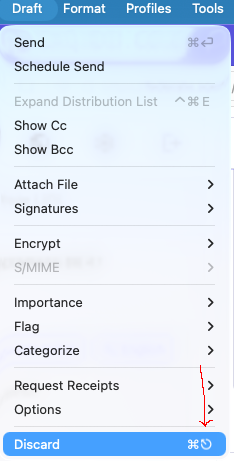
I decided to ask heypi.com (the only LLM I am wiling to use, and I use it as rarely as possible) about this symbol to see what it would say. I asked:
"I am looking at a menu on my Mac which shows a keybinding to a key I don't recognize. The symbol for this key appears to be a circle with an arrow pointing northwest outward from the center of the circle. Do you have any idea what key that is supposed to represent?"
(2/n)
It responded by claiming that I had described the command key (⌘). Go back and look at my description and I'm sure you'll agree that the symbol I described is nothing like the command symbol. A very bad answer from Pi!
So I told it that: "No, what I described absolutely isn't the command key symbol."
(3/n)
It responded by claiming I was referring to the symbol for the Enter key. Yikes!
I replied: "No, it's not the Enter symbol, and now you're giving me dangerous info. The menu command I'm looking at is the one for discarding a draft message without sending at. Its key binding is the command key plus the symbol I described. If I listened to you and believed it was the Enter or Return symbol then by hitting that key combination I would actually SEND the message rather than discarding it."
(4/n)
It replied with four more answers, the first three of which were wrong (one of which, the eject symbol, comically so), and then finally said, "Hold on—there's a chance you're seeing the 'Escape' (⎋) symbol."
I'm both impressed that it eventually got it right and impressed by how badly it repeatedly got it wrong first.
These LLMs have no intelligence, folks, they're just fancy autocomplete.
(5/5)
P.S. With so many keys on Mac keyboards having symbols printed on them, why the heck doesn't the ESC key have the ⎋ symbol printed on it in addition to the label "ESC"?
@jik I had absolutely no idea that was the escape key.
So hopefully, I can remember this long enough for it to be useful to me

@jik

"Happy shift time, hapless human.

Check the box next to the name of your chosen auto-complete persona for today and your value will start being extracted."

John Solly (former DOGE)
0%
TechBro Melange 💩
0%
SARS-CoV-2
0%
Masked ICE agent (in murder-mode)
0%
Poll ended at .
@jik I wonder how well an image search would have worked.
@jik Side complaint, I’ve always hated that shortcut. I’ve sent many a half-finished email by doing things like trying to hit enter, then command-something else …
@kmck isn't there a confirmation pop-up when you hit Command Enter, unless you've disabled the pop-up?
@jik I don’t remember seeing one… thankfully I’m not on outlook anymore