
There’s a tool I use to generate depth maps (grayscale images that denote depth using white as “no depth” and black as “as deep as it goes” and breaking up the layers in between into the number of grays the image uses) from STLs (meshes for, generally, 3D printing) so we can take our prototype 3D printed molds and reproduce them in aluminum using our fiber lasers (in theory, when everything is working correctly).

It’s a single web page, in which is some javascript that does the actual generation of the depth map, completely offline in your browser. It is super simple and it does the thing, so that’s what I’ve used since I found it.

But.
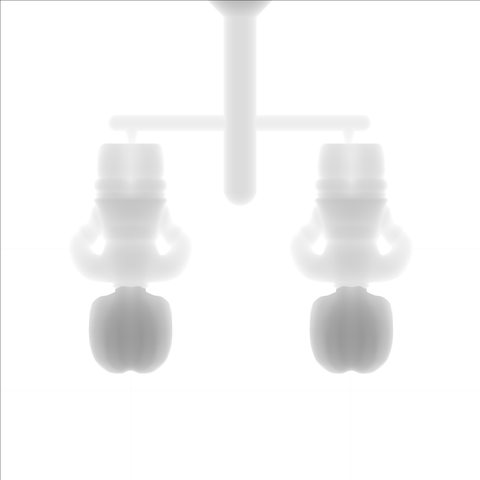
But it does this thing.

It adds a one pixel black line across the top and a one pixel black line down the left side of every PNG output it produces for me.

Like so:

That black line across the top and down the side?

That’s a graphical representation of an off-by-one error, folks.

I haven’t even looked at the code - I should, I should just fix it - but I will eat an injection molded toy of my choosing if it’s not.

To me, it smells like initializing a two dimensional array to hold the output pixels and then not starting at pixels[0][0] but instead pixels[1][1] and, well, if the initialization is 0 and that represents black, you get those nice lines added to your images.

The tool is here: https://fenrus75.github.io/FenrusCNCtools/javascript/stl2png.html

If someone wants to send a PR with a fix before I get around to thinking about finding my github credentials that’d be nifty.

It’s a great tool, and now hopefully in more than one way, because debugging via thinking about what you’re seeing is a skill that gets lost sometimes, especially these days it seems.

STL2PNG - javascript edition

Plus it made me smile to see such a concrete example of such an oft-referred-to issue.