
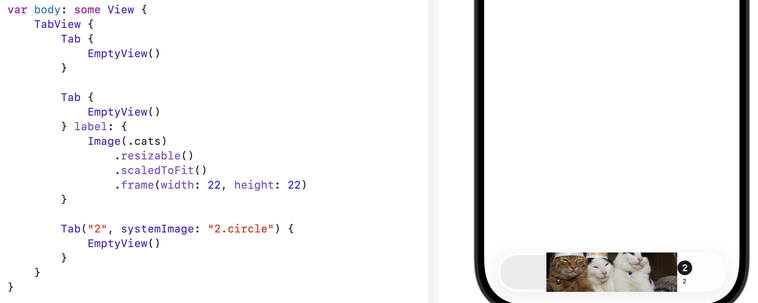
Any #SwiftUI expert out there who could help me get images in a TabView to work? No matter what I do, the image takes almost the entire width and height.
#iOSDev

@Typ0genius I think you'll have to scale it through UIImage/UIGraphicsImageRenderer and then use Image(uiImage:), because the tab view seems to be ignoring the view aspects around the image and just digging it out. Fascinating!
@tewha Thank. Yes I already found a UIKit solution for that, but I would prefer a SwiftUI solution as this will be for https://exploreswiftui.com
Explore SwiftUI - Visual Library for SwiftUI Components

Discover SwiftUI components and modifiers through visual examples with ready-to-use code samples. Copy, paste, and ship.

Explore SwiftUI
@Typ0genius I had a similar problem with images inside menus, I ended up just scaling the source image (in my case mostly SVGs, so edited the width/height fields in those files to something like 25x25)
@technicat Thanks for the recommendation. As this will be for https://exploreswiftui.com, I try to make it as universal/easy to use as possible and prefer to figure out those edge cases so that others don't have to.
Explore SwiftUI - Visual Library for SwiftUI Components

Discover SwiftUI components and modifiers through visual examples with ready-to-use code samples. Copy, paste, and ship.

Explore SwiftUI