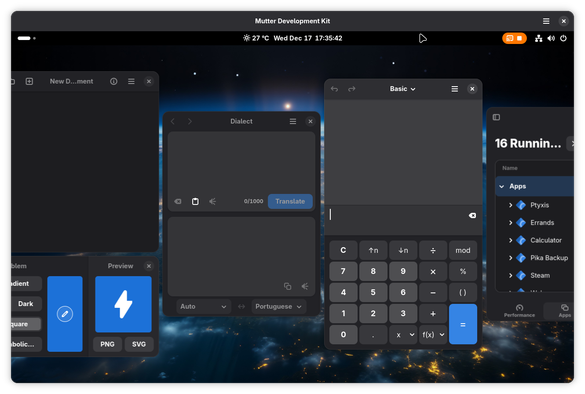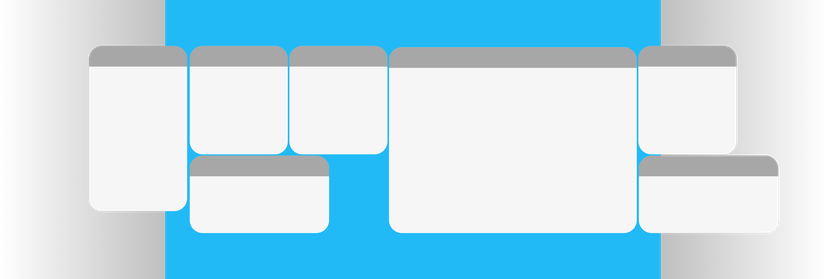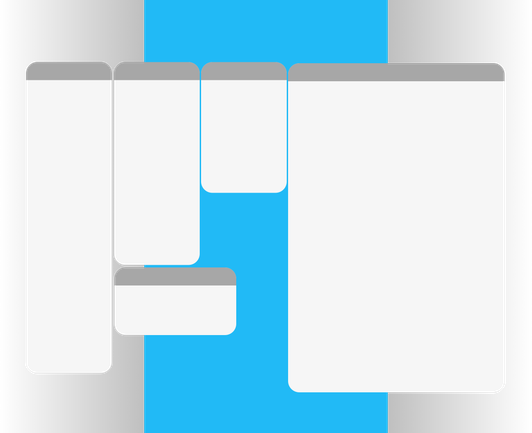
I tried everything: spiral packing, radial growth, bin packing... Each one promised to be "the definitive." The radial looked nice but had gaps. The spiral got stuck on edge cases. The bin packing ignored aspect ratios.

In the end, I went back to basics: horizontal rows with smart distribution. Windows arrange themselves in lines, respecting their original sizes. Simple, predictable, and it works.

Sometimes the elegant solution is the one that doesn't try to be brilliant. 🧘

Guys, MosaicWM is becoming more and more stable, so I would like to start having people testing it.

https://github.com/CleoMenezesJr/MosaicWM

#GNOME

I have an issue reported by several users that, after the discussion in this thread¹, made me rethink how the Mosaic WM should behave:

#GNOME workflow is based on workspaces, and the most practical approach — as most people do — is one task per workspace.

+++

¹ https://github.com/CleoMenezesJr/MosaicWM/issues/7

also: https://github.com/CleoMenezesJr/MosaicWM/issues/13#issue-3713014865

Unexpected overflows to new workspaces · Issue #7 · CleoMenezesJr/MosaicWM

Current behavior I already have one window open. When I open another window, it sometimes opens on a new workspace and sometimes not. This is quite confusing. Expected behavior It opens on the same...

GitHub
But that workflow quickly breaks: depending on the size of a newly opened window, the workspace may overflow and create more workspaces. To mitigate this I implemented: check the next workspace for available space; if it fits, use it; otherwise create a new workspace.
My first idea to improve this: instead of checking only the next workspace, check the subsequent workspaces; and instead of creating a new workspace adjacent to the current one, create it at the end. I did consider a downside: someone might open a casual window and it would end up far away. I solved this by remembering the last visited workspace before moving to the new one — so when that casual window is closed n the workspace becomes empty, we return automatically to the last visited workspace
Now the main problem: people use tiling/window managers that auto-organize windows so they don’t have to spend time arranging them. I feel these goals can conflict:
- If I organize my workspaces by task, how should overflow be handled when it creates additional workspaces?
- If a user knows which workspace they’re in and opens an app, should windows auto-resize to fit the workspace and only create overflow if there’s truly no room?
- If we resize windows when another is opened, how should we arrange them? Should larger windows shrink enough for the smaller one to fit?
+

- When an overflow occurs, should a new workspace be created at the end or adjacent to the affected workspace?

These are just the initial questions.

I heard "smart resize"?

The original idea for mosaic windows was that each window would open at its "ideal size," but that will take time to implement. Meanwhile, I propose a different approach to make tiling useful right away.

#GNOME's workflow encourages one workspace per task. I organize mine like this:

1. Terminal / Neovim
2. Browser
3. Messaging apps
4. Casual apps

+++

A simple change that when they reported it I couldn't unsee and had to rush to fix 🤣:

Layout of the mosaic in the overview. 🪟🫣

#GNOME #TheMosaicSaga

Some animations for moving windows between workspaces.

#GNOME #TheMosicSaga

Speedrun any%: get more commits than stars. 🤣🤣

Something from the original mockup I always wanted: windows sliding in from outside, "pushing" the existing mosaic, making the bouncy animation feel natural!

Thanks to @jadahl for pointing me to configure + first-frame signals. Now windows moved between workspaces slide in from their origin direction with momentum. Feels so much more physical! 🎯

#GNOME #TheMosaicSaga

These past few days, if you've been following Mosaic WM, you might have noticed... nothing visually new. No flashy features. No dramatic UI changes. And that's exactly the point.

Sometimes the most impactful work is invisible. I've been deep in what I like to call "refinement mode" (replacing polling) loops with event-driven signals, implementing coordinated pause mechanisms between competing systems, fixing race conditions that only appeared under specific timing conditions.

[1/6]

#GNOME

None of this shows up in screenshots. But you'll feel it. Lower CPU usage. Smoother animations. Fewer edge cases where things just... don't work right.

Early versions of Mosaic were functional but had rough edges. And that was okay! Seeing something work, even imperfectly, generates motivation. It's proof that the idea has merit. You can show people. You can get feedback. You can iterate.

[2/6]

#GNOME

If I had waited until every edge case was handled before show it, this project might never have seen the light of day. Perfectionism is the enemy of progress.

Still About Fun! With all this technical talk, it's easy to forget: the goal is still to have fun.

[3/6]

#GNOME

Mosaic WM exists because I wanted a tiling experience that felt native to GNOME. Something that doesn't fight the desktop, but enhances it. Every optimization, every bug fix, every architectural improvement serves that goal: making window management disappear so you can focus on what matters.

[4/6]

#GNOME

I'm genuinely happy about the people who have found this project. Keeping things low-profile was intentional (and it paid off). The contributors who showed up weren't just trying and moving on. They were testing, reporting, discussing. Quality feedback from people who actually care.

Every bug report that starts with "I noticed this edge case..." or "What if we tried..." is a gift. It means someone spent time understanding the project deeply enough to contribute meaningfully.

[5/6]

#GNOME

Thank you. Seriously.

What's Next? The foundation is solid now. The performance is respectable. With this groundwork, adding new features becomes safer and faster.

But for now? I'm enjoying the process. Building something useful, learning along the way, and sharing it with people who appreciate thoughtful software.

That's the whole point, isn't it?

[6/6]

#GNOME

Playing around with an idea. 👀

That's been a nightmare.

Working with virtual canva along with mutter's limitation of not being able to position windows out of sight has been very difficult to the point of even discouraging the idea.

I first started trying to use the same approach as PaperWM which is to clone the windows, but dealing with multiple hidden Windows / clones was just terrible.

Now I'm using an approach where I use a virtual layout and position the windows at the coordinates of that canva and literally crop the windows to appear or not appear on the screen. That's the idea I've been pushing the furthest.

Most of us still use FHD monitors. Mosaic windows are a great idea, but the original approach was designed with larger screens in mind.

[1/5]

It works well on those, but in daily use I and other testers ran into the same issue: windows more often don’t fit into the mosaic layout than the other way around, so we end up creating dozens of workspaces.

I tried a smart-resize approach, which, modest claim, worked well initially by reducing the number of overflows. Still, on smaller-resolution screens the available space becomes cramped and windows feel "squashed."

[2/5]

The goal is to reduce friction between the user and window organization and to encourage the "one task = one workspace" habit: open the windows and start working without anything getting in the way.

[3/5]

So here is Plan C: make the workspace a canvas that effectively doubles the available workspace and lets you scroll through windows. If windows fit in the viewport, nothing changes, but when you open more windows, instead of overflowing we expand the virtual space. Only after you reach that virtual limit does overflow occur.

[4/5]

#GNOME

This idea is based on this mockup (https://github.com/CleoMenezesJr/MosaicWM/issues/35), which I tested and adjusted where real use revealed problems.

[5/5]

#GNOME

I don't have any commits for this yet, but progress has been very slow. I'm not just implementing ideas, which has been quite difficult as noted in the toots above; I'm also testing them in my daily workflow to make sure they actually work.
I noticed people only really interact with toots that include images or videos. At least this documents the whole process so later nobody can say it was easy. Hahaha
When I have something more concrete I will open the idea for testing. So remember: this is not a final proposal, just another way to try to solve a problem.

I'm stuck and it's already starting to stop being fun.

Working without direction is discouraging, and every time I try new ideas, I always run into another big problem.

You can now enable or disable mosaic tiling on a per-workspace basis!

- Toggle mosaic directly from the Quick Settings
- Disable tiling on specific workspaces while keeping it active on others
- The top bar indicator reflects the current workspace's state (on/off)

#GNOME

🍿 I added a workspace switcher popup to visually notify when an automatic workspace change occurs, such as when a window does not fit in the workspace due to overflow or when the last window of a workspace is closed.

#GNOME

What a huge refactor!

The secret is just starting! In Mosaic WM, I began with polling for everything, it wasn’t "perfect," but seeing it work kept me going. 🚀

I just refactored everything to GObject and deterministic signals. The code is now sleek, but I’m glad I didn’t wait for perfection. Build first, optimize later. Growth is the best motivator! 🛠️✨

Maintaining Mosaic WM and my other open source projects has become a real part-time job. If you enjoy my work on Linux/GNOME stuffs and can chip in, please consider becoming a sponsor! 🧱✨

🔗 https://github.com/sponsors/CleoMenezesJr

#GNOME

I implemented a sequential evaluation queue for Mosaic WM, effectively resolving race conditions that arise with rapid spawning of windows.

Now, windows wait for the positioning of the previous one before the next evaluation, ensuring balanced layouts. Additionally, dynamic scaling of safety timeouts has been introduced, preventing premature rejections under heavy load.

P.S.: Ignore any glitches from the screencast. 🫣

#GNOME

Rewrote the drag reorder system from scratch.

Previously, every cursor movement during a drag ran a full layout simulation to check if the swap was valid🤢, double the computation, and rejected positions stayed locked for the entire drag session. Now, all valid layouts are pre-computed when the drag starts. While dragging, the cursor just looks up ready-made positions.

#GNOME

@CleoMenezesJr Descobri seu projeto hoje. Louco para chegar em casa e testar. Você está de parabéns! Só vendo as capturas de telas já acho que talvez seja a melhor extensão para Gnome!
@raphagm valeu demais! espero que goste. Quando testar me avise o que achou! o/
@CleoMenezesJr Instalado. Tirando alguns glitchs eventuais tô achando ótimo. A única coisa que me incomada um pouco (mas aí é questão de gosto mesmo) é o bounce das janelas quando ele monta o mosaico. Você pensa em implementar algum tipo de controle para animações, no futuro? Excelente trabalho ;) Espero muito que você continue com o desenvolvimento!