RE: https://tooting.ch/@oscherler/116220880751078685

The core challenge here is actually that 1Password doesn't integrate natively into the passkey ecosystem, causing these unfortunate experiences.

Highly recommend you reach out to 1P as a customer and express these frustrations. It's been over 2 years and they still haven't shipped native support.

@timcappalli At your saying that it’s 1Password that’s forcing Safari’s passkey dialogue to appear, even though the feature is turned off in Safari? How is that even possible?

I’m not gonna let them off the hook is that’s the case.

@oscherler that isn't a Safari dialog, it is the macOS passkey UI, which always appears.

1Password is hijacking your browser session to show their in browser extension UI, which interrupts the macOS UI.

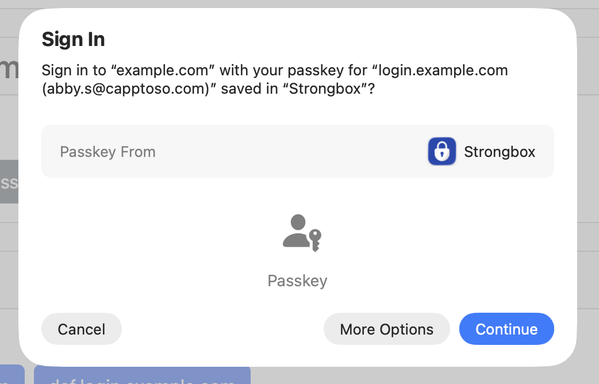
When 1Password integrates correctly, you'll see the 1Password in the macOS UI.

Here's an example with another credential manager (Strongbox in this case, instead of 1Password).

@timcappalli I turned passkeys off in system settings, and I don’t have a passkey for this site saved
in Mac OS passwords.
@oscherler You're not being offered anything in Apple Passwords, as it is disabled.
@timcappalli Yet the damn UI still shows up.

@oscherler the UI is the macOS passkey UI, which is used for all passkey experiences.

You disabled Apple Passwords, not the OS passkey framework (which can't be disabled as it is a core component for how passkeys are used).

As I mentioned, 1Password has a path to do this correctly (as shown with Strongbox).

@timcappalli So if I didn’t have a password manager and didn’t want to use passkeys, the UI would still show up?

I guess that’s what people mean when they say they’re getting passkeys forced down their throat.

@timcappalli The sad thing is that I’m a proponent of passkeys. But this experience is tending to alienate me. And that’s not all 1Password’s fault.
@oscherler in this case, it is unfortunately 1Password's fault.