Ok, this is a dangerous question, but I still have to ask. For all you fellow #Linux users I'm looking to replace my console text editor. I am not and will not be an emacs user and I'm not a fan of vi/vim. I used nano, but really disliked it. I really enjoy tilde for the most part (though I do wish it didn't actually take over mouse selection to such an extent that I can't copy/paste from outside the terminal in a GUI) but tilde seems to be dead. The dev seems to be MIA and the packages no longer work. We can still manually build it (though it's not static and you can't move the source files after building or it quits working) but I assume eventually that's going to stop working.

Is there an editor kind of modernish like tilde but, you know, not dead and not emacs-based and a TUI?

I was searching and ran across one that seems interesting. "chr" https://github.com/chr-editor/chr/

Very simple and minimal. It doesn't do some of the more advanced stuff I saw in some of the others and, very annoyingly, it's not saving its settings (so I have to manually create a configuration file) but it does actually have distro packages which makes me think it has more potential to not just die overnight. Probably. Maybe. 😆

Once I found the syntax for the configuration file to manually create it, it's fairly comfortable to use. (Biggest problem was I really had to change the default theme.)

Micro - Home

@rivercityrandom I guess I meant to say I'm looking for something that has like a basic TUI, less complex key-bindings, etc. Tilde has been (mostly) perfect for me really and if I have to I'll keep using it, just eventually it will surely stop working.

Looking at micro I think I'd still prefer nano if it came to that.

@nazokiyoubinbou yeah, I admit micro doesn't come with the classic Windows/DOS "CUA keybindings" by default. You may have to edit a json file to get them all the way you want them. If you're not bound to a terminal, the default text editors in GNOME and KDE are very Notepad-esque in their feature scope and ease of use.

@rivercityrandom Who said Windows/DOS? I can deal with other keybinds fine. It's appearance, functionality, etc I'm looking at.

The next closest thing I saw was jed, but the emacs stuff was too much. I kept getting stuck just trying to access stuff. (I will admit that emacs is something I will never get the hang of.)

Anyway, I'm looking specifically to replace the editor used in the console. Among GUI editors there are several I like. Almost too many options if anything.

@nazokiyoubinbou I also found this one while doing a quick Google search. The Dinky text editor looks like it has a TUI-style menu bar like tilde does, although since I'm currently at work and using Windows right now I can't vouch for its quality. I'll leave you alone now. https://github.com/sedwards2009/dinky/
GitHub - sedwards2009/dinky: A small but friendly, terminal based text editor

A small but friendly, terminal based text editor. Contribute to sedwards2009/dinky development by creating an account on GitHub.

GitHub

@rivercityrandom It looks potentially promising. I'm going to give that one a good look over.

Honestly I think I'd probably like it better than Tilde long term if it doesn't die out. One developer only, but they make pretty frequent releases.

EDIT: Built with zero issues. So far in trying it out I'm rather liking it. It's kind of pleasant.

@nazokiyoubinbou LibreOffice Writer? I use it everywhere and love it. Like Word but with no stupid Microsoft. https://www.libreoffice.org/download/download-libreoffice
Download LibreOffice | LibreOffice - Free and private office suite - Based on OpenOffice - Compatible with Microsoft

Download free office suite for Windows, macOS and Linux. Microsoft compatible, based on OpenOffice, and updated regularly.

@jake4480 What? No, that's not for a GUI and it's not a plain text editor... I use it for documents, but it's a billion times more complex than what we're talking about here and for the wrong environment besides.

I guess it wasn't clear from just TUI and the context of discussing emacs, vim, nano, tilde, etc? I'll add an edit.

Have you tried Lite-XL ?

https://lite-xl.com/

#lua #TextEditor
Lite XL

Lightweight and powerful code editor, available for Windows, Linux and macOS.

@matthew Sorry, I added an edit to clarify. I guess it wasn't clear from the context of talking about common terminal editors and talking about a TUI (though I feel like that one should have done it,) but I meant a console text editor.

I already have lots of GUI options that I like.

Micro - Home

@matthew I was looking more for something with a TUI type of setup like the aforementioned tilde.

So far I've found chr and dinky, both of which aren't exactly enjoying high renown, but chr has made it into the distro packages, so that's kind of a good sign I guess for it. I also saw Fresh which looked really really nice and I loved it, but "Claude" is their chief programmer now, so I expect it to break beyond hope in the near future. (Also I couldn't figure out how to switch it to handling tabs as tabs instead of replacing them with spaces, but I assume there is a setting hidden in there somewhere. Weird default behavior there...)

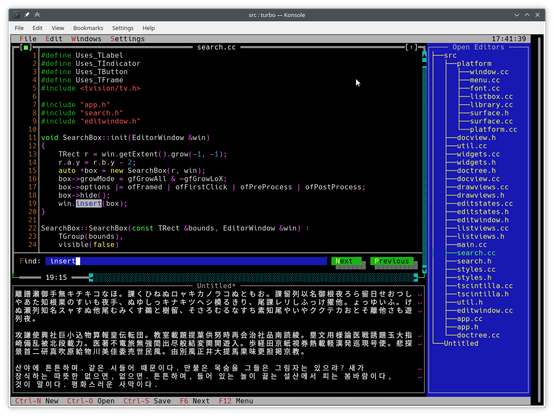
GitHub - magiblot/turbo: An experimental text editor based on Scintilla and Turbo Vision.

An experimental text editor based on Scintilla and Turbo Vision. - magiblot/turbo

GitHub

@canadaduane I sort of don't like that they kind of specifically desupport *nix (it explicitly states that *nix users must build it themselves but Windows binaries will be provided, which kind of makes it clear what their focus is.)

Still, I'll give it a look over. It's lacking a few basics like being able to actually remember settings though.

@nazokiyoubinbou I saw this recently, looks interesting: https://getfresh.dev/
Fresh - The Terminal Text Editor

Fresh is a fast, modern terminal text editor with intuitive keybindings, syntax highlighting, and instant startup.

@nivrig It looks really amazing. My first thought was that it was too good to be true. Then I looked at their github and saw that they allow direct submissions from Claude, so I guess it is too good to be true.    I may use it anyway for now, but I guess it has a future of being guaranteed to eventually break down and no one will know how to fix it without starting over at some point.

Darn. I really like it. Despite everything I may use it for now.

@nazokiyoubinbou Ugh, I hadn’t had a chance to look at it yet.

@nivrig It's actually really good as it stands right now. I imagine those submissions are relatively new. But I guess it's just a matter of time. I just backed up every file I could and may just never update until the day they reevaluate that decision. 😆 (Assuming I keep using it of course, but I honestly might for now.) Disable automatic update checks and it stops going online at all. (Nothing popping up with OpenSnitch so far.)

EDIT: Ran into a problem. It replaces tabs with the appropriate number of spaces. I get the impression it can be configured to treat tabs as tabs, but I can't find a setting for it anywhere...

What this means is things do not align when you use tabs. They're literally just spaces. (4 by default.)

Maybe I'll stick with tilde...

@nazokiyoubinbou You haven't given the faintest indication of *why* you dislike or like things so and suggestions are, at best, stabs in the dark. For example I could say “try Helix”, but you haven't said even whether you like or dislike modal editors or not.
@alerque Dude, I used up my character limit trying to explain as well as I could and you still criticize instead of just asking for clarity...