worked with the tcpdump folks on an updated set of examples for the tcpdump man page https://www.tcpdump.org/manpages/tcpdump.1.html#lbAF

the idea is that if you've forgotten how tcpdump's basic flags work, you can find a quick reference in the man page!

tcpdump(1) man page | TCPDUMP & LIBPCAP

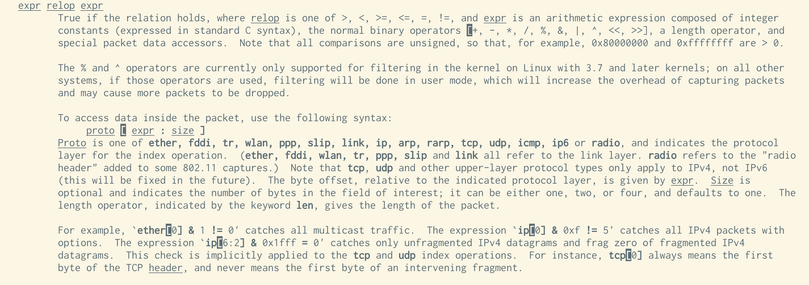
@b0rk or others, is there a page that explains a filter like this: tcp port 80 and (((ip[2:2] - ((ip[0]&0xf)<<2)) - ((tcp[12]&0xf0)>>2)) != 0)

I have no idea what is going on here. This is from the pcap filter man page. Why the masking and shifting and what is up with ip[2:2]? This part of tcpdump has remained a mystery to me for decades.

@choomba i have no idea, it's a mystery to me too. the only way i've ever managed to write filters like that is by copying and pasting them and it feels bad
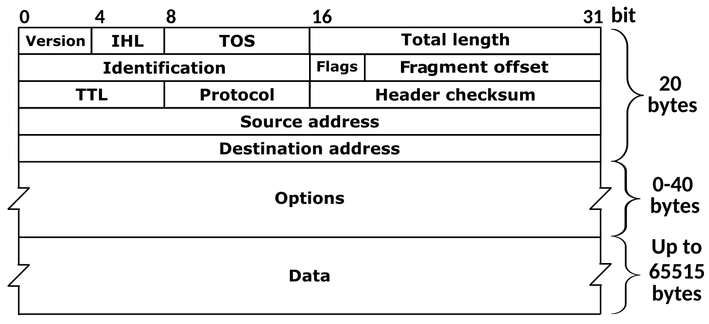
@choomba i think this is it? from the 'pcap-filter' man page. from the ipv4 header format it looks like ip[2:2] is bytes 3 and 4 of the ip packet, which are teh length
@b0rk Ah, that's something new, thanks! It does start to make sense. We get the total length of the IP packet, subtract the IP header length and then the TCP header length. Really clever. I haven't looked this deep into protocols since uni!
@choomba @b0rk When a filter is tough to understand, you can dump the filter with -d and step through the compiled packet-matching code to see what it does. See https://taosecurity.blogspot.com/2004/09/understanding-tcpdumps-d-option-have.html and https://taosecurity.blogspot.com/2004/12/understanding-tcpdumps-d-option-part-2.html
Understanding Tcpdump's -d Option

Richard Bejtlich's blog on digital security, strategic thought, and military history.

@taosecurity Thanks, but I don't think this will ever help me. Still cool that it exists, though.
Checking Wikipedia https://en.wikipedia.org/wiki/IPv4#Header and
https://en.wikipedia.org/wiki/Transmission_Control_Protocol

  • ip[2:2] is the size of the IP packet.
  • ((ip[0]&0xf)<<2)) is the size of the IP header
  • ((tcp[12]&0xf0)>>2) is the start of data in the tcp packets
So, this is filtering for tcp packets that have data (is, the TCP data offset is not equal to the end of the IP packet). This is a good example of inspecting packets directly, but definitely needs some additional explanation. Examples should probably not assume a fresh understanding of the protocol header structure.

CC: @[email protected]
IPv4 - Wikipedia

@ori @b0rk Small correction. The last one is the size of the TCP header, encoded in the high nibble of byte 12. I dove into this last night and finally understood it. It takes the full length of the IP packet (which wraps the TCP packet) and subtracts the IP and TCP header lengths. If the result is zero, we have a packet without data.