 Ra (Freyja) (it/its)𒀭𒈹𒍠𒊩
hey @GrapheneOS is there a way to request a Pixel 8 pro grapheneOS stock image with the tts integrated? I'm getting a pixel 8 pro next week and really want to try out GrapheneOS, is there a way to build one from source with that project integrated into it? I'm more than wiling to build the OS from source with my own keys and run my own update server
 GrapheneOS
@freya We plan to include our SpeechServices app providing text-to-speech in the OS very soon. We've had a lot of recent work caused by the release of Android 16 QPR2, upstream Chromium regressions, our Motorola partnership announcement and hiring multiple additional full time developers. Our TTS app was meant to be included in the OS already but has gotten delayed because a fair bit needs to be done to get it fully in shape for inclusion. It should be done within a week or two now.
@GrapheneOS oh fuck yes! I am excited!
@freya Our SpeechServices app is at https://github.com/GrapheneOS/SpeechServices if you want to build it and try it. It should work on another OS although we haven't been testing that. We have a bunch of improvements including performance enhancements making it a better experience which are pending and that's why it hasn't been included in the OS yet since the last round of changes before the initial release in the OS hasn't been completed yet. We could include it in our App Store prior to the OS though.
GitHub - GrapheneOS/SpeechServices: Fast, efficient, and high-quality text-to-speech for GrapheneOS using state-of-the-art models running completely on-device.
Fast, efficient, and high-quality text-to-speech for GrapheneOS using state-of-the-art models running completely on-device. - GrapheneOS/SpeechServices
@GrapheneOS oooo. I need to figure out the easiest and least fucky wayy to build that lol. android studio with a screenreader is what we in the industry call an unpleasant experience
 Peter Vágner
@GrapheneOS @freya Oh damn, it sounds fine. I've just built it and I can definatelly use it with a screen reader right away.
@pvagner @GrapheneOS can you send me a copy of the APK?
@freya I do have a debug build at the moment just to see it in action. I'd be interested to know what @GrapheneOS will say about it if it's ok for them to post a random build of their app here in this discussion.
@GrapheneOS I'm looking if I might be able to add support for different languages in the future. I see you've written a phonemizer doing the g2p as a part of the app. However training is done on a computer running your improved matcha TTS. While training what phonemizer were you using? Matcha's fork of Misaki or something else? I will be looking more into it, I'm also too excited about it right now.
@pvagner You'll need to talk to our developer soupslurpr on Matrix.
@GrapheneOS Oh yes, I see you also have forked Misaki and prepared graphemes_to_phonemes. I should read more and get to understand this platform.
@GrapheneOS are there any demos of what it sounds like in action?
 Andromxda 🇺🇦🇵🇸🇹🇼
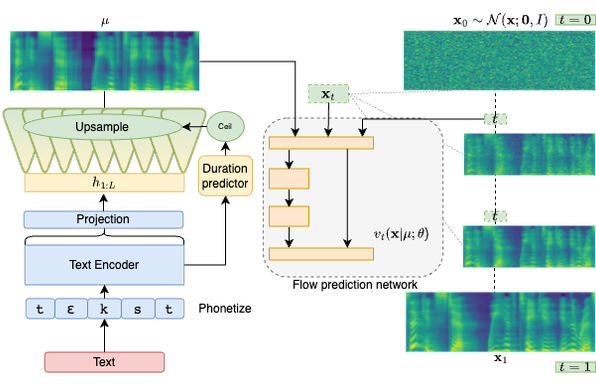
@freya Here's a demo for Matcha-TTS, which the GrapheneOS TTS feature is based on: https://shivammehta25.github.io/Matcha-TTS/
@freya We likely need to add Setup Wizard integration for enabling TalkBack too which we'll get to after the TTS app is bundled.
@GrapheneOS oh, that doesn't work automagically? actually no, wait, you don't need to integrate that into the setup wizard, just have the accessibility shortcut set to enable talkback when one holds down the volume buttons by default. global setting. done and done
 Henning
Didn't know #TalkBack was supported in GrapheneOS! It didnt speak via sherpatts though.
https://github.com/talkback-foss-team/talkback-foss
Google's talkback is open source, but requires some proprietary dependencies
@hen @freya Yes, GrapheneOS has a fork of the open source TalkBack integrated into the OS. It needs a high quality default enabled text-to-speech app not requiring downloading any voice data or configuring anything. We've made one and will be included it in the OS in the near future. It does work via Sherpa TTS but you need to do more than installing a TTS implementation. You need to set up the TTS to be functional if needed and activate it in the OS TTS settings even if it shows it selected.
@hen @freya Many of the open source TTS implementations don't come functional out-of-the-box but rather requiring downloading and enabling a voice for them to use. A user installed TTS always needs to be activated in the TTS settings since they receive sensitive data from other apps via an OS API and it would be unsafe for them to function by default. There's meant to be a high quality TTS included in the OS which doesn't require any setup which is why we built one and are including it soon.
@freya It's possible that this already works fine, we'll need to verify that.