 stoicmaverick
What's causing this?
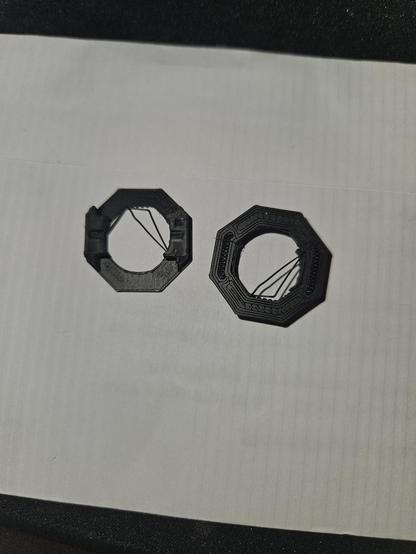
Those sections of extrusion are being pulled away from the print as the nozzle moves, because for whatever reason they are not adhering to the rest of the print properly.
Increase print temperature, reduce print speed, or reduce travel move speeds.
Also a sanity check, look at your slicer’s output preview and ensure nothing about that model is causing it to freak out and attempt to print in midair…
Nothing ever pulls off from an outer perimeter, it’s only inner perimeters of empty loops or holes.
Isn’t that obvious? Try making a circle of a certain size on a flat, empty table, by dragging a string. The circle will become smaller, than the target size because of the drag.
Now drag the string around a gluestick, it can’t be smaller than the gluestick’s circle because the gluestick is in the way.
 dual_sport_dork 🐧🗡️