 Simon B. Støvring
Yesterday evening I threw together a landing page for a side project to my other side projects:
It’s a tiny and opinionated tool for sending push notifications. No sign up. No message history. No dashboard.
I like it. Would you? 😄
Yesterday evening I threw together a landing page for a side project to my other side projects:
It’s a tiny and opinionated tool for sending push notifications. No sign up. No message history. No dashboard.
I like it. Would you? 😄
If I am to release brrr, then I’ll need to come up with a pricing strategy. Even if it’s a simple app, I’ll need to ensure that I cover my costs and ideally earn just a little. Choosing a strategy is difficult, though.
Current ideas include:
- First N pushes are free, then $X for 1,000 pushes.
- First month is free, then $X/year.
- One device is free. $X/year for multiple devices.
A tip jar and one-time purchase seem risky for an app with hosting costs.
When people try to send pushes without an active subscription, I could just return an error, but I feel like I should also do something more fun.
Like, I could send a push saying people need to start a subscription or scramble the text in the notification.
But I fear that any such notification might be sufficient for some users to deduce why they would have otherwise received the notification 😄
Do you want to help me test brrr? 👇
https://testflight.apple.com/join/55qZ7dRn
Learn more about the project on https://brrr.now
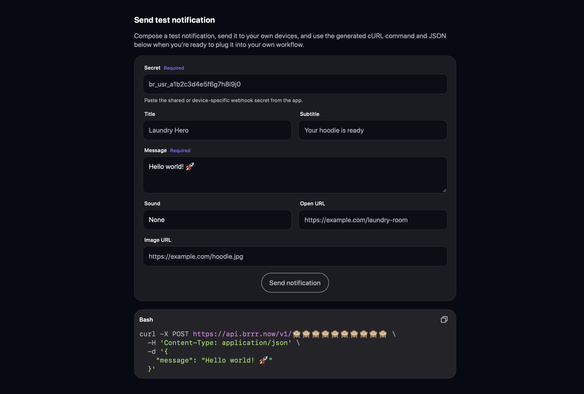
brrr’s site has a little notification composer now. You can use it to send notifications to yourself.
It also shows the JSON and the cURL command that can be used to send the notification.

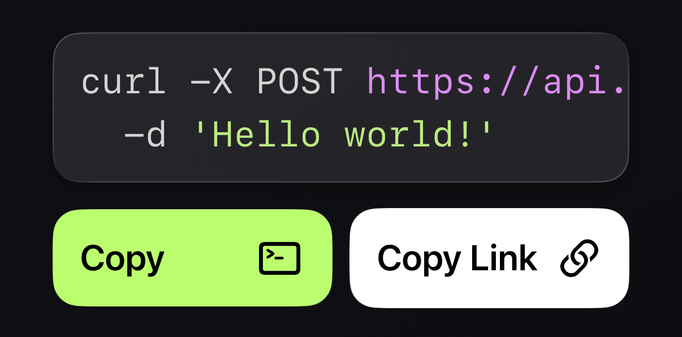
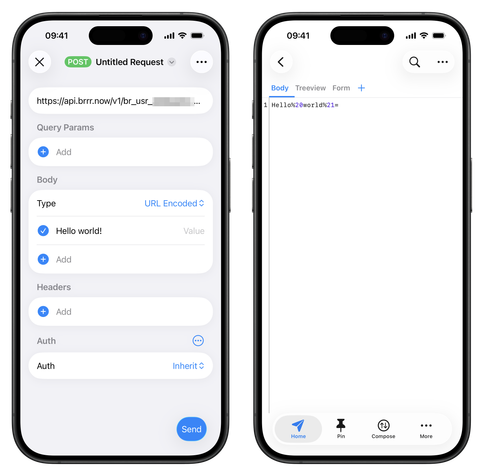
@simonbs Might be a HTTPBot (cURL import) issue; when manually entering raw JSON in the body the notification displays correct (spaces instead of escape codes).
Will check with Proxyman later today and report back.
@simonbs But first... command line:
PS C:\Users\pc> curl -X POST https://api.brrr.now/v1/br_usr_<redacted> \ -d 'Hello world!'
{"success":true}curl: (3) URL rejected: Bad hostname
PS C:\Users\pc>
Message was delivered successfully to target device (testing from Australia, executed from a Win11 device running a PowerShell terminal).
Possibly my network or firewall causing that URL rejected message in the curl response - will need to look when I have some time.
@simonbs Also, interesting item when adding the Webhook to Uptime Kuma, and sending a test message from it (see screenshot below).
Again, not sure if you, or me and my firewall/adblocking services causing it without further investigation.
My Uptime Kuma instance is running as a Home Assistant app (some kind of quasi-Docker container I think). At some point, will migrate it to a standalone Docker container.

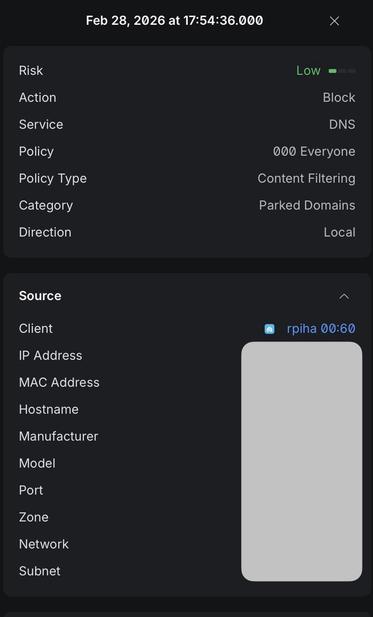
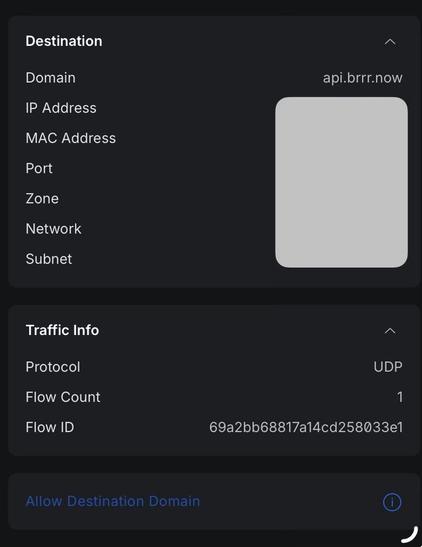
@simonbs Just confirmed - It tripped a Firewall rule at my end. Cloudflare has the domain classified as Parked domain (which I block), and the rule triggers line up with my test times.
I’ve just submitted a request to CF to have the parked classification removed, and switched to API.
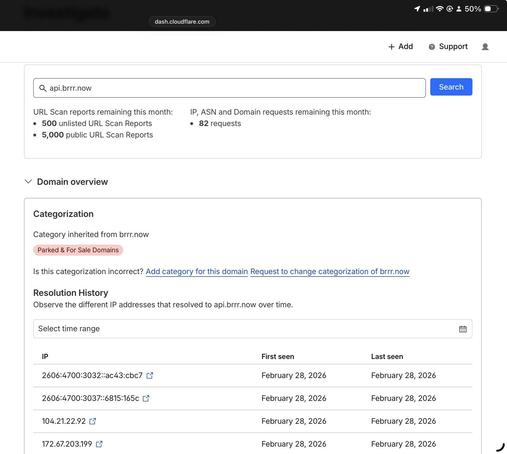
@simonbs Getting back to core, happy to report that I can't find any issues so far. Tested the core JSON body options.
Only possible thing I could find is how line breaks behave in the messages. I found that if I wanted part of the text in message: to appear on a new line, I needed to use \r\n, and not just \n alone.
Also no issue found using any combination of JSON fields regardless of order.
@simonbs
So I copied the url https://api.brrr.now/v1/br_usr_[MYKEY] from the app and pasted it in safari on my phone, and got {"error":"Not found"}
… perhaps I’m holding it wrong too?
@simonbs I can send you the full URL, including the key, if you want me to.
I will just need to work out how to send a private message using ivory first. :-)
@simonbs looks and works great! Was sending notifications within a minute of downloading. I think it’s a good balance of simplicity and customisability too. Nice work!
I like that you can tap on a notification and it shows you the content in the app, in case you missed the message on tap. It could be nice to see the last X notifications in the app, but I can also see that over complicating things too.
@aselford Thanks, glad you like it!
I don’t think I’ll add notification history. I think theres something to keeping it super simple.
@simonbs Not compatible with my iPad Pro 10.5” (iPadOS 17) 😢
Is there a technical reason for requiring iPadOS 26?


 Joline Celebrion
 Kyle Bashour
 Lars
Lars 
 maique

 Rob
Rob
 Michael Brown
 Himalaya

 Michael Lysons
 I can’t believe its not @twcau
 Alexander Steiner
 Leonard Wong
 Brendan (he/him)
 Chris
Chris Koen
Koen 
 Harold Leewis
 John Payne
 Chris Deluca