 Terence Eden
Virgin have also upgraded me to Gigabit fibre.
Which, as I wrote a few years ago, is mostly pointless.
https://shkspr.mobi/blog/2020/12/whats-the-point-in-gigabit-broadband/
I wonder when gigabit will actually be useful?
Virgin have also upgraded me to Gigabit fibre.
Which, as I wrote a few years ago, is mostly pointless.
https://shkspr.mobi/blog/2020/12/whats-the-point-in-gigabit-broadband/
I wonder when gigabit will actually be useful?

(This is a curmudgeonly post which is going to look ridiculously outdated in a few years.) My yearly contract with my ISP has just come to an end, so it was time to shop around for a better deal. They presented me with the following monthly options: Drop to 100Mbps for the same price I'm paying today (£44) Keep at 350Mbps for a tenner more (£55) Rise to 500Mbps for a fiver more (£49) Go to GI…
Anyway, if you want stupid fast Internet, sign up using this link and Virgin will both give us £50.
Using iperf, I can get a max of about 940Mbps between machines on my LAN.
I suspect that might be a limit of my router, USB-C Ethernet Hubs, and ancient cabling.
Most Internet speed tests simply can't handle gigabit connections.
Cloudflare's gets to about 900Mbps which I suspect is about as is good as possible.
But the reality is almost no service on the Internet can support gigabit home connections.
"'ullo John, gotta new router?"
Upgraded my Virgin Media to the newer Hub 5 (turns out the 5x doesn't have modem mode).
I can now get the full 1,130Mbps I'm paying for.
But, still, even though I have Cat6 cables most of my hubs, switches, and ports are only gigabit enabled. Domestic equipment simply can't use anything faster.
WiFi in a congested radio environment isn't going to get close.
Even if it could, most servers can't deliver that quickly.
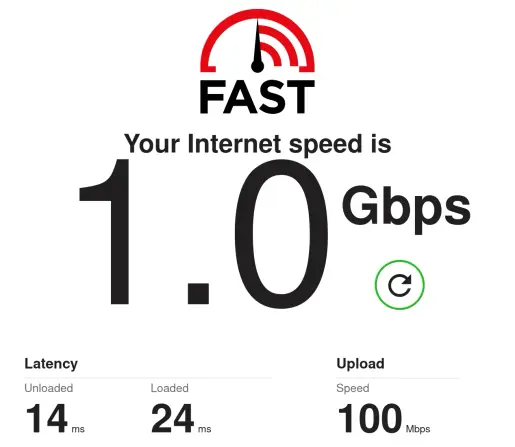
@WiteWulf I'm not convinced.
4K streaming needs a maximum of 25Mbps. So unless your house has 40 people all simultaneously watching different Netflix shows, it's hard to see how it could be saturated.
@Edent 4k streaming doesn't really use all that much bandwidth in the grand stream of things. In my experience the biggest user of bandwidth in domestic situations is software updates, the main offenders being Adobe and console games. They will devour all the bandwidth you have (okay, maybe not 8Gb/s).
Now, that usage may be sporadic, but when it's there it will impact the performance of everything else on the network unless you have a good quality router that's tuned to avoid buffer bloat.
@yvan I already had the Hub 4. I went onto their online chat and whinged about poor download speeds until they sent me a new Hub.
If you're on the XPON network, I don't think you have a choice though.
@Edent I consistenty get 900+ Mbps speeds on my iPhone 16 Plus or Pixel 8 Pro over WiFi 7 6GHz, even with the UK's half-gigahertz band restrictions. Since I have Hyperoptic 1Gbps service, that means WiFi is not a bottleneck.
Ironically, my Linux laptops, even those with Intel B200 WiFi7 adapters, usually painfully eke out 300 Mbps due to poorly optimized Linux WiFi 7 stack, apart form one MediaTek 8125 ThinkPad that can compete, but doesn't seem to like my Ubiquiti WiFi network much.
@Edent I'm using the TP-Link TL-SG105S-M2 (5 port) and a similar numbered 8port version.
https://www.tp-link.com/us/business-networking/soho-switch-unmanaged/tl-sg105s-m2/
https://thepihut.com/products/usb-3-2-to-2-5g-ethernet-converter is the usb adapter I've been using on the computer side. Synology NAS has 10Gb card plus the above linked together to spread load.
I've not had issues with them. This is the only equipment I've personal experience of so far as it's my first step into 2.5Gb networking.
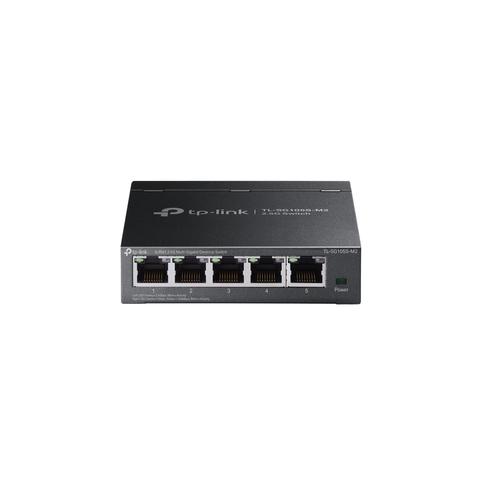
As the flagship 2.5G product, the 5-Port desktop switch delivers reliable, super-fast connections with the lowest latency possible—without the need to upgrade to Cat6 wiring. 5× 2.5-Gigabit ports unlock the highest performance of your Multi-Gig bandwidth and devices, and provide up to 25 Gbps of switching capacity.
@Edent TCP? Might be an interesting experiment to try enabling the `bbr` TCP congestion control algorithm and trying the test again:
echo 'bbr' | sudo tee /proc/sys/net/ipv4/tcp_congestion_control
(I gather there is a similar incantation for Windows.)
@Edent @dwm the core problem with gigabit ISP speeds is that they’re usually connected using PPPoE, and most home router/firewalls run a variant of OpenWrt. OpenWrt is Linux based, and its PPPoE daemon is single threaded and CPU-bound. The CPU just isn’t up to forwarding enough packets per second to maintain gigabit throughout.
For Linux based routers you need a beefy Intel CPU. The option is a BSD based system like OPNsense.
This is 5 years old, but still relevant:
https://forum.openwrt.org/t/so-you-have-500mbps-1gbps-fiber-and-need-a-router-read-this-first/90305

It's such a frequently asked question over the last few years that we really need a post we can point people to. So your cable company rolled out 500Mbps or 1Gbps download speeds, or you have 1Gbps symmetric fiber (GPON/EPON) from ATT or Centurylink or Orange or whoever. You realize your old all in one router from 2009 is not up to the task of handling this, but hey by now stuff should be cheap and available that will handle your new fiber connection right? So you want advice about a router for...
@http_error_418 Nope. They all say 25MBps is needed for 4K.
Obviously they can fill a buffer faster with a quicker connection. But the bottleneck is more likely to be the WiFi speed in a noisy environment.

@Edent Also noting that a *lot* of internet services throttle on a per connection basis, so individual connections are not going to go over a gigabit.
Downloading images with Ollama saturates the pipe completely as a counter example of unthrottled connections
@Edent seem to get about 700mbps from a Pi 5 connected via a switch to my router- so in lieu of a 700mbps connection I think I’m okay with overpaying slightly for 1G 🤣
Unfortunately I’ve run out of disk space so I can’t download anything 🙃
I think in most cases 1G is just becoming the norm because it’s a defacto limit for consumer gear and a nice, round, catchy number to sell. “Gigabit” has a nice ring to it.
 Simon Cox
 mORA
mORA Simon Greenwood
 Gary
Gary 
 Yvan
Yvan DamonHD
 Fazal Majid
 Shaun McDonald
 Dr. David McBride (dwm)
 Advanced Persistent Teapot
 Erik Ableson
 Edd
Edd Rob Turner 🇪🇺
 gadgetoid