The lossless data compression fairies are having fun with me today...

  • Scan 8.5" x 11" document at 1200dpi @ greyscale
  • -> 60 MiB PNG, thank you
  • Open PNG in GIMP, select a good threshold point, convert to 1bpp
  • -> 514 KiB PNG
  • Wait... 116:1 compression from 8-bit PNG to 1-bit PNG? HOW??
  • convert to pdf
  • "Warning, this file is really huge and may actually be a decompression bomb" lol, ok.
  • -> 515 KiB PDF, nice
  • ocrmypdf foo.pdf document.pdf
  • -> 194 KiB PDF
  • WHAT? HOW?!?
  • pdfimages -png document.pdf foo
  • -> 514 KiB PNG
  • WHAT IS HAPPENING?!?

#PDF #PNG #Compression #greyscale

P.S., I found out that by default, ocrmypdf uses (lossless) #JBIG2 compression. That's why it was so well compressed. Also, the resultant PNG file at the end (which was basically the same PNG file that went into the PDF) was converted from JBIG β€” pdfimages converts images, it doesn't extract them in their natively stored format (but a -list will show you what the native format is). Also, I think pdfimages -all will just export the native format, whatever it is, but I haven't tried that yet.

@rl_dane In certain specific cases you can take an already compressed image and encode it with base64 and then compress it 10 times further.

@mctwist

That would be a very strange edge case where expanding the data stream into base64 somehow exposed regularities that the compression algorithm somehow missed in the original data.

I've personally never seen base64/uuencoded files become smaller than the original files when compressed. (compared to the original files compressed the same way)

@rl_dane I've seen one of fediverse that did this to poison AI bots. A seemingly 2MB image extracts to 32GB.

@mctwist

Wouldn't that poison, I dunno, fediverse clients as well? ^___^

@rl_dane Nah, it's only located publicly through robots.txt, a file only bots *should* read.
Technically it is a 4GB bitmap compressed to 20MB PNG, encoded to base64 and then put inline into an HTML that the webserver compresses down to 800kB, or something. Not sure about values, but I guess you get the point.

@rl_dane the surprising steps are the lossy ones ;-)

* the (lossy) downsampling to 1bpp and (lossy) thresholding enabled "lossless" run-length encoding or whatnot to compress at such a high ratio

* the OCR step likely also wasn't lossless β€” for every very-slightly-unique splotch on the page with a visual pattern _close enough_ to a prototypical `a`/`b`/`c`/… (visually) it probably got replaced with a shared version of said ~letter instead

@natevw

To your first point, you're absolutely right. Thresholding yeilds far more than an 8:1 compression because PNG is far more able to crunch bilevel graphics vs. grayscale.

To your second point, you're describing the #JBIG lossy compressor for scanned documents and monochrome images, and yeah, that's super cursed. I'd be surprised if that's what ocrmypdf is doing, but it's possible? Β―\_(ツ)_/Β―

@rl_dane
Is ocrmypdf replacing imagesnwith text? I don't get the "what why??"

@pixx

no, ocrmypdf just performs the OCR (using tesseract) and inserts it as textual metadata with the original images intact.

Someone suggested it may be using JBIG compression (lossy, cursed) for the image, but that would be weird! I've never seen ocrmypdf compress that well before.

If I had thought of it, I'd have looked to see if the resultant PNG file (once extracted) was the same as the original going in, but I don't think I have the intermediary files anymore.

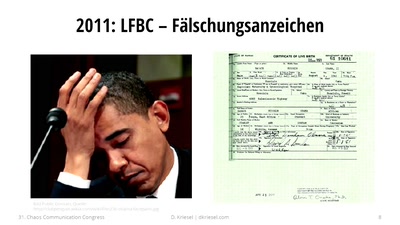
@rl_dane that's cursed, why would you unnecessarily convert images? The only time i heard anything about JBIG was this ccc talk
Traue keinem Scan, den du nicht selbst gefΓ€lscht hast

Kopierer, die spontan Zahlen im Dokument verΓ€ndern: Im August 2013 kam heraus, dass so gut wie alle Xerox-Scankopierer beim Scannen Zahle...

media.ccc.de

@kabel42

ocrmypdf doesn't even use JBIG by default, so I have no idea how that happened. But that is what happened.

@rl_dane it would make sense as preprocessing for OCR

@kabel42

Why though? It would cause more errors in the OCR! XD

I mean, yes, both tesseract and JBIG have to identify something akin to character cells, but they're not exactly sharing algorithms, AFAIK.

@rl_dane you could maybe reuse the extraction from JBIG?

@kabel42

Dunno. I think tesseract is much older than JBIG.

@rl_dane oh, wow, tesseract a lot older than i thought, i thought that was an odds ml thing :)

@kabel42

Nah, mid-90s tech.

Oh wait, mid-80s (through mid-90s). Wow.

https://en.wikipedia.org/wiki/Tesseract_OCR

Tesseract (software) - Wikipedia

@rl_dane "Originally developed by Hewlett-Packard as proprietary software in the 1980s"
@rl_dane PDF can PNG? I thought it could only TIFF or JPEG.
@mirabilos @rl_dane can't you embed everything? Wasn't there at least one printer manufacturer that embedded firmware updates?
@kabel42 @rl_dane you can attach arbitrary files, yes, see for example the PDFs under https://mbsd.evolvis.org/music/free/, but that’s not inline as graphic
Index of /music/free

@kabel42 @rl_dane Okular shows these, btw, do give it a try

@mirabilos @kabel42

I'll have to wait until I'm on one of my Plasma machines. ;)

rld@Intrepid:~$ doas pkg install okular doas (rld@Intrepid) password: Updating FreeBSD repository catalogue... FreeBSD repository is up to date. Updating FreeBSD-kmods repository catalogue... FreeBSD-kmods repository is up to date. All repositories are up to date. The following 75 package(s) will be affected (of 0 checked): ... Number of packages to be installed: 75 The process will require 292 MiB more space. 69 MiB to be downloaded. Proceed with this action? [y/N]: n rld@Intrepid:~$
@rl_dane @mirabilos 292 MiB for 75 Pkgs, thats not a lot :)

@kabel42 @mirabilos

Feels like a lot for a PDF viewer ;)

(Of course, I get that Okular is a lot more than that, and I get why installing most of the Plasma dependencies would take a lot of room, but... naaaah. ;)

@rl_dane @kabel42 it was only an example; mupdf doesn’t show them I think, you can get at it with it very manually…

tg@x61p:~ $ mutool show x.pdf 1 1 0 obj << /Names << /EmbeddedFiles 3 0 R >> /Pages 4 0 R /Type /Catalog >> endobj tg@x61p:~ $ mutool show x.pdf 3 3 0 obj << /Names [ (Giordani -- Caro mio ben.meta.xml) 5 0 R ] >> endobj tg@x61p:~ $ mutool show x.pdf 5 5 0 obj << /EF << /F 8 0 R >> /Type /Filespec /UF (Giordani -- Caro mio ben.meta.xml) >> endobj tg@x61p:~ $ mutool show x.pdf 8 [ the file contents ]

… but not so nicely. I’d expect most graphical ones that are not xpdf or gs or so to show them in some way. Acrobat Reader 5 does. pdf.js (as built-in in Firefox) does.

@mirabilos

Actually, you're right. The native lossless image format in PDF isn't PNG. I'm not totally sure what it is.
pdfimages just says "image," not "PNG", "TIFF", or "PPM"

rld@Intrepid:tmp$ pdfimages -list foo.pdf page num type width height color comp bpc enc interp object ID x-ppi y-ppi size ratio -------------------------------------------------------------------------------------------- 1 0 image 2040 2040 rgb 3 8 image no 7 0 96 96 3155K 26% 1 1 smask 2040 2040 gray 1 8 image no 7 0 96 96 8188B 0.2%
@rl_dane gah, don’t make me open ~/Misc/books/specs/pdfreference1.0.pdf at this time of the night…
@mirabilos @rl_dane *whipsper* do it

@kabel42 @rl_dane nah, I just put the fanfiction aside because zzz despite oversleeping. I guess the meds make me extra tired (taking four different ones now for the allergies alone), on top of the allergy effects themselves.

Also, MalikπŸˆβ€β¬› is ever-so-lightly vibrating my lower legs, upon which he is dozing. Warm, weighted blanket…

@mirabilos

There's a quiet cruelty in the fact that the pdf reference is a PDF.

Kinda like the "how to use your VCR" videocassettes of old 😁

@rl_dane a really badly rendered one at that, kinda like dvips output…

@rl_dane the native PDF image format is 1/2/4/8‑bit greyscale images and 1/2/4/8‑bit-per-component colour images (three components for RGB, four for CMYK). 12‑bit images from PostScript Level 2 are not supported. You can have images and image masks (the latter cannot designate the colour space they use). Images (including masks) can be interpolated for smoothness, have a specific decode matrix for source values to colourspace values (think palette), can have the pixels vector-transformed, and the raw data can be LZW or RLE compressed (RLE is basically only good for 8-bit greyscale screenshots, not scans), CCITTFax (that’s what I thought of when I said TIFF; it is G3 or G4 fax) for monochrome images, or DCT (JPEG).

So, it doesn’t store JPEG files as files, but only the guts of them, and the DCT filter does not support all JPEG features (β€œthat are not relevant” says the spec) either.

@mirabilos @rl_dane RLE is great for 1 bit "grayscale", but the colour-image compression seems rather basic

@kabel42 @rl_dane yes, it is very basic, which is why most images are embedded lossily.

Or as vector, if you can.

@mirabilos @kabel42

I mean, PDF seems to encode images as efficiently as PNG does, so I don't know of anything more efficient than that that is lossless.

How does the vectorization work? Does it somehow convert the image to PS? I'm not familiar with that option.

@rl_dane @kabel42 there is no vectorisation, if you start with a bitmap SOL

@mirabilos @kabel42

You mentioned vector transformation in the toot about 4 items above.

@rl_dane @kabel42 ah, that. That’s just for scaling, rotating, shearing, the usual.

@mirabilos @kabel42

Ahhh, ok. Not vector conversion. I got it.

@kabel42 @mirabilos

RLE is classic compression, easy for 8-bit microprocessors to do.
It's the compression that MacPaint used all the way back in 1983.
Extremely fast, but not very powerful. Very easy to explain, though, compared to the lepel-ziv(-welch) families of algorithms.

I can't get my head around the burroughs-wheeler (bzip[23]?) algorithm at all. Seems like a bizzare kind of sorting-brute-force-that-somehow-yields-amazing-compression-ratios-with-magic.

@rl_dane @mirabilos RLE is also very popular for logic analyzers :)

@kabel42 @mirabilos

Makes sense, you'd have a ton of repeated data. ;)

@rl_dane @mirabilos you basically encode the time between edges

@kabel42 @mirabilos

right. Literally "X more of this following byte"

@rl_dane @mirabilos or you do it per bit and only encode the length between changes
@mirabilos @rl_dane IIRC jpeg is DCT + scaling + LZ(W?)
DCT is lossless except for float rounding errors
@kabel42 @rl_dane the DCT filter in PDF is lossily.
@mirabilos @rl_dane Maybe, what the pdf spec calls DCT filter is DCT + filter? As in, two steps combined?
@kabel42 @rl_dane it’s basically what we know as JPEG
@mirabilos @rl_dane but DCT is also just Fourier Transform (/FFT) but with cos instead of sin
@kabel42 @rl_dane ignore what you know as DCT, PDF calls its JPEG filter DCT (it also uses weird names for other things, half of this inherited from PostScript)
@mirabilos @rl_dane so it's not DCT it's "That cool DCT thing that makes JPEG work" :)
@kabel42 @rl_dane imprecise naming is widely spread in ICT, unfortunately

@kabel42 @mirabilos

DCT is lossless until you apply the "filters" (someone help me out with the terminology) that tosses out the data that isn't needed according to the requested quantization factor.

So, JPEG is (as I understand it):

  • RGB -> YUV colorspace conversion
  • Optionally reducing the resolution of the color portion of the image by 2x (vert. or horiz.) or 4x
  • Conversion to DCT
  • "Tossing out" "unneeded" data
  • Huffman encoding to reduce the size of the resultant data
@rl_dane @mirabilos it's been a bit since i TAed that lecture but sounds about right.
@rl_dane @mirabilos PNG is also cool, you have a couple very simple algorithms to predict a pixel based on the neighbours and then only save which algo you used and how wrong you were which is usually a mall number that compresses better.