
A while back I bought two of those Maclocks with the intention of modding one into a tiny Mac. After seeing the success of @WiteWulf I decided to give it a go.

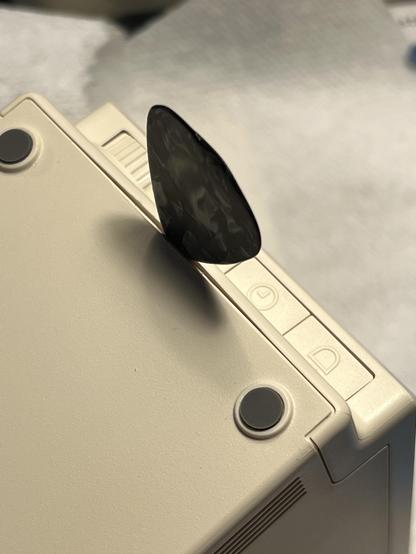
Opening the case is definitely the hardest part. Gary said to use guitar picks to start, so I began on the bottom and opened a gap to get a stronger metal spudger inside to lift up the rear case to release the six clips (circled in third pic) from the front. We're inside!
#VintageApple #VintageMac #RetroComputing #Maclock

To make a Mac, I'm using a Pi Zero 2 W, a Waveshare 2.8" DPI LCD, and the MacintoshPi image which includes Basillisk II and SheepShaver already installed, and they work without X11 running, perfect for the thin-resourced Pi Zero.

https://jm.iq.pl/macintoshpi-mac-os-7-8-9-for-raspberry-pi/

One thing that was missing was AppleTalk support but I solved that by installing sheep_net from these instructions. And works over WiFi!

https://www.ecliptik.com/blog/2025/Live-Laugh-Localtalk-with-Basilisk-II/

#VintageApple #VintageMac #RetroComputing

@paulrickards oo, good tip on the Macintosh pi image. I’ve been struggling to get my pi and waveshare working with SDL/no X today. It’s always better if someone else has already put the legwork in! 👍

Also: I received a Raspberry Pi 3A+ today. It’s not a commonly used variant, being a hybrid of the 3B+ and the Zero 2W. It fits fine in the Maclock case, but is clocked faster, at 1.5GHz (Zero 2W is 1GHz), and has 3.5mm audio out. I’m going to try and put a small amp and speaker inside mine.

@WiteWulf Oh nice, didn't know about the Pi 3A+. It does solve the missing audio issue I have with the Zero 2 W. Although I did see it's possible to use PWM on GPIO to do audio.

https://learn.adafruit.com/adding-basic-audio-ouput-to-raspberry-pi-zero/pi-zero-pwm-audio

But the Waveshare DPI LCD is probably using the pins I need (or not?) I can't really tell if it's possible or not.

Adding Basic Audio Ouput to Raspberry Pi Zero

To keep the Raspberry Pi Zero as low cost and small as possible, the Pi foundation didn't include a 3.5mm audio jack. There's also no breakout pads for the audio output. This made us a little :( at first but then we thought "hey you know, we can probably figure out how to get audio out with a little hacking!

Adafruit Learning System

@paulrickards here's the pins used by the 2.8" DPI display:
https://www.waveshare.com/wiki/2.8inch_DPI_LCD#Pinout_Definition

Wouldn't bitbanging PWM audio via GPIO be quite CPU intensive, though?

2.8inch DPI LCD - Waveshare Wiki

@WiteWulf Yeah been using that page and bumping it against the PWM pins needed and it looks like they're being used for the display.

As for performance, maybe not? I think it's just using a hardware timer for PWM (but I could be wrong!)

BTW Does touch work on your display? Doesn't seem to work for me, although I doubt I'd ever use it (with the clear plexi being in the way and also way too small).

@paulrickards I downloaded the MacintoshPi image and got no display when it first booted on my Pi Zero 2W or 3A. I expected to see a console? Not sure what I'm doing wrong.

There doesn't seem to be an opportunity to specify what display you're using, and the author isn't using the same small Waveshare display from what I can see.

Did you use the image, or build on a clean Buster install as the git page also suggests?

@WiteWulf I used the pre-installed image on the site. SSH is off on the image 😕 I got a console on HDMI, auto logs in at user pi. Then I installed the overlays and change the /boot/config.txt for the LCD to work. It's a Buster release so follow those install instructions. Except for rotation which was squirrel to get working! In /boot/config.txt comment out the framebuffer_width=960 and framebuffer_height=600 lines and add display_rotate=3 to the top.
@paulrickards yeah, I managed to enable WiFi by editing the config files before it booted it, but having ssh turned off hamstrung me. I don’t have a monitor with HDMI at home (have to take over the TV 😀), so I’ll take it into work with me to configure it tomorrow. It’s good to know that it’s easy enough to configure by adding the display drivers.