I discovered a wonderful hack that likely would allow me to run Windows 2 on my vintage Apricot PC Xi before the New Year.

Quick recap: Apricot PC is a British computer from 1983, not compatible with the IBM PC. It had a Windows 1 port, but not Windows 2, and thus couldn't run Word, Excel, or Illustrator. With a bit of driver-writing, I managed to start Windows 2 on it, but my video driver is rudimentary and cannot be used for practical purposes. Windows video drivers are super-complicated, so I was fully expecting to spend over a month writing one (at least there are docs for everything!)

But I just discovered a way to run Windows 2 with Windows 1 video drivers. So if I had a Windows 1 driver for Apricot, I could use it in Windows 2. Of course, it's never that simple...

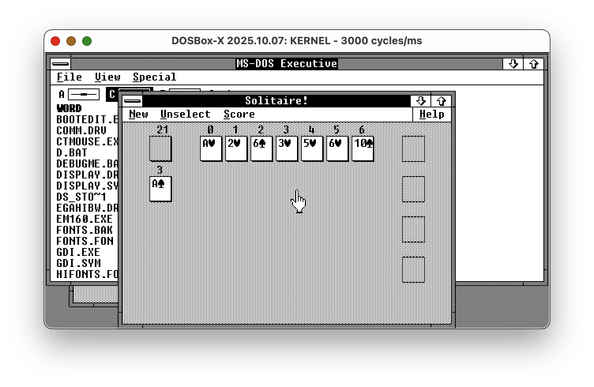
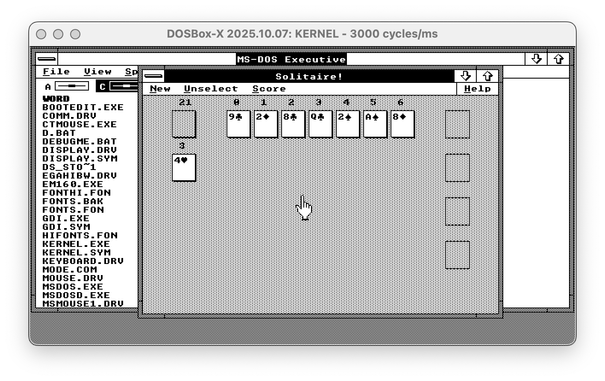
Find the difference between Windows 2 with Win1 driver and Windows 2 with the real Win2 driver - both are EGA 640x350!

🧵 thread with a few more screenshots and pointers

As you might know, graphical drivers for Windows 1/2/3 are _complicated_. They are expected to implement a huge chunk of Windows GDI, the graphical abstraction library. This means they're responsible for drawing parts of the window decorations, and so on.

You also might remember that Windows 1 had window decorations _completely_ different from Windows 2, as it was using tiled windows instead of overlapping ones. But for some reason, Windows 1 video drivers can render floating windows just fine, and even can draw minimize and maximize buttons.

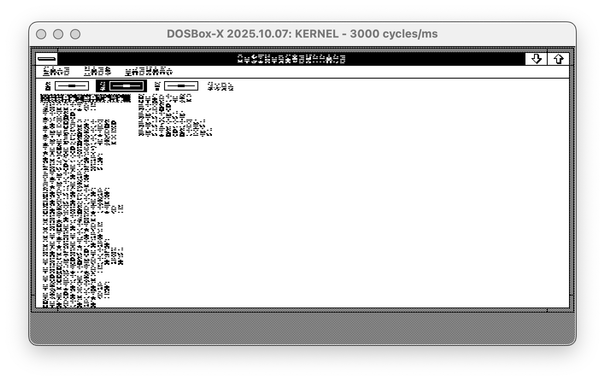
However, Windows 1 drivers handle fonts in a different way. Windows 2 is supposed to offer a new Font API, but most apps are using the legacy entry point for ExtTextOut. The font format is completely different, though. So, imagine you transplant a Windows 1 driver to the Windows 2 system. The second screenshot is what you get.

(🧵2/? continue)

@nina_kali_nina regarding win1 fonts, I wonder if we can use psftools to convert win2/3 fonts into win1 fonts? https://www.seasip.info/Unix/PSF/index.html
PSF Tools

@roytam1 this is far trickier than I thought, but it's workable to an extent. I should be able to get Cour, Helv and Times working. Thanks for sharing the link.
@nina_kali_nina IIRC win1 has Courier and Helv and Times (Tms Rmn) already?
@roytam1 yes, but Windows 2 and Windows 3 cannot work with them. I haven't looked too deeply into it, but my guess is that Windows 2 sees an old header and ignores the file, because using this file from Windows 1 would normally crash the Windows 2 display driver

@roytam1 I feel like I'm doing something wrong with the psftools :(

The documentation says that fon2fnts and fnts2fon should be able to produce byte-identical copy of the Windows 1 fonts, and there's even a script for this. But when I use the tool with the arguments from the script, it produces invalid non-byte-identical output on Arm Mac, x86-64 Linux and even on Windows with the precompiled files. %)

@nina_kali_nina BTW I think you need to convert fnt to psf first and convert psf back to fnt with --fontver=1 to produce a win1 font.

@roytam1 Nope :< That's not working, either.

Look, I have a working hifonts.fon

I do

`fon2fnts hifonts.fon` and it gives me two fnt files, System and Terminal.

Then I pack it back with the command described in the package (or its variations):
`../psftools-1.1.2/winfonts/fnts2fon sysnew.fnt termnew.fnt nhifonts.fon \
--winver=1.0 --modname=FONTS --idbase=28 --idstep=2 --sysfont=0 --fontid="FONTRES 133,96,72 : System, Terminal (Set #3)"`

The idbase and the idstep ar correct, and so is the FONTRES. The resulting file has some font headers broken, and the font doesn't print anything on the screen.

If I do the extra step of converting each fnt file to psf and back, with --fontver=1 (they already were in the 1.0 format), I get the same result but with a bigger file.

I suspected it must have been an issue with my build of psftools, but the result is the same with the binaries provided by John Elliot himself. I guess I just should speak to him directly to get more deets :<

@nina_kali_nina yeah please do so. I hope John can provide more info and maybe a new tool for converting fnt version/format directly.

@roytam1 I think I might be able to side-step the issue by using the official MS-provided SDK for the time being. When I have the energy to do so...

Thanks for sharing the link to the psftools, it is an amusing package.

@roytam1 T_T I got _everything_ working, and it was such a pain.

I gotta document this somewhere when i have the energy. Long story short, psftools fnts2fon produces incorrect output, but the fnt files themselves are correct and can be fed to Windows 2.0 RC to produce Windows 2.0 files with Windows 1.0 font data.

Here is a screenshot of Windows 2.0 that is using Windows 3.0 fonts in Windows 1.0 format with the Windows 1.0 video driver

@nina_kali_nina BTW I dropped him a line via email about this.
@nina_kali_nina alright got reply from John:
I can see a flaw in the Windows font loader where for Windows 1.x fonts
it reads and writes 0x75 bytes of header but other functions assume the
header is 0x76 bytes long. The attached diff seems to make the win1fonts
test script work for me, though I don't know what knock-on effects there
might be to the other psftools utilities.

(Assuming that the Windows 1 font header is actually 0x76 bytes long
would be another way round, because it's usually followed by the font
bitmap which has to be word-aligned, but the spec doesn't seem to rule
out having (for example) the face name immediately follow the header and
that doesn't seem to have the same constraint.)

I don't think I've written a tool to convert FNT files directly from
Windows 2.x to Windows 1.x format, but it doesn't sound impossible.
with a code diff:
--- psftools-1.0.12/winfonts/mswfntr.c 2002-07-14 02:10:16.000000000 +0100
+++ winfonts/mswfntr.c 2026-01-05 14:44:03.264816005 +0000
@@ -86,8 +86,15 @@
if (!addr) return -3;
/* Work out font size. This is f->dfSize minus header size */

- if (f->dfVersion >= 0x0300) base = 0x9A;
- else base = 0x76;
+ /* Note: It's doubtful whether to consider the Windows 1.x font
+ * header as 0x75 bytes followed by an alignment byte, or as
+ * 0x76 bytes. Here I am assuming 0x75. Usually what follows
+ * the Windows 1 font header is the bitmap which has to be
+ * word-aligned anyway. The important thing is that 'base' needs to
+ * match the number of bytes read by msw_fontinfo_read() */
+ if (f->dfVersion >= 0x0300) base = 0x9A;
+ else if (f->dfVersion >= 0x0200) base = 0x76;
+ else base = 0x75;

size = f->dfSize - base;

--- psftools-1.0.12/winfonts/mswfntw.c 2002-07-14 02:18:30.000000000 +0100
+++ winfonts/mswfntw.c 2026-01-05 14:44:20.957256323 +0000
@@ -88,8 +88,15 @@
if (!addr) return -3;
/* Work out font size. This is f->dfSize minus header size */

- if (f->dfVersion >= 0x0300) base = 0x9A;
- else base = 0x76;
+ /* Note: It's doubtful whether to consider the Windows 1.x font
+ * header as 0x75 bytes followed by an alignment byte, or as
+ * 0x76 bytes. Here I am assuming 0x75. Usually what follows
+ * the Windows 1 font header is the bitmap which has to be
+ * word-aligned anyway. The important thing is that 'base' needs to
+ * match the number of bytes read by msw_fontinfo_read() */
+ if (f->dfVersion >= 0x0300) base = 0x9A;
+ else if (f->dfVersion >= 0x0200) base = 0x76;
+ else base = 0x75;

size = f->dfSize - base;
(P.S.: John put your email into recipient list so you may find same mail in your inbox as well)

@roytam1 I have received a reply in CC indeed, thanks. I was hoping to provide a more helpful bug report to John, or even a patch - otherwise it can be a bit difficult to understand what exactly isn't working. But it seems John could replicate the issue on his side, which is nice :)