 Honghong Lu
Not too bad solder paste printing today.
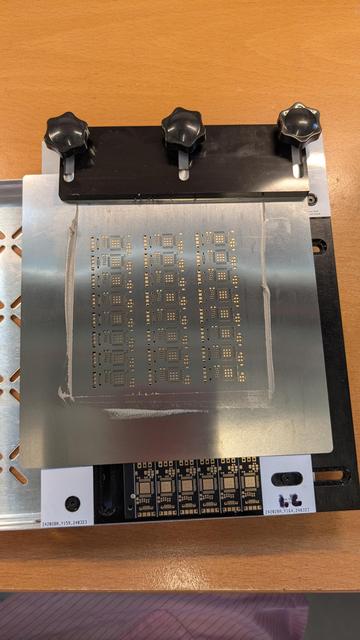
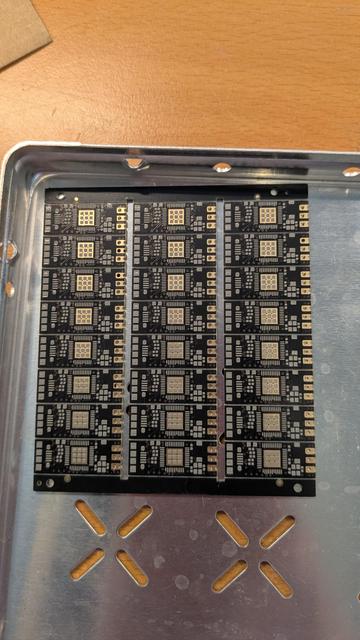
@cccpresser Here are my printing solder paste with a frameless stencil key points
1.The stencil must be perfectly flat, no bending or deformation, especially for designs with many apertures.
2. With no frame to provide tension, the stencil needs full support.
The support platform and PCB must be flat and support the entire squeegee travel. So I use Solder plaster the stencil printing tool we made. We also add an extra pcb to support the stencil . Please see the above post photos
@cccpresser
3.Alignment is critical.
Both the stencil and PCB must be firmly fixed so they cannot shift under squeegee pressure.
4. Don’t worry about wasting paste.
Apply a generous bead outside the apertures.
Hold the squeegee at ~45°, print slowly and evenly in one single stroke.
Near the end, hold the stencil down to prevent lifting or vibration.
5.Carefully lift the stencil and remove the PCB with tweezers.
6. Load the next PCB and repeat steps 4–5.
@Honghonglu do you clean the stencil between prints?
I always have a litre squeeze out on the bottom, after 3..4 uses it is much that the resulting print looks smeared.
 cpresser