🚨Starting Dec 16th, Meta AI will read your private messages - unless you opt out now! 🚨

Opting out is hilariously complex, but we've got you covered:

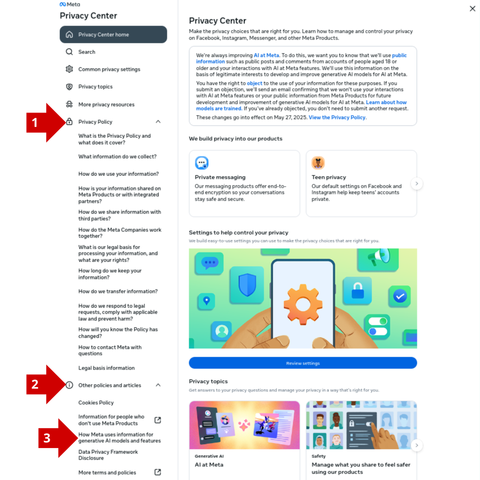
1. Go to Meta Privacy Center on DESKTOP
2. Privacy Policy
3. Other Policies and articles
4. How Meta uses information for generative AI model and features
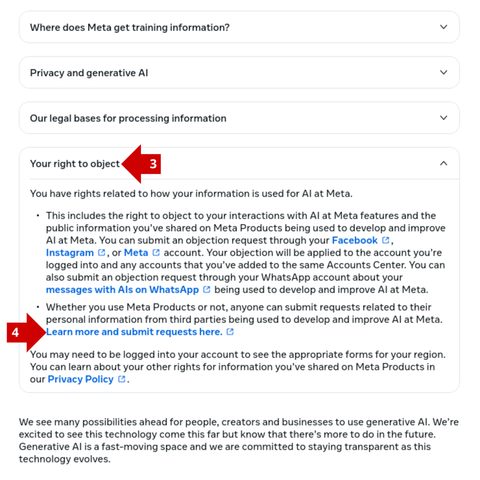
5. Your right to object
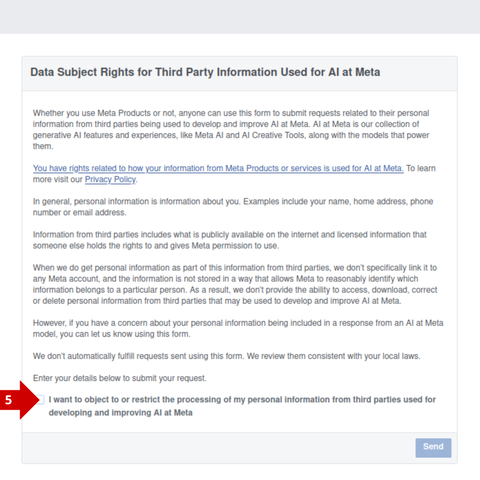
6. Learn more and submit requests here
7. Tick: I want to object to or restrict...

Oh, and @noybeu is already on it: https://tuta.com/blog/noyb-meta-ai-is-it-legal 🍿
@Tutanota @noybeu thanks for the heads up. Here's how to do it on mobile:

- Navigate to Privacy Centre. On Facebook this will be under "settings and privacy". On Instagram this will be under "settings and activity"->"more info and support".

- In the privacy centre, search for "more detailed information about meta's generative AI models" and select it.

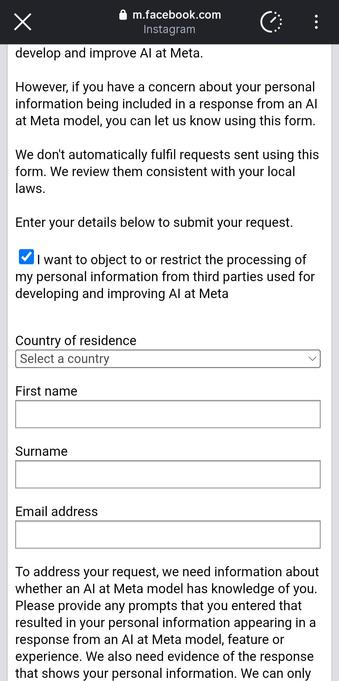
- Scroll down to "Your right to object", open and click "Learn more and submit requests here" which open the objection form.

- Do note that this form asks for yet more personal information about you, rather than just linking your objection with your account :/

@davetortoise @Tutanota @noybeu

Interesting - that’s not an opt-out; it’s an objection and a statement of “we’ll attempt to limit based on information you provide us.”

I’d also be curious if this covers WhatsApp.

@alatartheblue @Tutanota @noybeu yup, it's pretty scummy. I'd imagine it only covers whatsapp if a person has linked their meta account to it (I haven't)

@Tutanota @davetortoise @noybeu

I don’t use meta or WhatsApp for any type of messaging (or anything, actually), but I know a lot of people that use it almost exclusively.