
I'm teaching myself how to do pixel art, and I got Aseprite, which is fantastic. So I have the game already - and it's fun - but it's using art I "borrowed". But that gives the right idea on size - I can go a few pixels over or under.

Anyway, I was sketching away in Aseprite and I got a reasonable looking outline (no shading yet), and I thought "how far off am I on size?"

My sketch: 96x40 pixels.
Game needs: 24x12

Derp. You have no pixels. None. It's all in the shading. Make every one count.
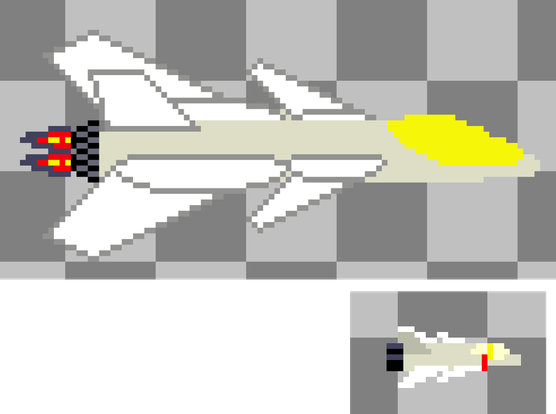
Before vs after. I actually find it so much easier at this smaller size. You just don't have that many choices!
And yes - the only thing cooler than a swing-wing aircraft is one where BOTH wings swing. The Tomtomcatcat F28!
Watching a modern bunch of pixel art tutorials, and they spend a lot of time talking about outlines, and then shading inside. Which works fine at the big size. But at the small size you simply don't have space for both outlines and shading - pick one or the other!

Revised size, did shading and reorg, and exported it to the game! Note - all assets APART from the main ship are *ahem* borrowed from other games. Placeholders only!

The shading is too subtle in the game context, and I want a nicer exhaust.

For ~15 hours from "total art newb" - it's acceptable :-)

#Mega68k

@TomF Might we worth doing an unfiltered upscale before uploading - a lot of what's there is getting lost. Digging the vibrancy, though!
@Cheeseness Sigh. What a mess. It's odd - previous uploads (~6 months ago?) worked great.
@TomF I find that stuff often changes without warning (had to upload a video 4 times today to try and find what the new default size limit is since it doesn't seem to be documented anywhere). It's a bummer