 Jan Schaumann
Advanced Programming in the UNIX Environment
An illustration of how permission octal modes and umasks work.
Advanced Programming in the UNIX Environment
An illustration of how permission octal modes and umasks work.

Advanced Programming in the UNIX Environment
Week 3: Union Mounts and Whiteout Files
One of the file types we've encountered are those of type S_IFWHT, so called "whiteout" files. But what the hell is that?? Let's illustrate! We describe the concept of union mounts and see what happens when a file in the upper layer is removed while the same file still exists in the lower layer: a whiteout file is created to cover up the lower file.

Enjoy the videos and music you love, upload original content, and share it all with friends, family, and the world on YouTube.
Advanced Programming in the UNIX Environment
Week 4: The Unix Filesystem
In this video lecture, we begin a closer look at the Unix Filesystem (UFS). We visualize how the filesystem structures the disk and organizes files and directories. We illustrate how directory entries are created and moved around.


Advanced Programming in the UNIX Environment
Week 4: Links
In this video lecture, we'll take a look at the system calls used to create, remove, and rename both hard- and symbolic links. We'll compare expected output against trivial implementations of the ln(1) and mv(1) commands.

Advanced Programming in the UNIX Environment
Week 4: Directories
In this video lecture, we take a look at how directories are created and removed, as well as how to move around the filesystem hierarchy. We also learn why the 'cd' command must be a shell builtin in order to work.

Enjoy the videos and music you love, upload original content, and share it all with friends, family, and the world on YouTube.
Advanced Programming in the UNIX Environment
Week 4: Directory Size
In this video lecture, we dive deep into the structure of the directory on a traditional Unix File System and see how its size is independent of the file sizes of its entries, but dependent on the filename lengths. We'll also use hexdump(1) to cheat a bit and look at the directory structure on disk.

Enjoy the videos and music you love, upload original content, and share it all with friends, family, and the world on YouTube.
Advanced Programming in the UNIX Environment
Week 4: /etc/passwd
In this short video, we try to answer the awkward question "Mommy, where do UIDs come from?". We look at the /etc/passwd user database and identify the various fields before we look at how things can get weird.

Enjoy the videos and music you love, upload original content, and share it all with friends, family, and the world on YouTube.
Advanced Programming in the UNIX Environment
Week 4: getpwuid(2) and /etc/groups
In this video lecture, we look at the library functions used to look up account information. We learn about how primary and supplementary groups are handled as well as how the hashed passwords are stored outside of the world readable /etc/passwd file.

Advanced Programming in the UNIX Environment
Week 4: atime, mtime, ctime
In this video lecture, we start looking a little bit closer into what our systems think of "time", something that experts most accurately describe as a big ball of wibbly, wobbly, timey, wimey... stuff. In short, analyze how the atime, mtime, and ctimes of a file connect.

Enjoy the videos and music you love, upload original content, and share it all with friends, family, and the world on YouTube.
Advanced Programming in the UNIX Environment
Week 4: time(3) is an illusion
Having revisited the atime, mtime, and time in our last video segment, we now have to come to terms with time(3) itself. We'll discuss managing the data structures and handling arbitrary concepts such as leap seconds, timezones, and (ugh) Daylight Savings Time. It gets silly real quick.

Enjoy the videos and music you love, upload original content, and share it all with friends, family, and the world on YouTube.
Related to our discussion of time(3), here's a deeper dive into the Unix epoch, its origins, and how the Y2K38 issue actually affects different unix systems well before the heat-death of the universe.
Advanced Programming in the Unix Environment
Week 5: The Unix Development Environment
This week, we cover the concept of the Unix userland as an Integrated Development Environment. This introduction outlines the different tools we will cover in subsequent videos, including the editor, the compiler chain, make(1), the debugger, and code revision and management tools. No vibe coding here.

Enjoy the videos and music you love, upload original content, and share it all with friends, family, and the world on YouTube.
Advanced Programming in the Unix Environment
Week 5: The Editor
In this video lecture, we look at the required feature for a full-fledged programmer's editor and illustrate some of the core functionality by example of vim(1). This includes basic motion commands, setting and moving to markers, using folds, and the use of the ':make' and quick fix lists to address compiler errors efficiently.
(Don't worry, we'll talk about ed(1) later.)

Advanced Programming in the Unix Environment
Week 5: The Compiler Chain, Part I
In this video lecture, we begin our discussion of compilers as part of the Unix programming environment. We provide a high-level overview of how compilers process input source code and turn it into an executable.

Advanced Programming in the Unix Environment
Week 5: The Compiler Chain, Part II
In this video lecture, we look at the preprocessing stage of the compiler and observe how it invokes the cpp(1) command to include header files or replace macro definitions in place.

Advanced Programming in the Unix Environment
Week 5: The Compiler Chain, Part III
In this next-to-last part on the compiler chain, we look at the compilation proper and the optimization and assembly of the intermediate code into an object file. (We will revisit some of this when we take a closer look at shared libraries in week 11.)

Advanced Programming in the Unix Environment
Week 5: The Compiler Chain, Part IV
In this video lecture, we conclude our discussion of the compiler chain, analyzing the last step in the process: linking the object files into the executable. We identify aspects of the C Runtime libraries as well as the standard C library that we need to include and cover a few of the most important flags to ld(1).

Advanced Programming in the Unix Environment
Week 5: make(1)
Moving on from the compiler, we now look at how the make(1) utility can be used to help us selectively build our code project.

Advanced Programming in the Unix Environment
Week 5: Debugging your code
Next in our discussion of the Unix _development_ environment, we start a short series on the use of a debugger by example of gdb(1). First, we illustrate just why exactly we might want to use a separate tool instead of sprinkling "printf" statements all over our code...

Advanced Programming in the Unix Environment
Week 5: Using gdb(1)
Alright, let's look at gdb(1)! We begin by using it to troubleshoot our failing programs and immediately identify the location of our program where it segfaults. We also see how to inspect variables and call functions from within the debugger.
Advanced Programming in the Unix Environment
Week 5: Using gdb(1), part II
In this video lecture, we continue to explore the capabilities of the debugger. We show how you can set a breakpoint to pause the program and how to step through the program while watching our code.

Advanced Programming in the Unix Environment
Week 5: Using gdb(1), part III
In this video lecture, we'll use our newly learned debugging skills to analyze and fix yet another flawed program. In the process, we learn to debug code from multiple source files and find out how to change the value of variables while the program is running.
Advanced Programming in the Unix Environment
Week 5: Using gdb(1), part IV
In our last segment on gdb(1), we use the debugger to examine memory locations in a running program and illustrate how pointers and arrays work in the C programming language.
Advanced Programming in the Unix Environment
Tool Tip: ed(1) is the standard text editor
As part of our discussion of unix development tools, we take a short detour to provide a quick walkthrough of ed(1), the standard text editor. This is not done merely to up your geek creds, but understanding ed(1) will also helps us better understand other tools like vi(1), sed(1), and ultimately even things like diff(1) and patch(1) better.

Advanced Programming in the Unix Environment
Week 6: Memory Layout of a Process
Let's talk about the details of a process. We start with a visual representation of a process in memory and create a program that prints out the addresses of different elements of a program and observe the alignment of the text, data, and bss segments as well as the placement of the heap and stack. We also illustrate what a stack overflow looks like.

Advanced Programming in the Unix Environment
Week 6: Program Startup
In this video lecture, we learn how a program starts. "What, you write 'main()' and off you go!" you say? Not so fast! Let's look at the program entry point '_start' and see if we can change it, and in the process find out that the function prototype of 'main' may not be what you think it is. Use your debugger to better understand how the process begins and ends its life.

Advanced Programming in the Unix Environment
Week 6: Process Termination
After we talked about program startup in our previous video, we now look at how programs terminate. We observe the return status and how exit handlers are registered.

Advanced Programming in the Unix Environment
Week 6: Process Termination
Relevant to our discussion of process termination, using the debugger to understand program behavior, our little pop quiz "What does `int main() { printf("Hello World!\n"); }` return?" provides for a short detour into the realm of nasal daemons:
Advanced Programming in the Unix Environment
Week 6: The Environment
In this video lecture, we're going to take a look at the process environment. We'll use what we learned about the process layout in memory to understand how the environment variables are stored and, if necessary, moved around. We'll also get a quick look at what malloc(3) does.

Advanced Programming in the Unix Environment
Week 6: Process Limits and Identifiers
In the last few videos, we've looked at the details of the process layout in memory, and how a process starts and is terminated. In this video lecture, we we will spend a few short minutes on two additional aspects of every process: its resource limits and its process ID.

Advanced Programming in the Unix Environment
Week 6: Process Control
In this video lecture, we will look at process control: how new processes are started from an executable, and what happens when they terminate. In particular, we will look at the fork(2), exec(3), and wait(2) system calls. Be warned, though: there will be zombies, so limber up.
Advanced Programming in the Unix Environment
Week 7: The Login Process
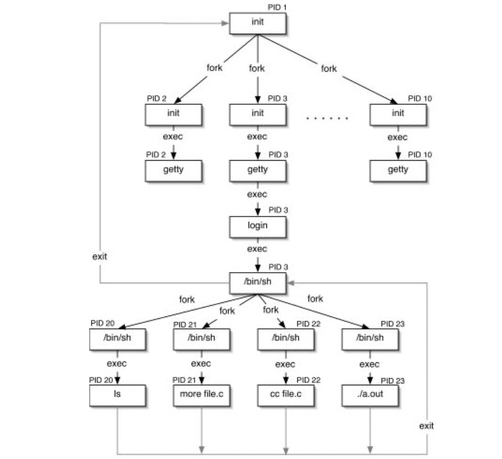
We'll begin our discussion of process relationships, including process groups, sessions, and our first, asynchronous type of inter process communication in the form of signals. To get us started, we look at how processes created during the normal Unix boot process relate to one another.
(This does not include systemd. I said "the normal Unix boot process". init or gtfo)
Advanced Programming in the Unix Environment
Week 7: Job Control
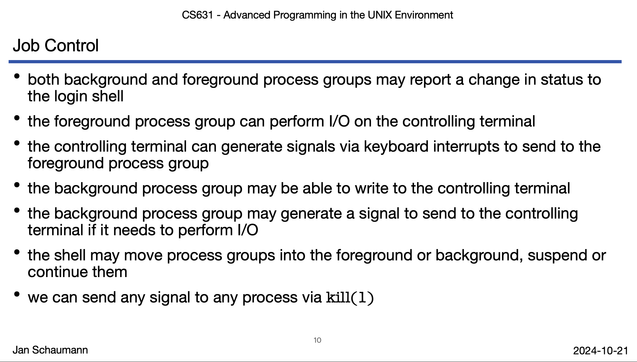
In this video lecture, we illustrate the concept of job control in the shell, first introduced in the C shell, and allowing you to run multiple tasks from within the same terminal, switching back and forth between them by placing them into the background, suspending them, or bringing them to the foreground. It's one of my all-time favorite productivity hacks - Ctrl+Z FTW!
Advanced Programming in the Unix Environment
Week 7: Signals
In this video lecture, we look at Unix signals, simple, asynchronous event notifications. We run through a number of examples to illustrate how signals are delivered, can be ignored, caught, handled, or blocked.
Advanced Programming in the Unix Environment
Week 7: Reentrant and Interrupted Functions
With this video lecture, we will conclude our coverage of Unix signals, by looking at what happens when we call unsafe functions from within the signal handler as well as what happens when we are interrupted while blocking on certain I/O.

Advanced Programming in the Unix Environment
Week 8: Interprocess Communications Intro
This week, we begin our discussion of Interprocess Communication. We start by providing a quick overview of the different properties of IPC mechanisms as well as which mechanisms we will cover.

Advanced Programming in the Unix Environment
Week 8: System V IPC
In this video lecture, we cover traditional, primarily asynchronous System V Inter Process Communication: semaphores, shared memory, and message queues. We then also take a brief look at the POSIX message queues implementation.

Advanced Programming in the Unix Environment
Week 8: Pipes and FIFOs
With this video lecture, we continue our discussion of Interprocess Communication and dive into two of the oldest and most ubiquitous forms of Unix IPC: pipes and FIFOs. We also discuss popen(3) and the dangers of shelling out to unverified commands.
Advanced Programming in the Unix Environment
Did you know that #NetBSD comes with a number of historical Unix research papers and supplementary documentation? Here, we find papers by Marshall Kirk McKusick on the Fast File System, by Robert Morris and Ken Thompson on Password Security, a shell tutorial by Stephen R. Bourne, a guide to using vi(1) by Bill Joy, and the well known BSD IPC Tutorials! Take a tour through /usr/share/doc...

Advanced Programming in the Unix Environment
Week 9: socketpair(2)
Let's continue with the above mentioned IPC tutorial and discuss the socketpair(2) system call and compare its functionality with that of the pipe(2) call. This introduces the concept of sockets, domains, and protocols, which we'll dive into in the next few videos.

Advanced Programming in the Unix Environment
Week 9: socket(PF_LOCAL, SOCK_DGRAM, 0)
Following up on socketpairs, we're continuing our discussion of the sockets API by an example of datagram connections in the PF_LOCAL (formerly AF_UNIX) domain.

Advanced Programming in the Unix Environment
Week 9: socket(PF_INET, SOCK_DGRAM, 0)
We're finally moving on to network communications, and show how to communicate between hosts across the internet using datagram sockets in the PF_INET domain, that is, via UDP. We also observe the packets as they are sent by using the tcpdump(8) utility.

Advanced Programming in the Unix Environment
Week 9: socket(PF_INET6, SOCK_STREAM, 0)
In this video, we demonstrate sockets using TCP to establish a sequenced, reliable, two-way byte stream over an #IPv6 network. Our good friend tcpdump(8) helps us inspect the packets on the wire to observe the 3-way handshake, data being exchanged, and connection tear down or observing a reset (RST) packet from the server if it's not listening on the port.

Advanced Programming in the Unix Environment
Week 9: I/O Multiplexing
With this video, we complete our discussion of interprocess communication and move from one-to-one communications towards a more typical client-server model with a server side process capable of handling multiple simultaneous clients. We accomplish this by using the select(2) syscall to handle synchronous I/O multiplexing.
Advanced Programming in the Unix Environment
Week 10: Dæmon Processes
In this video lecture, we take a quick look at processes intended to run continuously and in the background: daemon processes. We'll also brush upon system start scripts and daemon/service conventions.
Advanced Programming in the Unix Environment
Week 11: The Executable and Linkable Format
This week, we begin our exploration of shared libraries. We start with a look at the Executable and Linkable Format (ELF) for binary files such as executables, object files, core files and shared libraries. We'll use the hexdump(1) and readelf(1) utilities to better understand the format.

Advanced Programming in the Unix Environment
Week 11: Of Linkers and Loaders
Picking up where we left off when we talked about the compilation and linking process in Week 05, we now take a look at how a relocatable object file is turned into an executable by the dynamic linker (ld) and how an executable is loaded into memory by the run-time link-editor (ld.so or ld.elf_so).
Advanced Programming in the Unix Environment
I often see students confuse the "sizeof" operator and the "strlen" library function, especially when mixing fixed-sized buffers vs. pointers. So as a brief intermezzo, let's explain the difference between the two.
Based on that, I eventually ended up writing a manual page for 'sizeof', which is now included in #FreeBSD:

Advanced Programming in the Unix Environment
Week 12: syslog(3)
In this video lecture, we take a look at the standard Unix central logging facility, syslogd(8), and the syslog(3) library function. We show examples of system logs and how to separate messages by priority and level.
Below is an accurate capture of syslogd(8) in action:
Advanced Programming in the Unix Environment
Week 12: Non-blocking I/O
Continuing our grab bag of miscellaneous topics, we briefly cover non-blocking I/O, whereby a system call that would normally block, waiting for I/O, returns immediately with an errno of EAGAIN or EWOULDBLOCK. We use the examples of I/O into a pipe (restricted to PIPE_BUF bytes at a time) or over the network using TCP with its buffer.

Advanced Programming in the Unix Environment
Week 12: Resource Locking
More miscellaneous "advanced I/O" - this time we discuss resource- and record locking using flock(2), lockf(3), and fcntl(2).
Advanced Programming in the Unix Environment
Week 12: Asynchronous and Memory Mapped I/O
With this video, we conclude our short series on advanced I/O topics with a quick summary of asynchronous (aio(7)) and memory mapped I/O (mmap(2)).

Advanced Programming in the Unix Environment
Week 12: Cryptographic Basics
A segment on where and how cryptography can help solve certain security issues, including a few code examples for how to handle secrets/passwords (and how they linger in memory!), how to hash passwords, and the impact of poor pseudo-random number generators (with a blast from the past via the 2008 Debian weak keys).
Lecture slides:
https://stevens.netmeister.org/631/12-cryptobasics.pdf
Advanced Programming in the Unix Environment
Week 13: Restricting Processes: POSIX ACLs
This week we're diving deeper into ways to restrict processes. We begin with a review of standard Unix file permissions and then show how POSIX.1e Access Control Lists (ACLs) can be used for more fine-grained control.

Advanced Programming in the Unix Environment
Week 13: Restricting Processes: eUIDs, file flags, mount options, securelevels
In this video lecture, we look at new ways to restrict processes and even root itself. We revisit how we change effective UIDs using setuid, su(1) and sudo(8), and then cover file flags, certain mount options, and BSD securelevels.

Advanced Programming in the Unix Environment
Week 13: Restricting Processes: Restricted shells, Chroots, Jails
In this video lecture, we cover restricted shells, the chroot(2) syscall, and FreeBSD jails as ways to contain users and processes beyond file access controls.

Advanced Programming in the Unix Environment
Week 13: Restricting Processes: Process Priorities
In this video lecture, we revisit resource utilization by processes and how to set their CPU scheduling priority or "niceness". We discuss dynamic priority scheduling algorithms and the use of the nice(1) and renice(8) utilities.
Advanced Programming in the Unix Environment
Week 13: Restricting Processes: Processor Affinity and CPU Sets
In this video lecture, we discuss how we can restrict a process to a specific CPU or set of CPUs by way of "CPU pinning" or processor affinity and via CPU sets.
This lecture also exists as a blog post version as well:
https://www.netmeister.org/blog/cpu-pinning-and-sets.html

Advanced Programming in the Unix Environment
Week 13: Restricting Processes: Capabilities, Control Groups, Containers
In this video lecture, we're completing our discussion on how to restrict processes by looking at POSIX Capabilities, Linux Namespaces and Control Groups or "cgroups", and how these and the various other methods we've discussed in the last few videos allow us build containers like Docker or LXC.

Advanced Programming in the Unix Environment
The entire semester in one 157 slides deck: https://stevens.netmeister.org/631/f25.pdf
Full playlist on youtube of all 72 video lectures: https://www.youtube.com/watch?v=BsB9Cg6yJc4&list=PL0qfF8MrJ-jxMfirAdxDs9zIiBg2Wug0z


 Peter Sommerlad
 Scott Ellis