Hey, I got a response to one of my Feedbacks!

Me: β€œIn Xcode 26 beta 4, if a Mac app included a new Tahoe-style .icon file with the same name as its existing app icon in its .appiconset file, the Tahoe-style .icon would show up in Tahoe and the pre-Tahoe icon from the .appiconset would show up in pre-Tahoe versions of macOS.

In Xcode beta 5, this no longer works. The Tahoe .icon is shown on all versions of macOS.”

(1 month passes)

Apple: "Please know that this is by design.”
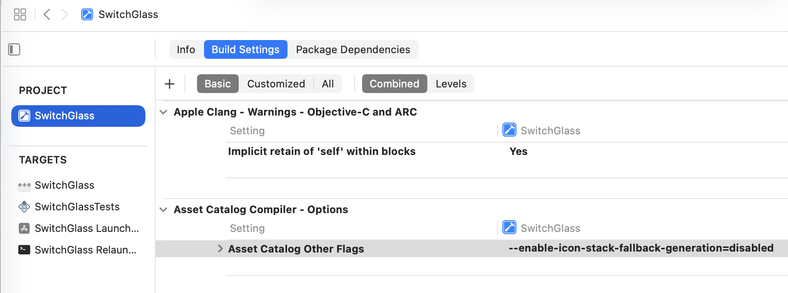
Anyway, a month ago I also filed FB19437407: Provide a way for an app to have different app icons in Tahoe and pre-Tahoe versions of macOS

There is a way to do this today using an undocumented command-line option:

1. Name your Tahoe .icon file the same as the name of your existing .appiconset in the Assets catalog.

2. Set the ASSETCATALOG_OTHER_FLAGS build setting to --enable-icon-stack-fallback-generation=disabled

But how long will this work?

@siracusa Could it be, that this trick does not work with Xcode 26.1 anymore? (I just built one of my projects with it and now it uses the Tahoe Icon even on Sequoia.)
@superpixel Yes, it looks like it doesn't work anymore :-/