
Last night I got massively nerdsniped by @quixoticgeek and stayed up til 5am trying to work out how to plot a route in which I travel one of each type of currently active ICE (1, 2, T, 3, 3MS, 4, 3Neo) in order of entry into service in the run up to taking one of the first ICE-Ls.

The naïve way to do this is a breadth-first search based on the end station and time working backwards through the routes that have the right kind of train on them and discarding any nodes that don't have any connections to the next type of train. As it was early in the morning at that point, I decided it was a good start in terms of algorithm. Optimisation can happen later.

So, I decided to try to find actual data in order to try and create these routes, and, well, I can now start to understand a lot more of the frustration expressed at #OpenTransport2025.

So, the first problem is that doing this using live APIs seems like being a bad netizen at best.

I could probably use DB's own APIs to get station arrivals and the routes that led to those arrivals, but that seems like a lot of queries for all the possible ICEs heading into Berlin Hbf or Köln Hbf on a particular day.

I could also probably use Transitous APIs for something similar. Amusingly, I might be able to do this using ÖBBs data endpoints too.

Whilst that initial data dump would not be too onerous... A breadth-first search of the potential connections, even with a sensible caching strategy, is likely to hit API limits pretty quickly.

So I think, "let's see if I can do this offline on my own machine". Woe is me.

So, after I was so pleasantly interrupted, I'm continuing this thread.

There's two main types of data I need - the type of train, and the train timetable.

The first doesn't seem to be widely available as far as I can tell. Thankfully @marudor does publish them in an easy to read table up at https://bahn.expert/trainRuns - I can therefore just download the data for each day I need, and save it as a file I can parse. I don't expect this trip to take more than about three days, so it doesn't seem like a big deal at the moment.

This way I can thus see that today's ICE 91 from Hamburg Altona to Wien Hbf is running on an ICE-T.

Of course, if I'm hypothetically going to get onto this train from an ICE 2, I need to know where the train stops, and when.

And that's when we start having problems...

Bahn Experte

Dein Begleiter um Stressfrei Bahn zu fahren. Sucht die besten Informationen aus allen Quellen um dich ans Ziel zu bringen.

At #OpenTransport2025 we had a significant number of full and frank exchanges of opinion about the quality and availability of data from service operators. In this case, I know that all European rail operators are required to publish their timetables on National Access Points.

So I googled National Access Point for Germany, and end up on https://GTFS.de

There I find a link to a GTFS feed for Deustche Bahn long distance, which is basically what I'm after, so I download that.

In my defence, it was 2am, a time I'm rarely awake, and I wasn't really thinking straight, but GTFS does sound like something that is useful for me.

So I unzip and look at the file, and... to my surprise it's not that difficult to make out what's there.

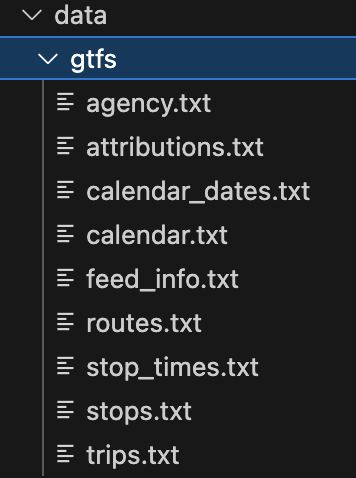
There are a bunch of files that end in .txt, and inside they are in CSV format. There are a bunch of IDs that are used to link different lines in different files, and... it looks about as easy as I understood it to be, basically something you can load into a database pretty easily if you want to serve this data at scale, which is basically what google developed this file format for.

But before I load it into a database, let's see what it's like.

There's a routes.txt, and that shows the route_short_name, the company that runs it, the route type and a route_id. A quick search shows that "ICE 91", gives me a route id of 84, and I can take that route_id and look in the conveniently-named trips.txt and find that there is a relation there between route_id, service_id and trip_id, and a quick find in the file shows 61 lines that have that same route_id.

"That's funny", say I, "That seems more than is really necessary..."

Nevertheless, I soldier on.

Next I look at stops.txt that has the names of stations on it, along with a stop_id. This will come in useful later, I'm sure.

There's also a stop_times.txt, and that seems to have my trip_ids, and also the stop_ids and the times of arrival and departure, as well as an index for the orders the stops are stopped at in that trip. So, at least if I can work out which of my 64 trip_ids I want, I can then work out what stations they stop at and when.

And this seems to be where calendar.txt comes in, as it has a service_id, and then an indication of start date, end date, and days of the week it runs. That will come in handy to work out which of the trips I can use.

So I do a bit of munging in python, and get my trips and services, and... hang on, there's still too many trips for ICE 91 for Monday 3rd November...

I dereference the stop_ids and it's stopping all over the place in all sort fo routes that aren't ICE 91...

At this point, I think back, and wonder if I'm doing something wrong. I decide to try my luck with a python GTFS munging library, and after an abortive attempt with partridge, I settle on gtfs_kit as something a little more robust.

I have a look through the API and finally work out how I can do things on my interactive prompt that make sense of the data, and I continue to query it based on route ICE 91, and find that I still have more than one actual set of destinations.

This doesn't seem right at all.

So I remember back to the talks I went to at #OpenTransport2025 and recall that Transitous does do cleanup of GTFS feeds, and maybe my data needs a little cleanup.

It's definitely possible to download the post-processed so-called DELFI file, and that claims to have the entirety of the DB timetable in it as well as a lot of busses... so I download it and stick it into gtfs_kit, and ask it to give me the timetable for ICE 91, and... I still get a whole bunch of different routes...

Well, at this point, around 4 in the morning, I decide that maybe I'm doing something wrong. I rule out any misunderstanding of GTFS or gtfs_kit, and then I think... let's try a different train. So I pick ICE 804 out of my trip history and try to search for it and... it's not there.

I play around with queries for a bit, and when I tab past my bahn.expert screen I realise that there's actually two columns on the screen by ICE 91, which was what I was looking at earlier: Fahrtnummer and Linie.

And I realise that what I'm looking at in routes.txt is the ICE 91 Linie, and not the Fahrtnummer, which my trusty translator tells me is "Trip Number". Incidentally, Trip number 91 is also the Hamburg to Wien route I know as ICE 91.

But I look at the trips data in the GTFS and... I can't see anything sensible there that tells me which of the trips associated with the route id for ICE 91 is trip number ICE 91. And I certainly can't seem to find it anywhere else in the text files.

At this point, quite disilusioned, I wonder where Transitous gets its data from, in order to identify the actual train route number. ICE 804 is definitely identified in the Motis frontend in transitous.org, so there has to be a mapping from trip_id to that identifier somewhere in the files... but I can't find it.

And that's where I start other get disillusioned, my hyperfocus ends, and I realise it's 5am.

I do a little checking as I abort my sleeping a few times... maybe it's on wikidata... nope, maybe it's on OSM... nope.

But I'm not about to join the transitous matrix at that time of the morning, and anyway, I have a train to catch.

And, well, that's the story of my rather abortive attempt to try to work out how to read a GTFS file.

In case you're still wondering...I am going to document the rest of my development process as I search for the possible routes. This is just the start of it, but I felt that it's worth sharing one person's attempt to understand public transport data

For those of you that provided algorithm suggestions earlier - thanks! I'm going to explore them more soon, but first I want to get this data down.

I will be doing more tomorrow, and I've even found a source of NeTEx-formatted data which may be more useful than the GTFS derived from it.

For those of you who are following this saga, I'm starting again today, as I have a little time to kill. And I'm going to try something different again. I'm also calling this the #ICEAgeChallenge, which is the hashtag I'm using for future posts about this.

You can find the next thread up at https://cupoftea.social/@moof/115542687852053780

Moof! (@[email protected])

For those of you keeping, um, track, I've taken on something I've decided to call the #ICEAgeChallenge - take all the ICE trains in order of when they were put into service, ending with the first ICE-L trip from Köln-Berlin on the 14th of December I'm also publicly documenting my attempts to code up something that will calculate this information. The first thread can be found here: https://cupoftea.social/@moof/115479529077333886

CupOfTea.Social

@moof Yeaaah, took a look at it and I think the problem is that what you're looking at is an unofficial automated conversion from the original NetEx DELFI data. In that data, DB uses a separate KeyValue field for the train number, which cannot be mapped to GTFS directly - so it ends up dropped, I think, comparing the two datasets.

You can see what Transitous does here: https://github.com/public-transport/transitous/blob/main/feeds/de.json (that's the official source which is supposed to require sign-up, but I guess they effectively left their API key out in the open) and here for the cleanup: https://github.com/public-transport/transitous/blob/main/scripts/de-DELFI.lua

EDIT: And yeah, there's someone mirroring the official NetEx because sign-up requirements for this are kinda bull

transitous/feeds/de.json at main · public-transport/transitous

Free and open public transport routing. Contribute to public-transport/transitous development by creating an account on GitHub.

GitHub

@moof Are you filtering by route or by trip? The route 91 should probably give you lots of different trips, which would be expected.

One thing you will not find in the cleaned up GTFS, that is the train category "ICE". We currently reconstruct that by operator and route_type in a MOTIS script. Unfortunately the DELFI GTFS converter does not include this into the output.

@transitous Yeah, that's the conclusion I've come to. I'm unsure, though, why this reconstruction is in MOTIS and not in Transitous.
@moof Well Transitous is a MOTIS instance, and MOTIS supports this postprocessing while our other tools don't.
@transitous Oh, right, I was under the impression they were separate but complementary projects, Transitous being the ETL layer and Motis being the frontend, search engine, API, etc...

@moof They are separate projects, but Transitous doesn't just do data collection and postprocessing, but also the hosting of a MOTIS instance.
A good comparison is probably that MOTIS is to Transitous what MediaWiki is to Wikipedia.

So our goal is currently less to publish improved GTFS feeds, but to provide a good routing service. The GTFS files are a nice byproduct though.

@moof I thought I would have a different play with these data(*). I used R (that's what I know), and read the csv's into a list, realizing that I had:

agency.txt: agency_id, agency_name
calendar.txt: service_id (which day each service runs)
calendar_dates.txt: service_id, date (seems to only be for irregular services)
routes.txt: route_short_name, agency_id
stop_times.txt: trip_id, arrival_time, departure_time, stop_id, stop_sequence
stops.txt: stop_name, stop_id
trips.txt: route_id, service_id, trip_id

(*) I used the German medium-distance dataset, not your long-distance one.

@moof then I thought I would pick a random trip and see where it went.

I picked a random row from trips.txt and left-joined it onto calendar.txt and calendar_dates.txt to find out which days it ran

I left-joined it to routes.txt and agency.txt to find out the route name and who runs it

Then I found all instances of my trip_id in stop_times.txt. (For me, this only turned up one trip each time.)

Then I left-joined this onto stops.txt to get the stop names and displayed this nicely.

I realized at this point that my German geography is not very good, so I used leaflet to draw a map of the route, having noticed that stops.txt also has the latitude and longitude of each stop, and I could see the railway lines I was "travelling" along.

I then generated a largish number of trips to see where they went....