 Rose
Rose99% of Windows usability issues would be fixed if Windows had the guts to add this button
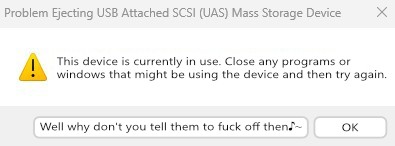
99% of Windows usability issues would be fixed if Windows had the guts to add this button
Windows has that button, but only if you right-click the drive in file explorer and select “eject”. The dialog is very similar, but has the option to continue anyways. That option doesn’t appear when ejecting from the taskbar.
Which is weird, because it means that Microsoft went out of their way to make two different, almost identical dialogs. And they made the better one harder to reach.
Puns? Puns are why nobody likes nerds? Of all the things to complain about in the world, puns are such an issue for non-nerds?
Weakness, get gud scrubs.
 elDalvini
 Cevilia (they/she/…)