 Steve Troughton-Smith
Keep going and do Xcode
https://mastodon.social/@daringfireball/115447175725037606
https://mastodon.social/@daringfireball/115447175725037606
@gruber @stroughtonsmith I suspect the problem with Xcode isn’t development work, but rather with entitlements.
Allowing Xcode on iPad would mean that a user process would have access to another user process (for debugging). Same with hardware for things like USB ports.
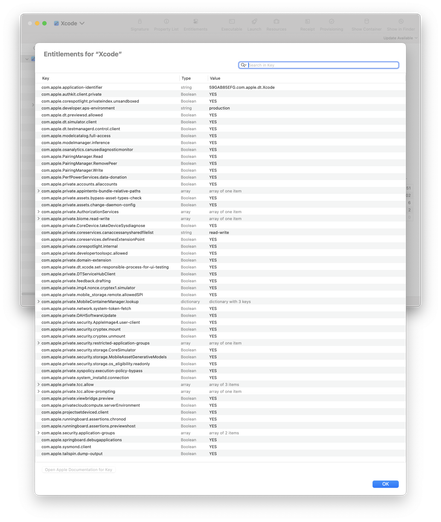
Look at the current Xcode entitlements to see the scope of this problem. It’s a security issue that they want to isolate on the Mac.
@chockenberry @gruber @stroughtonsmith Apple has had a *decade* since the first iPad Pro was introduced to work through these issues. Ten years later, it’s embarrassing that Apple still hasn’t released a version of Xcode for iPad focused on iOS development.
iPad “Pro” marketing has been misleading in this regard for years and has de facto eliminated the amazingly capable iPad hardware as a viable tool for a substantial base of Apple’s professional users.
@jdotc @gruber @stroughtonsmith Read my toot again.
I’m saying that they can’t do it without compromising the security of the platform.
@vinski @gruber @stroughtonsmith I think that some variation of this is the only way it could happen. (And the fact that it has gotten excellent on the Mac is a sign.)
But still, on-device testing requires access to system components - look at the things that don't work in the Simulator because of this: biometric authentication, NFC, camera, Bluetooth, USB, haptics, off the top of my head.
Huge security exposure on most of them, too.
@gruber @stroughtonsmith Here is a short list of the entitlements that Xcode uses (and are largely unavailable to other apps - only two of them are documented).
If you want to explore them yourself, it's easy: drop the Xcode app on the Apparency app. (https://www.mothersruin.com/software/Apparency/)
@stroughtonsmith @gruber I haven't played with them enough, but are they able to do things a normal Simulator isn't able to do?
I'm wondering about accessing biometrics, USB, and other "device only testing" things.
I'm having a really hard time imagining Apple Security saying "yeah, why not?" to sensitive parts of the system.
 John Gruber
 Craig Hockenberry
 John Davis
 Schamschula
 jdotc
jdotc Ville Turpeinen