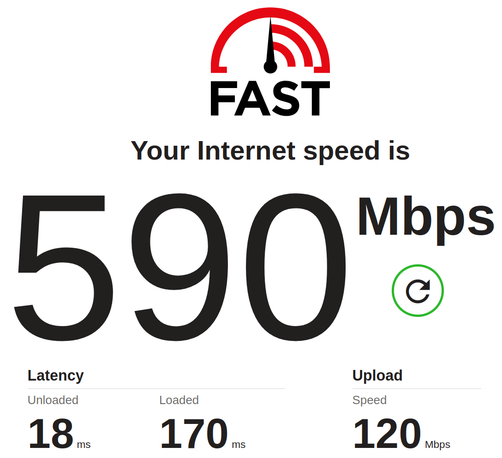
Finally, we have an internet connection worthy of 2025. But the story behind it...

Our LTE connection was originally 50/10 Mbps, and the actual speeds remained the same even after increasing the speed to 100/20 Mbps. I spent a lot of time with O2 support, got a more expensive plan with unlimited speed, and a new, expensive 5G modem. But the actual speed was still 35/8 Mbps. I was losing hope.

Until today, when I discovered that in the Unifi Dream Machine settings, there was the Expected ISP Speed item with 50/10 Mbps values, which I had set there for the original speeds 3.5 years ago. All this time, I thought it was there to just set the scale of the chart, but it also works as an upper limit. 🤦‍♂️

@sesivany O2 you say ...
@jachym I can blame them for many things, but not for slow wireless connectivity in our location. Not any more. 🙂
@sesivany@vivaldi :-D
@sesivany i had noooo idea that those settings actually affect the speed! ...now i'm tempted to set it to at least double what would be expected to ensure it'll never ever cap speeds.

@bastilian if you don't know your official/theoretical internet connection speeds, it's really better to set the values rather higher than lower. I really thought it was just for informative purposes. To set the right scale for speed test charts, to tell you what is your actual speed compared to the official.

I also disabled smart queues which they don't recommend for speeds above 300 Mbps, but I don't think it had any significant effect.

@sesivany Lol, I wish I could do the same with Gigacube. My speed is usually around 30/20 (but the advertised speed is of course 150/something).
@testmir we're lucky that an O2 BTS is close. The modem is on the roof, the BTS is 300m away and there is direct visibility.