You can now view conversation threads for Mastodon, Bluesky and Micro.blog directly in Tapestry 1.4! Swipe left on the item or tap the new conversation bubbles icon to view a thread quickly and easily.

The update also adds Bluesky saves, improves Mac window handling and much more.

Download/update Tapestry today - https://tapestry.iconfactory.com

#UseTapestry

@Iconfactory On the Mac, if you close the window and reopen, it forgets window size and position. It also defaults to “all feeds”. On the iPad, it does the second but not the first. My preference would be to remember both the window size, position, and current list, as part of the state.
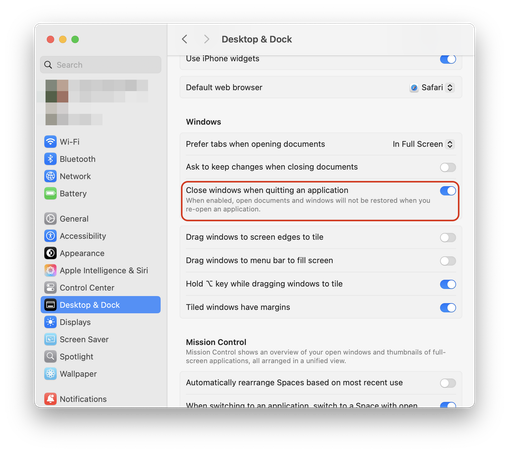
@interestingmonkey You need to turn this setting off in macOS:
@Iconfactory No difference when I turn that setting off. I’m not quitting the app, just closing the window with cmd-w.
@interestingmonkey And you updated to 1.4?
@Iconfactory Yes, just confirmed in about box. It’s 1.4. I’m on Tahoe.
@interestingmonkey so I’m told this is the correct behavior. If you want Tapestry to remember what you were looking at don’t close the window. When you invoke a new window, it always defaults to the default size and timeline. Hide the window instead. This will also allow the timeline to refresh in the background, closing it doesn’t.
@Iconfactory I’m also not sure what control you have over this, but on iPad (26.0.1), if Tapestry is in a non-full-screen window, and you open a link in a webview and then tap the x, it will close window but then scroll to the top of the current list. I have to force quit the app and re-open if I want to keep my position in list.
@interestingmonkey None, this is iOS 26. If this happens use the Jump Back action in the lower left menu of Tapestry to recover your position in the timeline.