 Vincent Sparks 🔜 Furlingame
fucking ocr
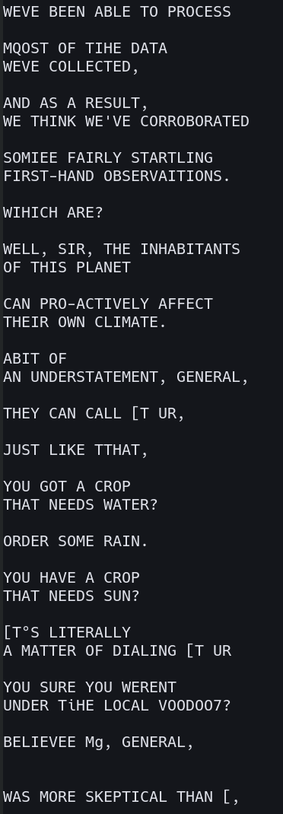
For reference, I'm running #tesseract_ocr on the subtitles of an episode of SG-1.
(For those unaware, because Unicode wasn't really a widely-deployed thing when the DVD format was standardized, but the people standardizing it still wanted DVDs to be able do display subtitles in every language, the subtitles on a DVD aren't encoded as text, they're encoded as images. This is why different DVDs have subtitles in different fonts. Blu-Rays kept this decision, because I guess they didn't want to ship a font with 100% Unicode coverage on every Blu-Ray player. I wrote a script that takes an MKV file with PGS subtitles and spits out a folder full of PNGs.)
Here are the files it's looking at. They're bright white font-rendered text on a transparent background.
Why does #OCR struggle with this?

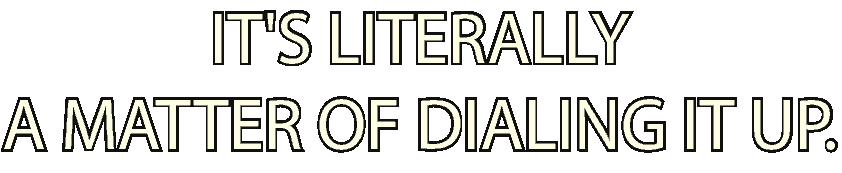

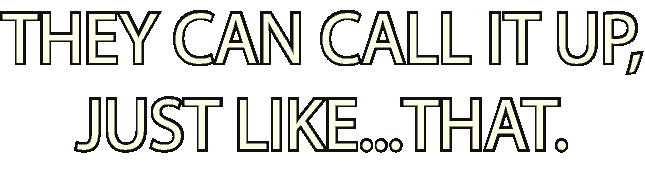
I don't suppose it would help to re-color the images as black text on white background?
It's long-shot AF, but you may as well try. 🤷♂️
@argv_minus_one oh my god it worked perfectly
the joy i feel is greatly outweighed by disappointment
@argv_minus_one okay, not quite, there are still a couple of errors, like pipe characters instead of capital I's and missing spaces, but it's 99% there
if i just took @jhwgh1968's idea and postprocessed the output by replacing all pipe characters with I's (much as I might delude myself, they're never going to put a pipe character in a TV subtitle) and called it a day, this might be just about done
i'd still *rather* fix it on the OCR level just on principle but that sounds like Effort and this is more than good enough.
To be fair to Tesseract, the pipe and uppercase I are basically indistinguishable in most sans-serif fonts.
For example, you probably can't reliably distinguish these on Mastodon: Il| (uppercase india, lowercase lima, pipe)
Humans infer the correct character from context, and even that only works when the human is looking at a known word. I suppose Tesseract could do the same using a dictionary. 🤔
That actually worked?! You're fing kidding me.
 ARGVMI~1.PIF