@due is there any way to stop this happening on my watch? Was fine until os26 this morning. Have already restarted watch and phone and updated Due in the App Store.

If I even slightly touch the crown, it fixes itself and shows my quick snooze options and “mark done”. If I double pinch it knows “mark done” is there.

I just can’t see the options until I touch the crown.
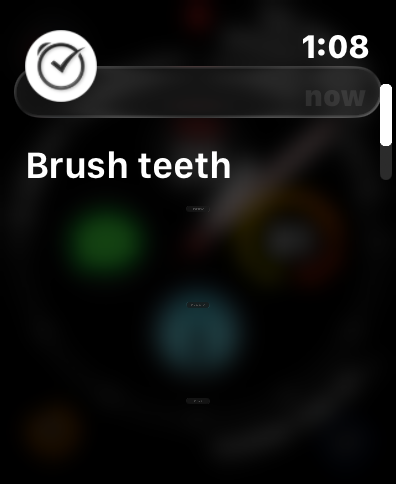
@Zemackdaddy so it looks like the action buttons are super tiny? And then when you say you touch the crown, do you see them animating to grow in size or something?
@due They are not tiny. When the alert arrives, the buttons do not appear at all. If I scroll the crown at all, the buttons appear. If I double pinch to, the spot where Mark Done would be is highlighted though no buttons appear (abnormal) and it marks it done (normal).
@Zemackdaddy I was referring to them, they look like tiny buttons
@due My eyes aren't that good. But what you see in the image is what the notification shown. If I scroll the crown, they draw in properly.
@Zemackdaddy the buttons are drawn by the system in the notification, so that explains why it’s different in the app. My guess is that there’s a bug preventing the buttons from animating to full size, and your crown movement triggers that. If you remove Due Watch app, then interact with a Due notification on your watch, what do you see?
@due good call. After removing your Watch app, the notifications on the watch look fine. I will just roll with that I guess. Happy to TestFlight a build or get you logs somehow if you want.
@due actually I will reinstall the app. I lose too much functionality now that I think about it.
@due oops. Last minute, I decided to keep the iPhone Air over the pro and set the Air by WiFi transfer from the other phone and I no longer have the problem.
@due If I open the Due watch app from a complication and tap one of my reminders, all buttons show normally. This only happens when an alert/notification happens.