Safari 26 is here!!! Anchor Positioning, Scroll-driven animations, High Dynamic Range images, the new HTML <model> element, the all-new Digital Credentials API, SVG icon support, WebGPU, WebKit in SwiftUI, every site can be a web app on iOS and iPadOS, and much more.

https://webkit.org/blog/17333/webkit-features-in-safari-26-0/

WebKit Features in Safari 26.0

We’re happy to share with you what’s arriving in Safari 26.0!

WebKit
@jensimmons Some nice additions, I can’t wait to start using scroll-driven animations. Will older versions of MacOS be getting the update as well, or is it exclusive to MacOS 26?

@alextm Safari 26 works on macOS 26 (of course) and two years of macOS before that — so macOS Sequoia and macOS Sonoma. And scroll-driven animations is supported in all three.

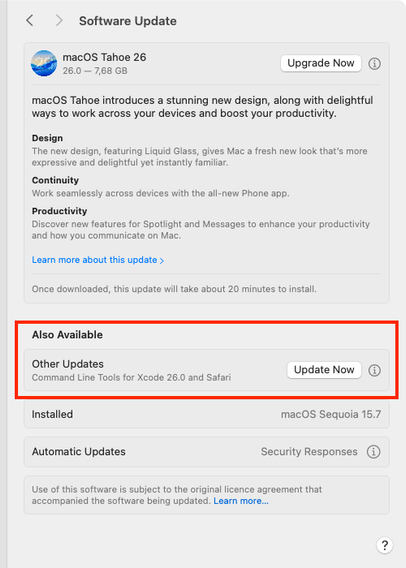
You can update Safari by itself. Go to  > System Settings > General > Software Update [edit] and find Safari listed under ”Also Available”. (Once it’s out & your computer sees that it’s available.)

@jensimmons @alextm I just checked for a Safari update after updating to the latest Sequoia (15.7), after noticing it is not included, and there's no 'more info' either, even after reloading several times.

All I get is the upgrade to Tahoe? I'm used to checking under 'more info', since that's also where updates to Safari Technology Preview, Xcode CLI Tools, etc. show up, but ... nothing.

Running 'softwareupdate --list' doesn't show anything extra either. Something something staggered rollout, perhaps?

--

UPDATE: It shows up now, along with the updated Xcode CLI Tools, as 'Also Available', so no need to click on anything to reveal them, which may be a new thing? 🙂

@sindarina @alextm ”Safari” will show up in the Also Available section once Safari 26.0 for macOS Sequoia is found by your computer. It can take a while for the news to arrive. I bet it’s listed today. Yes?

And yes, how it works changed! It’s no longer behind a “more” link.

@jensimmons @sindarina I just checked and I can see the Safari 26 update now. Thanks!