Hey, I got a response to one of my Feedbacks!

Me: “In Xcode 26 beta 4, if a Mac app included a new Tahoe-style .icon file with the same name as its existing app icon in its .appiconset file, the Tahoe-style .icon would show up in Tahoe and the pre-Tahoe icon from the .appiconset would show up in pre-Tahoe versions of macOS.

In Xcode beta 5, this no longer works. The Tahoe .icon is shown on all versions of macOS.”

(1 month passes)

Apple: "Please know that this is by design.”
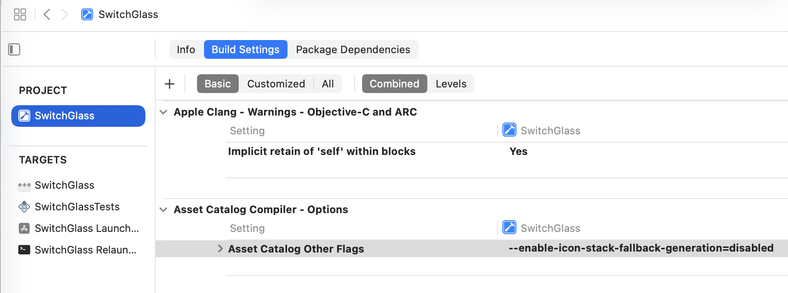
Anyway, a month ago I also filed FB19437407: Provide a way for an app to have different app icons in Tahoe and pre-Tahoe versions of macOS

There is a way to do this today using an undocumented command-line option:

1. Name your Tahoe .icon file the same as the name of your existing .appiconset in the Assets catalog.

2. Set the ASSETCATALOG_OTHER_FLAGS build setting to --enable-icon-stack-fallback-generation=disabled

But how long will this work?

@siracusa Are you by any chance getting these warnings during builds with this option on?

"Failed to generate flattened icon stack for icon named ‘…’.”

@dimitribouniol Yep, but I am ignoring them because the built apps seem to work the way I want them to.
@siracusa Cool, not just me then (and I also verified they seem to be working, thanks for sharing!)