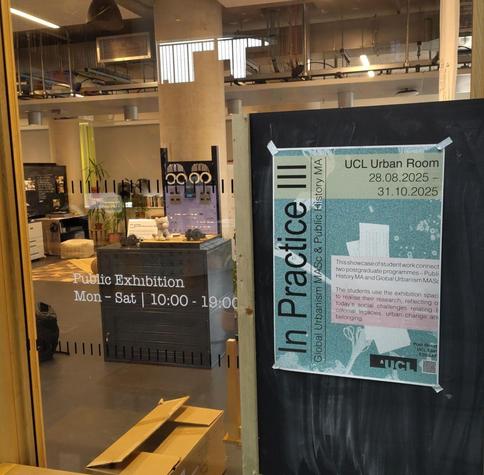
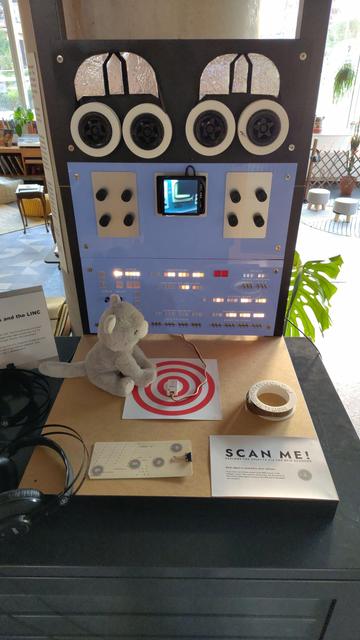
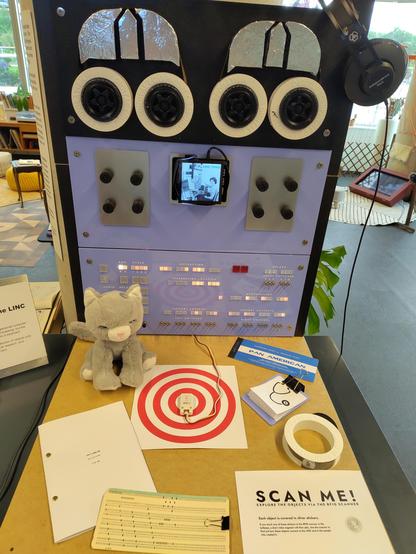
My #RetroComputing exhibit about the #LINC is about to open at the #UCL Urban Room for the next two months.
https://www.ucl.ac.uk/bartlett/events/2025/aug/practice-iii-student-showcase

Edit: It's now open! You have until Friday, 31 Oct 2025 to come and see it!

My #RetroComputing exhibit on the #LINC and Mary Allen Wilkes is open for free to the public in #Stratford #London through the end of October 2025. Please drop by and interact with it!

https://www.ucl.ac.uk/bartlett/events/2025/aug/practice-iii-student-showcase

In Practice III: Student Showcase

The annual 'In Practice' exhibition showcases Global Urbanism MASc and Public History MA student work exploring urban change, colonial legacies and belonging through site-based, creative research.

Bartlett Faculty of the Built Environment
Here's the "attract mode" video that plays in a loop on the exhibit until someone places an object on the RFID reader: https://youtube.com/shorts/mzWC1EU96B0
Before you continue to YouTube

https://github.com/open-simh/simh/pull/505 ← There's a new emulator in open #SIMH for the #LINC, by @larsbrinkhoff. I will absolutely be running this on the hardware from my exhibit once the current exhibition finishes, and I'll work on getting the knobs and switches working accurately. I'll need to drive way more neopixels for that to work! #retrocomputing #vintagecomputing
LINC: New emulator for the classic LINC computer. by larsbrinkhoff · Pull Request #505 · open-simh/simh

This emulates the classic LINC from 1965. Out of scope: earlier models e.g. with only 1024 words of memory, or newer models such as micro-LINC 300, LINC-8, or PDP-12. The emulator passes diagnost...

GitHub
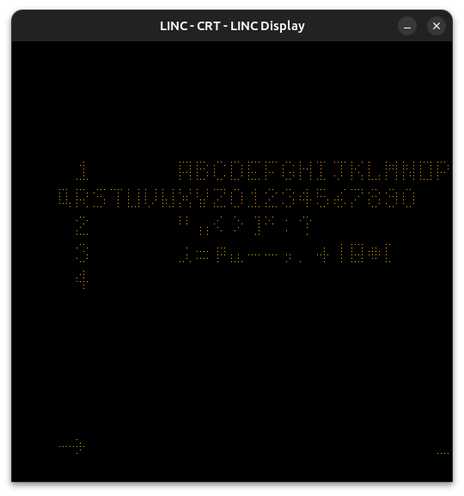
Hey #RetroComputing folks! I'm running #LAP6 on @larsbrinkhoff's #LINC emulator! #VintageComputing #PDP12

@spacehobo @larsbrinkhoff this is brilliant. It's one thing to hear there's a new emulator for given hardware, but it's another to hear from an independent person saying they've got that emulator up and running. Well done to both of you!

Spacehobo I'm delighted to see snippets from Wes Clarke's presentation at the 1986 conference on the History of the Personal Workstation in your video loop: https://www.youtube.com/watch?v=l9YBZo30Ses

Wesley Clark, "The LINC Was Early and Small"

YouTube
@fluidlogic @larsbrinkhoff Yeah, here's the complete playlist of what's currently in the exhibit: https://www.youtube.com/playlist?list=PL_tU5IBz7Zsea6V7bQ4R9FCzurz9-50X7
LINC

YouTube
@fluidlogic @spacehobo True enough, configuring and using someone else's unpolished emulator is not for the faint of heart!

@larsbrinkhoff @spacehobo my comment is not intended in any way to undermine your work in building the emulator! Thank you!

#LINC is such an important machine, and it's wonderful that you were able to adapt the #SIMH framework to support it.

@fluidlogic @spacehobo Oh, no worries! I didn't read any ill will into your comment. Quite the contrary, thank your for the encouragement.

@spacehobo I made USB game controllers provide inputs for the knob, for playing Spacewar on the LINC. But it was no fun, I want real pots.

However, it was a little fun to push on the stick to have LAP6 display more text lines.

@larsbrinkhoff Wait, was that spacewar real? I assumed it was just noodling around with DSC instructions!
@spacehobo No, it's real. I got a copy from PDP-1 and Spacewar enthusiast Norbert Landsteiner, a.k.a mass:werk. There's another copy on the LAP6 tape I have been testing. Left player uses knob 0 and 1 and sense switch 5. Right player, knobs 6 and 7, and sense switch 0.
@larsbrinkhoff That is impressive! I guess the PDP-1 was basically a pro-grade TX0, so I probably shouldn't be surprised!
@spacehobo Say, are there any schematics etc available for your panel?

@larsbrinkhoff It's currently unwired to anything! I have a freeCAD model that the fab folks turned into a 2D file for their laser, and they cut it from a sheet of 3mm acrylic that I bought at 500mm wide and 5u high. I also have 3D files for the numbered pot knobs and the LINCTape spools (which aren't the same size exactly because they were just props).

The lights are all just a string of neopixels driven from a crickit hat (which was also meant to drive the motors on the tape drives, but I had to cut those as deadlines loomed). The switches and knobs are real, but unwired to anything. I originally had a cheap 10" display behind the cutout for the scope, but managed to break it in all the hammering and screwing, so it's now got one of those 100mm square 720x720 displays in it (which was fine by me because I had square aspect ratio video).

The exhibit currently only uses a single RFID reader for visitor interaction, because it's mostly playing videos where Wilkes describes the development of the LINC.

The current electronics would let me plug in three or four analogue inputs for the pots, and a keyboard. To get the neopixels working authentically would just require an extension to the string and a lot of patient work, I think. Getting the switches working authentically for a replica would probably want a microcontroller translating state into something that speaks SPI or I²C to the pi.

And then there's the square buttons, which I also just left as inert diffusers for LEDs.

There's loads of potential, but I'd always want it to be convertable back to the RFID museum-in-a-box mode for workshops and exhibits later.

@larsbrinkhoff https://learn.adafruit.com/adafruit-crickit-hat-for-raspberry-pi-linux-computers ← Long story short, it's all driven by one of these. I also have some of the serial device bandwidth taken up by the RFID reader, but that would go away as I switched it to replica mode instead of exhibit mode.
Adafruit CRICKIT HAT for Raspberry Pi Linux Computers

Crickit complements & extends your Pi, doing all the things a Pi can't do, so you can still use all the goodies on the Pi like video, camera, Internet, bluetooth... but now you have a robotics playground as well.

Adafruit Learning System
Incidentally, this exhibit was inspired by @museuminabox! I wrote the code all myself (as I needed video and other integrations, and didn't need their online shared database of objects/interactions), but I did cite them in my bibliography!

You have until the end of this week to go and see my exhibit!

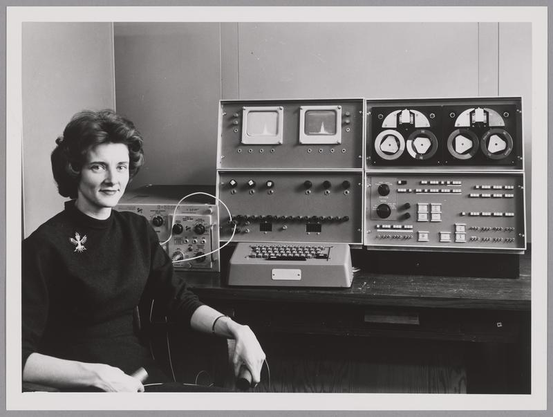
Thanks to @larsbrinkhoff for uncovering the catalogue of the MIT Museum's collection, which includes this excellent photo of Mary Allen Wilkes in front of the Alpha Linc (as it was capitalised at that time): https://mitmuseum.mit.edu/collections/object/GCP-00049266?query=linc&resultIndex=2

You can see the "alpha" had two scopes, the potentiometers over on the experimenters' box, triangular tape mounts, and the configuration of the console panel is different. I strongly suspect the big knobs on the console are the same ones Clark put on the Average Response Computer.

I think that Wilkes's top has an embroidered Austrian coat of arms on it, likely from the year she went studying music in Vienna after being turned down for a graduate fellowship in Philosophy. She qualified for the fellowship, and really impressed the judges, but was ineligible because it was only granted to men.

Another amazing find by @larsbrinkhoff is this #LAP6 source code printout: https://bitsavers.org/pdf/washingtonUniversity/linc/LAP6_Manuscript_Listings_May67.pdf

It was good to see probably the most hardcore #LINC program out there in its original source form. But looking into this we found an oddity that uncovered some ingenious #RealProgrammer tricks that Mary Allen Wilkes used in her code.

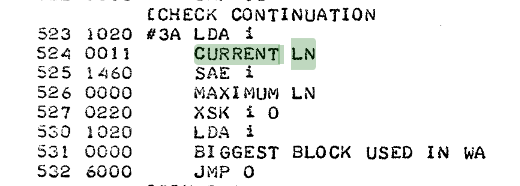
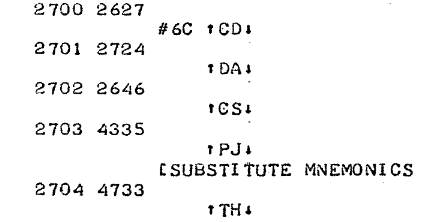
Take a look at the attached screenshot here. This is a section from the `MSDISPLY.M` "manuscript" (text/source code) file for the main LAP6 editor. The first column is the memory location (in octal), second column is the octal value for the instruction line, and to the right of that is the source code in LINC assembly.

The code is full of subroutines, which make use of the fact that the first 16 memory locations are treated as a sort of register file, and the `JMP` instruction stores a return pointer in "register" 0 so that a `JMP 0` is basically `RET`. The only mnemonics that are in this code are `JMP`, `LDA`, `SAE`, and `XSK`.

`LDA i` loads the next word in the code into the accumulator, `SAE i` skips an instruction if the accumulator is equal to the next word in the code, and `XSK i 0` checks to see if the address in register 0 has overflowed somehow. The details of this subroutine are less interesting than all of the other lines.

Some of the lines have text like `BIGGEST BLOCK USED IN WA` and `MAXIMUM LN`, which the assembler has assigned the value `0000`, presumably because they are invalid instructions in LAP6 assembly. I guess that's a neat trick: bad memonics can make a handy self-documenting null value!

But take a look at line `524`:

```
524 0011 CURRENT LN
```

That's a bit of a novelty. How did `CURRENT LN` assemble to the value `0011` (9, decimal)?

Well remember that Mary Allen Wilkes had a strong hand on the LINC ISA: she wrote the emulator that could run LINC code before the hardware was anywhere near functional. She also wrote the assembler for this ISA on that emulator. She had direct control of both parts of this chain, and so she made it so that the LINC Assembly Program only checked two letters to see if it was a valid mnemonic: the middle letter was ignored for uniqueness!

So the word `CURRENT` basically matched the regex `^C.R`, and the assembler put the instruction for the `CLR` mnemonic, which is `0011`! (Incidentally this clears the accumulator when run as an opcode rather than an operand).

I'm still not sure how it picked the values. Somehow at one point she uses the text `TAPE INSTR` to match the `SCR` instruction (`0340` if you're curious). So my regex above wasn't the only way it could match mnemonics.

But now that I know that only the first and third letters are unique in combination, the whole instruction set begins to make more sense to me.

#RetroComputing #MaryAllenWilkes
@spacehobo @larsbrinkhoff `TAPE INSTR` matches the regex `S.R$` (as does `SCR`), so maybe that trick worked at either the beginning or the end of the string.

@gregly @spacehobo I suspect anywhere in the string, but I'm not sure.

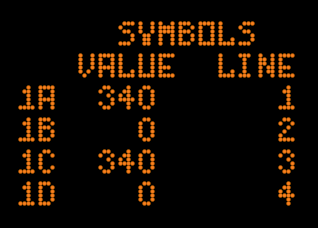
Whitespace is mostly optional in this syntax so you could type e.g. XSKi0. Uppercase letters are grouped by three to form opcode mnemonics. The singe letters lowercase i, p, and u are always full tokens by themselves. A number followed by a letter forms a two-character label. Strings of octal digits are numbers. Spaces are only needed in those cases there's a parsing disambiguity.

@gregly @spacehobo What I don't know is how parsing proceeds if there's an undefined token, for example in TAPE INSTR.
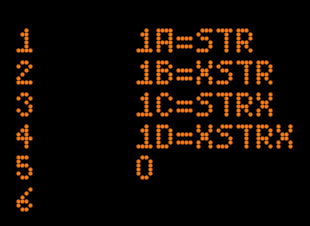
@gregly @spacehobo Here's an experiment. In this particular instance, LAP6 only recognizes STR (actually SCR or S?R) if it's first in the string.
@gregly @spacehobo Side note: the 0 at the end is to avoid an empty program. Without it, LAP6 will not display memory allocations and symbol values.
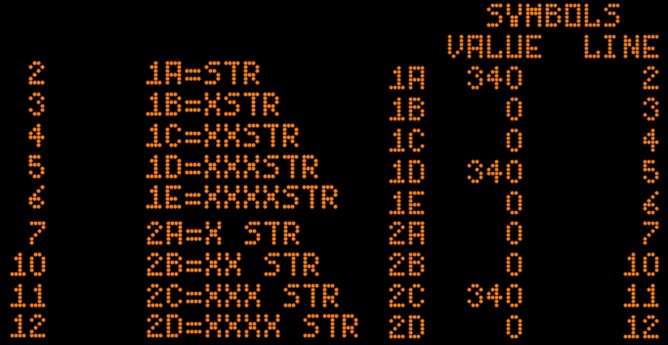
@gregly @spacehobo Yet TAPE INSTR works. Another experiment. It seems STR have to be aligned to a token start. I.e. XSR... isn't recognized but maybe XXXSTR is parsed as XXX and STR. Having a space between X and STR doesn't help here.
@larsbrinkhoff @gregly So it seems like she used the half-word instructions to load one six-bit letter from each word in the source, and compared that against her "order code" tables.
@larsbrinkhoff @gregly I've got a lot of stuff to do today, so I probably won't have time to really dig into it, but I printed out CONVERT for marking up during lunch. One thing I noticed is that the endianness of the patterns for matching opcodes is reversed. Here's `DSC`, `ADD`, `STC`, `JMP`, and `HLT`!

@gregly @spacehobo Apparently strings of mnemonics are stripped off spaces and grouped into three characters for matching. So TAPE INSTR is parsed as TAP EIN STR, with STR matching SCR.

I have replicated this parsing in my LAP6 compatible assembler, and it gets the right results for the MSDISPLY part of the LAP6 manuscripts (sources).

@spacehobo And another photo in the series dates the occasion.
@larsbrinkhoff Oh, that is an excellent find!
@spacehobo I certainly hope that when the exhibit closes you're able to post photos of it for those of us who won't be able to see it in 3D!
@neale Here's a closeup of the exhibit as I left it after showing it to @anmeisel the other day. #LINC #RetroComputing #UCL #PublicHistory
@spacehobo @neale @anmeisel oh I absolutely /love/ this!
@fluidlogic @neale @anmeisel It plays video in response to RFID tags on the objects!
@spacehobo @neale @anmeisel I saw that in the alt text! It's brilliant!
I'm looking to triple the number of objects and videos before the exhibition ends, so look forward to new pieces arriving on site in the next couple weeks.
Here's a photo of it with the full complement of objects on the table.