@Iconfactory Ever seen this before? The actual app opens up fine behind it. I can’t get it to stop this.

Going to reboot the Mac.

@mikhailt hmmm strange. Perhaps @bigzaphod knows what’s up.
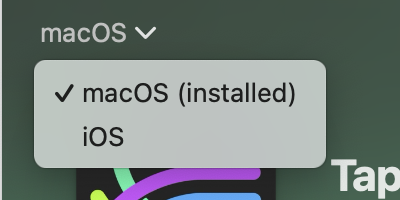
@Iconfactory @mikhailt that’s pretty weird and haven’t seen that before. I assume this is Mac TestFlight? Make sure it isn’t using the iPad version but instead the Mac build just in case that’s causing it somehow. (There’s a selector inside TestFlight on the upper left of the Tapestry screen - that same TestFlight panel that has the update/install buttons in it.)

@bigzaphod @Iconfactory Yep, I uninstalled the iPad version a few weeks ago when the macOS build came out and installed the macOS build specifically.

Not sure what’s up. I’ve tried to read the logs, nothing odd outside of a sandbox restriction issue.

Hopefully, it’s a one time thing.
@mikhailt @Iconfactory very strange. I'm assuming rebooting didn't do anything to fix it?
@bigzaphod @mikhailt @Iconfactory I saw the same thing earlier. Uninstalled it, rebooted and reinstalled from TestFlight and it’s been fine. No idea what caused it. Weirder still, it was fine on a different Mac.
@jmock @mikhailt @Iconfactory huh. Well, maybe uninstall is a workaround. Cloud sync will take forever unfortunately. (Dang iCloud.)