 John Siracusa
Looks like Tahoe/Xcode beta 5 no longer lets me show my pre-Tahoe app icons in pre-Tahoe OSes. This is a bummer. I filed FB19437407 asking for the ability to do this.
 Václav Slavík
@siracusa You can still do it in b5 by setting different filename for CFBundleIconFile (old) and CFBundleIconName (new), and need to do it in Info.plist and unset the App Icon setting in Xcode so that the values are preserved in output Info.plist
@vslavik This doesn’t seem to work for me. Here’s the Info.plist settings from the built app. “AppIconGood” is the old, pre-Tahoe icon. I see AppIconGood.icns in Contents/Resources in the built app, and it is the expected old icon. But the built app shows the new Tahoe app icon in the Finder in both Tahoe and Sequioa. What am I missing?
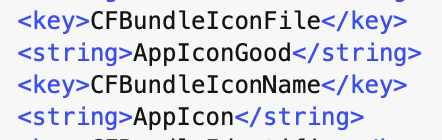
@siracusa I only tried with app icon in Assets.xcassets so far, didn’t try external file. I think you may be getting another copy generated into the asset catalog, make sure to have ASSETCATALOG_COMPILER_APPICON_NAME unset in the project and ASSETCATALOG_COMPILER_INCLUDE_ALL_APPICON_ASSETS=YES (although that shouldn’t be needed for non-catalog icon…).
@vslavik I switched to an icon in the asset catalog and made sure the settings are as you say. Still no luck. Can you create an empty sample project that demonstrates this ability for an app to show a different icons in the Finder in Tahoe and Sequoia?
@siracusa I just spent a few hours trying to reproduce in a new project, no luck. Or in a clean build. Must have been some caching, stale assets file or another form of PEBKAC :( There's apparently something special about app icons stored in Assets.car, it's not just the name, and that's what is throwing a wrench into things.
@vslavik Did you happen to save your Assets.car file from a build app when it was working for you? If so, I'd be interested to see its contents:
xcrun --sdk macosx assetutil --info /path/to/Assets.car