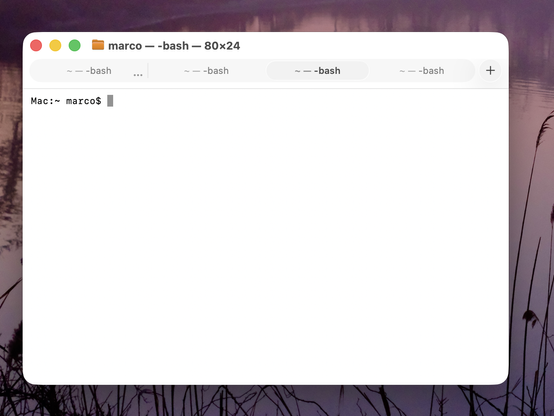
Honestly, this is making Terminal (and Safari) in Tahoe VERY hard for me to use.

Tabs in Tahoe are extremely difficult to distinguish from each other and from the active tab.

I've never switched away from Safari, and I've never investigated third-party terminal apps, but if this ships in the fall, I'll most likely need to do both. And I really, really don't want to.

Please, Apple, fix your design. Computers aren't passive "content" viewers β€” they're tools.
https://www.manton.org/2025/07/05/minor-nitpick-in-macos-tahoe.html
@marcoarment
I thought they were ruining it to make it pretty. But *that* is just... Windows-esque.

I was about to say ugly, but it doesn't even qualify for that. It's not ugly in the same way that an empty white wall is not ugly.

@leeloo yeah, no need to dis Windows Terminal. It’s open source, actively developed, highly configurable, with good defaults and functionality, and some whimsy fun like optional retro CRT effects. 😎 It’s miles better than whatever the heck Apple are doing β€” or not doing β€” with their terminal for the past decade.

@traal
I did not say Windows Terminal. In fact I don't remember having heard of Windows Terminal before. My first thought when I hears Windows Terminal was Hyperterm.

I was talking about Windows in general (win10 I think), flat white everything.

@leeloo Ok, that's fair.

I tend to want to let people know that the native terminal on Win11, which is a free and highly recommended Windows Store download on Win10, is pretty awesome. Microsoft these days actually *want* developers to like them and their platforms. 😊 I use both Mac, Win11 and various Linux servers for development, and Win11 honestly compares pretty well, out of the box, with great options for further customization.